SXL Resolver (VS Code)
SXL Resolver is the SXL Studio extension for VS Code and Cursor: hover previews for token references in JSON and var(...) in CSS, alias chains, completion and go-to-definition.
SXL Resolver adds design-token IntelliSense to VS Code and Cursor. It reads token JSON/JSONC files and CSS custom properties and shows the resolved value, a visual preview and the alias chain right in the editor. It only reads: token files are never modified and nothing is written into the repository.
| Feature | JSON / JSONC | CSS, SCSS, Less, Sass and component files |
|---|---|---|
| Hover | {color.brand.primary}: final value, preview, alias chain | var(--color-brand-primary): final value and preview |
| Completion | Token paths inside {...} | Custom property names inside var(--...) |
| Go to definition | From a reference to the token definition | From a variable to its declaration |
Current version: 2.3.4. Requires VS Code 1.85 or newer. Cursor is supported through its Open VSX-compatible registry.
Installation
VS Code
- Open Extensions (
Cmd+Shift+Xon macOS,Ctrl+Shift+Xon Windows and Linux). - Search for
SXL Resolverand press Install.
Cursor
- Open Extensions in Cursor and search for
SXL Resolver. - If the latest version is not offered yet, open the extension page on Open VSX and download the
.vsixof the version you need. Registry mirrors can lag behind Open VSX. - Run the command and select the downloaded file:
Extensions: Install from VSIX...
Where it works
| Files | Languages |
|---|---|
| Token JSON | json, jsonc |
| Stylesheets | css, scss, less, sass |
Component files with var(--...) | typescript, typescriptreact, javascript, javascriptreact, vue, svelte, html |
Multi-root workspaces are supported.
Token files
- List the token folders in
sxlResolver.tokenPathsin the workspace settings (.vscode/settings.json). - Open a JSON or JSONC file from these folders and hover a reference such as
{color.brand.primary}or{spacing.reg.md}.
{
  "sxlResolver.tokenPaths": [
    "tokens",
    "packages/design-system/tokens"
  ]
}
Paths are workspace-relative or absolute. Use relative paths in settings shared with the team. Several folders are merged into one token set. Files that write type, value and extensions without the $ are recognised too (sxlResolver.allowNoDollar).
Hover preview
Hover a token reference. The Result part shows the final value, the Source part shows the alias chain from the reference down to the base token, with the file each token lives in. The token names in Source are links: click one to open its file at the definition.
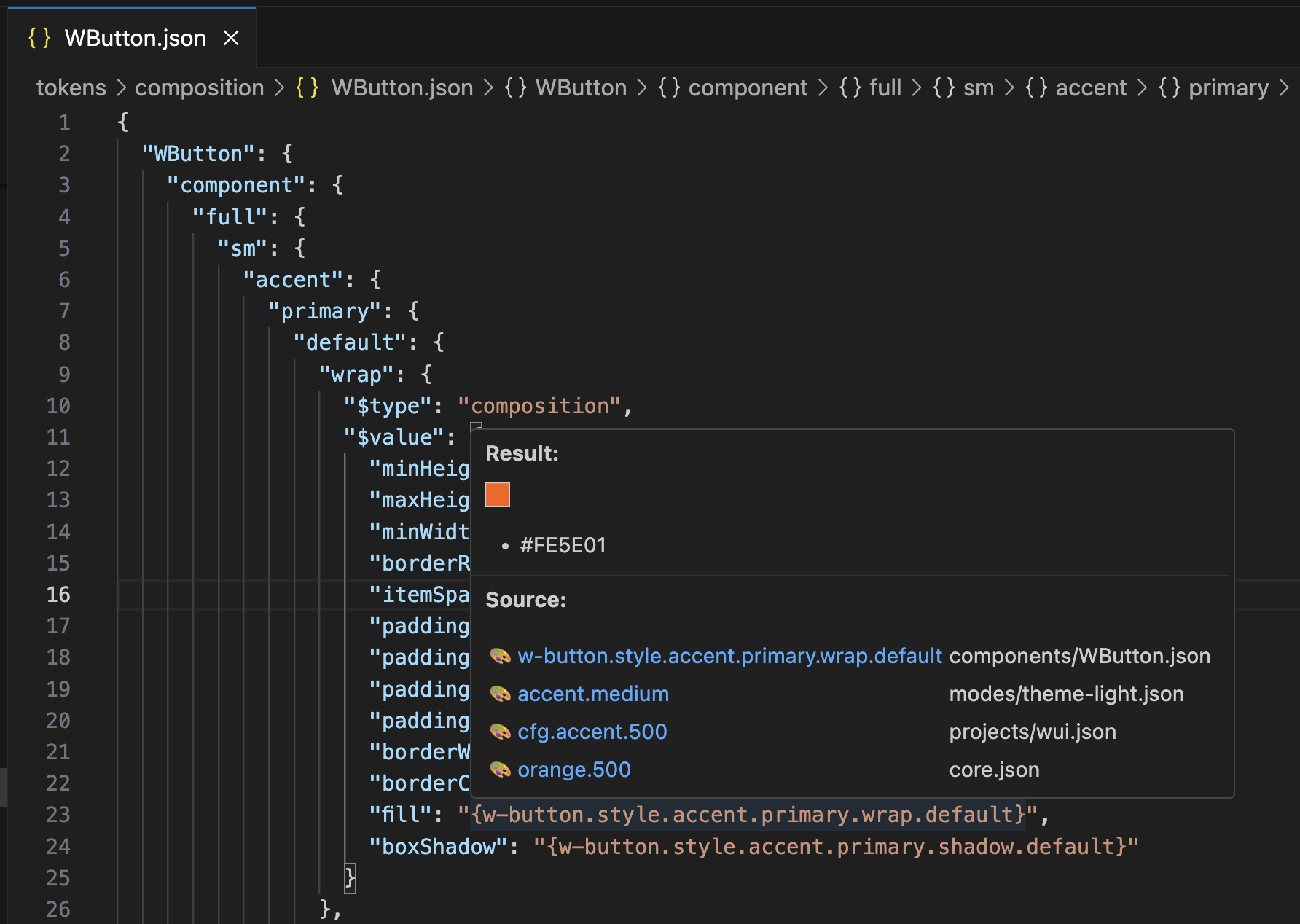
A colour token in a composition file: the swatch, the final HEX and the chain from the component token down to orange.500 in core.json.
Composite tokens are expanded property by property.
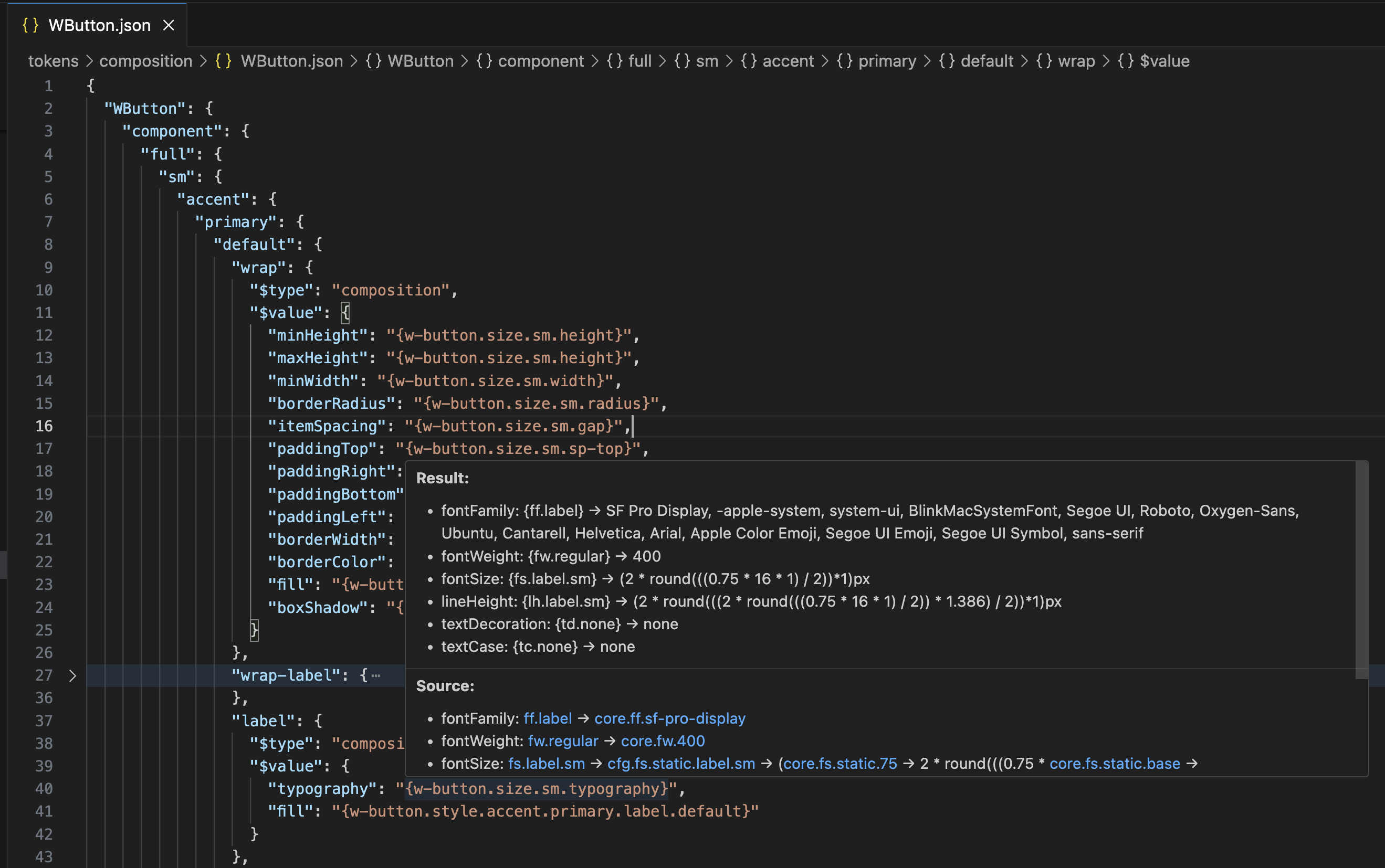
A typography token: Result lists every property with its value, Source shows the alias chain of each property.
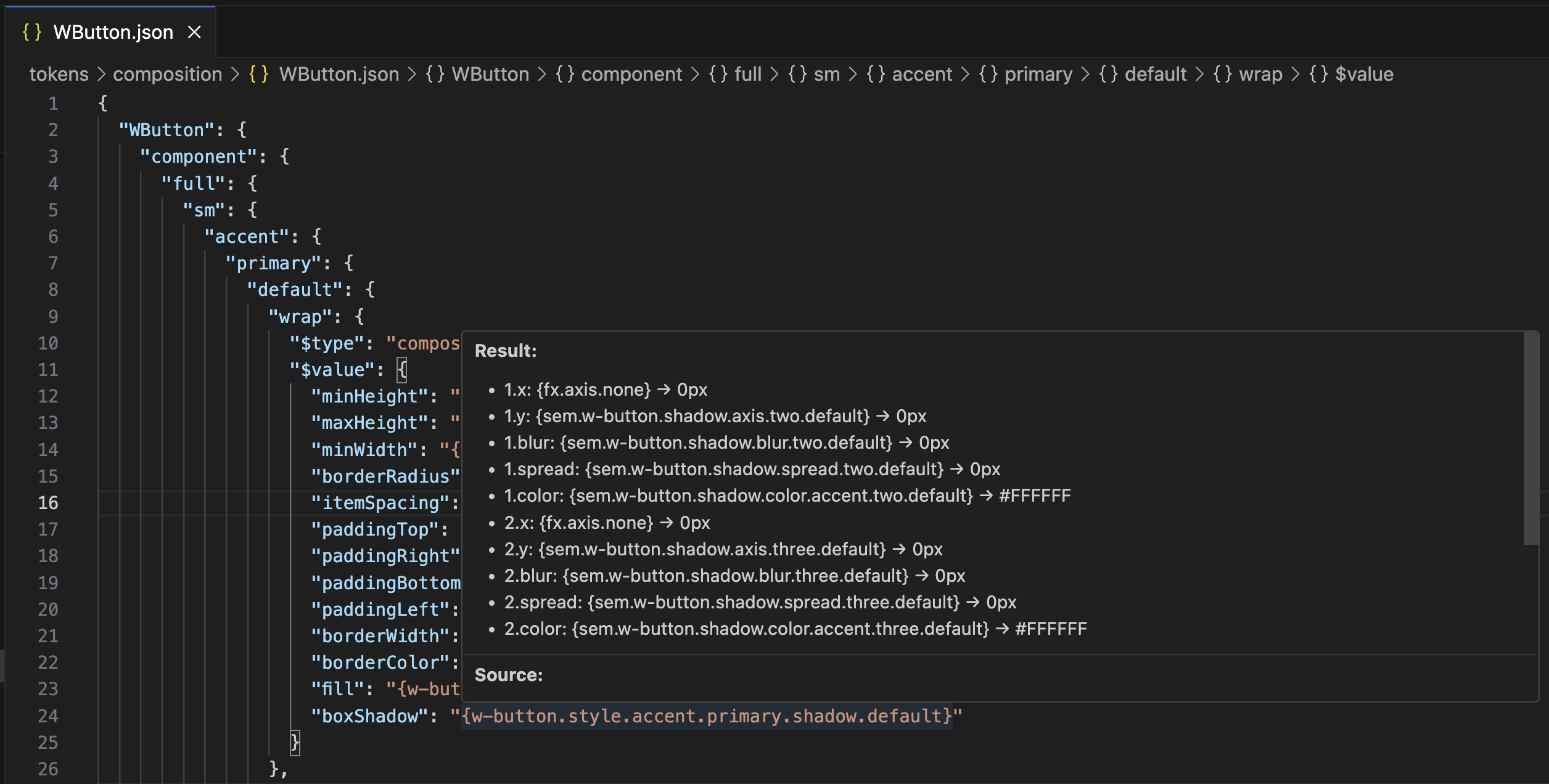
A shadow with two layers: x, y, blur, spread and colour of each layer.
The chain depth is capped by sxlResolver.maxChainLength (5 by default). Type icons can be switched off with sxlResolver.showIcons.
Supported token types: colours, gradients and fills; typography and its parts (font family, weight, size, line height, letter spacing, paragraph spacing and indent, text case and decoration); shadows, blurs, backdrop blur, glass and effects; dimension, sizing and spacing; radii, border widths, borders and stroke styles; opacity, numbers, strings and booleans; grid; transitions, durations and cubic-bezier curves; templates and compositions.
Completion
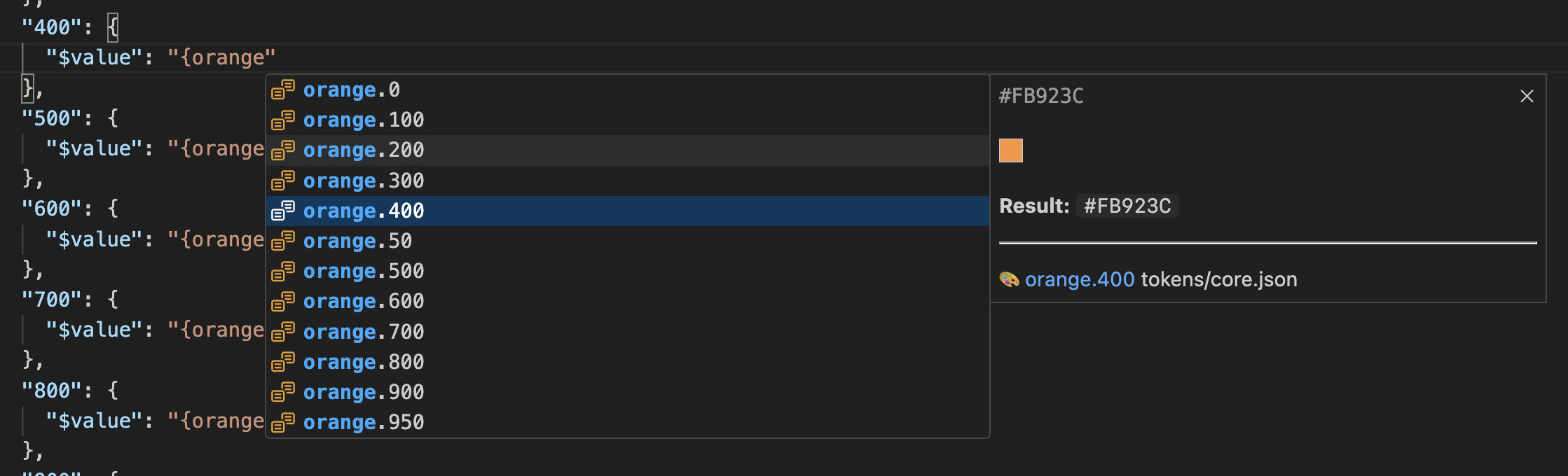
Typing {orange. in a JSON file: the matching tokens with type icons, and the hover of the highlighted item.
- In JSON the list opens after
{and is filtered by the token path. - In CSS and component files, typing
var(--suggests custom properties from the current workspace and from the configured sources. - The list is capped by
sxlResolver.maxSuggestions(300 by default).
Go to definition
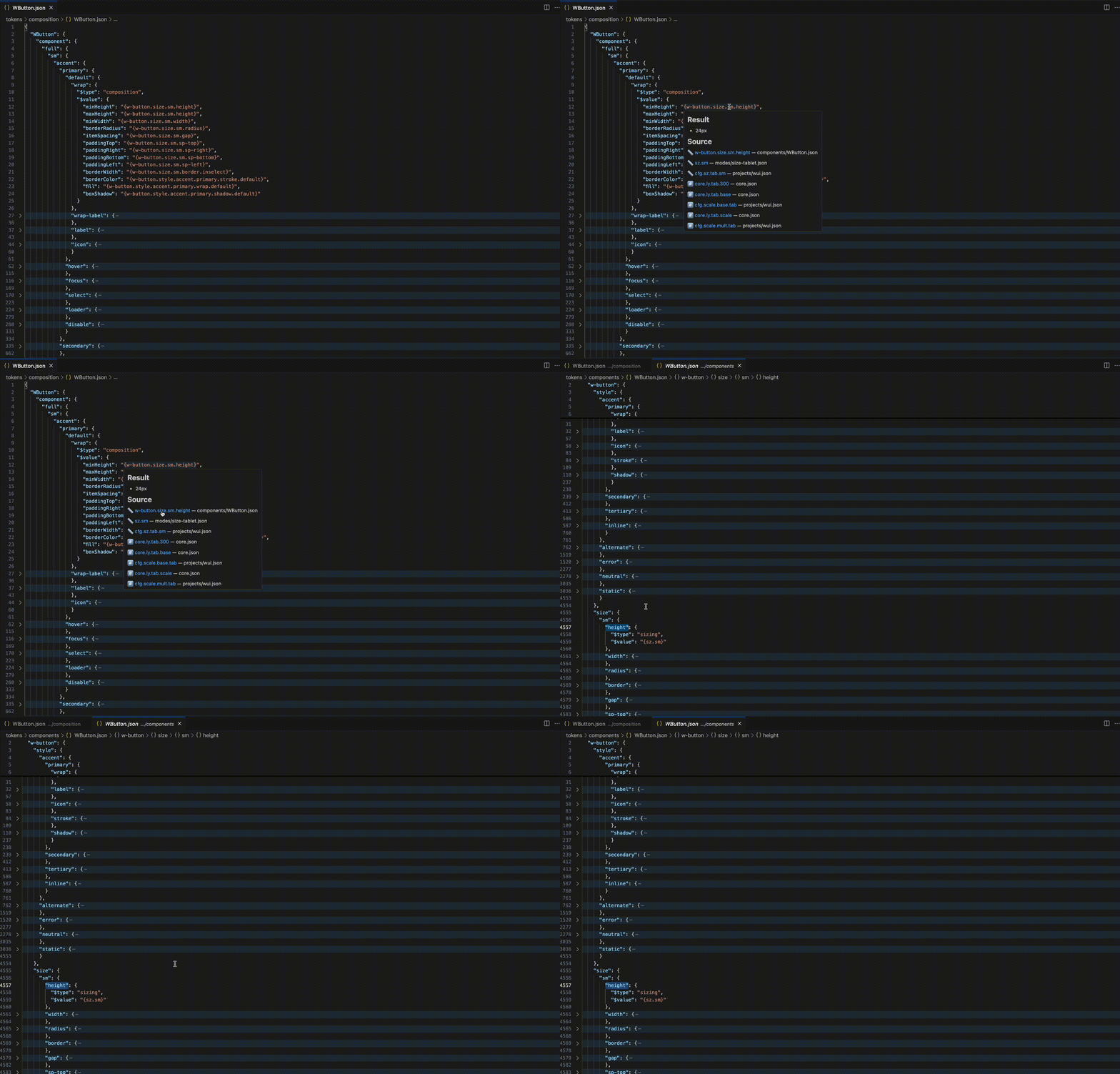
Hover on {w-button.size.sm.height} in a composition file, a click on the first link in Source, and the editor opens components/WButton.json at the height token.
Ctrl+Click(Cmd+Clickon macOS) or Go to Definition on{token.path}orvar(--name)opens the file with the definition.- The links in the Source part of the hover do the same through the
SXL Resolver: Reveal Token in Filecommand.
CSS variables
By default Resolver scans the CSS, SCSS, Less and Sass files of the open workspace and skips node_modules, .git, dist and build. Hover var(--space-md) in padding to get the final value such as 8px. Hover var(--font-title) to get the typography preview with font-family, font-size, line-height and font-weight. Colours, gradients and effects get a visual preview.
When the variables come from a published design-system package or from generated CSS in another folder, add them to sxlResolver.cssVariableSources. Resolver follows the entry points of the package and their relative @import files and indexes only those files. Do not point it at the whole node_modules: it is slow, can index several versions of one package and mixes variables of unrelated products or themes.
From a published package
Replace the package name, entry points, manifests and appliesTo globs with the values of your project. manifests is optional, see the Manifest section below.
{
  "sxlResolver.cssVariableSources": [
    {
      "name": "Commerce app styles",
      "package": "@org/design-system-styles",
      "entrypoints": ["commerce/index.css", "components/index.css"],
      "manifests": ["commerce/tokens-manifest.json"],
      "appliesTo": ["apps/storefront/**", "packages/storefront-ui/**"]
    },
    {
      "name": "Operations app styles",
      "package": "@org/design-system-styles",
      "entrypoints": ["operations/index.css", "components/index.css"],
      "manifests": ["operations/tokens-manifest.json"],
      "appliesTo": ["apps/operations/**", "packages/operations-ui/**"]
    }
  ]
}
From the same workspace
Use paths when the CSS files live in the current repository or when you need an absolute local path.
{
  "sxlResolver.cssVariableSources": [
    {
      "name": "Local design-system styles",
      "paths": [
        "packages/design-system/styles/commerce/index.css",
        "packages/design-system/styles/components/index.css"
      ],
      "manifests": [
        "packages/design-system/styles/commerce/tokens-manifest.json"
      ],
      "appliesTo": ["apps/storefront/**", "packages/storefront-ui/**"]
    }
  ]
}
A source can also be a plain string: a workspace-relative or absolute path to a CSS file or folder.
Source fields
| Field | Purpose |
|---|---|
name | Label of the source shown in completion details |
package | Package name from package.json dependencies. It is resolved from the nearest workspace package and works with pnpm, npm and yarn layouts |
entrypoints | CSS files or folders inside the package to index. Relative @import files are followed in order |
paths | Alias of entrypoints. Without package the paths are workspace-relative or absolute |
manifests | Optional tokens-manifest.json files with cssVar, type, value and resolvedValue metadata. Resolver reads them and never generates them |
appliesTo | Workspace-relative glob patterns of the files that use this source group. Separate apps, packages, themes or brands with it |
Resolution priority
When you hover or complete var(--token-name), Resolver looks in this order:
- CSS variables declared in the current file.
- The matching groups of
cssVariableSources. - Other scanned workspace CSS variables, nearest to the current file first.
- The JSON token whose Code Syntax
Webor kebab-case path matches the variable name.
If two products define the same variable name, split them into separate source groups and limit each one with appliesTo. Then a file of one application never receives a value from another product.
Manifest
tokens-manifest.json is optional.
Without a manifest, Resolver reads the CSS files, follows the var(...) chains and infers a broad type from the value: color, gradient, typography, dimension, duration, number, shadow or text.
With a manifest the original token types are kept. It matters when a CSS value is ambiguous: 8px can be spacing, sizing, fontSize, borderRadius or borderWidth, and CSS alone cannot tell them apart. Add the manifest files to the manifests field of the source group.
A manifest is produced by Transformer with the manifest platform. If the design-system package already ships manifest files, just reference them: the application repository does not need to run Transformer. Resolver itself never creates manifests or any other files.
Composite tokens exported to CSS are shown as their CSS value. Open the JSON token files when you need the full property breakdown.
Settings
| Setting | Default | Purpose |
|---|---|---|
sxlResolver.tokenPaths | ["tokens"] | Token folders, workspace-relative or absolute. Several folders are merged |
sxlResolver.showIcons | true | Type icons in hover and completion |
sxlResolver.maxChainLength | 5 | Maximum alias chain depth shown in hover |
sxlResolver.maxSuggestions | 300 | Maximum number of completion suggestions |
sxlResolver.allowNoDollar | true | Recognise type, value and extensions without the leading $ |
sxlResolver.cssVariablePrefix | "--" | Prefix used when a CSS variable is mapped back to a JSON token |
sxlResolver.enableCssHover | true | Hover for var(--...) in CSS and component files |
sxlResolver.enableCssCompletion | true | Completion of custom property names inside var(--...) |
sxlResolver.cssVariableSources | [] | Extra CSS sources: package entry points or workspace paths, with optional manifests |
Where settings live
Resolver settings are editor settings, not application configuration.
.vscode/settings.jsonin the repository, when the whole team should share the same token and CSS sources. Cursor reads VS Code-compatible workspace settings.- A
.code-workspacefile, under the top-level"settings"key, when one window contains several repositories. - User Settings JSON for personal absolute paths. Open it with the command:
Preferences: Open User Settings (JSON)
Commit relative paths. Keep absolute paths in personal settings only.
Commands
SXL Resolver: Force Refresh Tokens
SXL Resolver: Reveal Token in File
Force Refresh Tokens reloads all token files and CSS variables; the Refresh Tokens button in the status bar does the same. Reveal Token in File opens the file of a token; the links in the hover use it.
If something does not work
| What happened | What to do |
|---|---|
| Hover or completion shows old values | Run SXL Resolver: Force Refresh Tokens. If the settings changed while the editor was open, also run Developer: Reload Window |
No hover on a {...} reference | Check that the folder with the file is listed in sxlResolver.tokenPaths; relative paths start from the workspace root |
var(--name) shows nothing | The variable is declared outside the scanned workspace, for example in a package. Add the package or the folder with the generated CSS to sxlResolver.cssVariableSources |
8px is shown as dimension, not spacing | Without a manifest only broad types are inferred. Add the tokens-manifest.json of the package to manifests |
| A variable resolves to a value from another product | Split the products into separate source groups and limit them with appliesTo |
| Cursor does not offer the latest version | Check the extension page on Open VSX: registry mirrors can lag. Install the .vsix from Open VSX manually |
| Open VSX shows an unverified namespace warning | The extension files are fine. The warning concerns namespace ownership on Open VSX and goes away once the publisher verifies the namespace |
Privacy
SXL Resolver runs locally in the editor. It reads token and CSS files from the open workspace and the configured sources, and it does not send token files or CSS values to an external service.