Animation
Token types of the Animation group: Duration, Cubic Bezier, Easing and Transition. Which values are accepted, what they become in Figma and how to create them in the editor.
Motion tokens describe animation durations and curves. duration, cubicBezier and easing export to Figma variables of the Timing and Easing types, which Figma uses in prototypes and animations. transition stays internal: it is a composite description of a transition for code generation.
$type | Value | Figma |
|---|---|---|
duration | Time: "200ms", "0.2s", a number | Timing variable |
cubicBezier | [x1, y1, x2, y2] or cubic-bezier(...) | Easing variable with a custom curve |
easing | A preset, cubic-bezier(...), spring(...) | Easing variable |
transition | An object with duration, delay, easing | Internal, not exported to Figma |
Timing and Easing variables have no scopes, so the token form has no Scopes section. References work only within the same type: Timing to Timing, Easing to Easing, and cubicBezier and easing are interchangeable.
In the Export to Figma window these types are owned by the Variables → Timing and Easing switches, enabled by default. Apply to layers does nothing for motion tokens: their place is in Figma variables and in code.
Duration
The length of a transition or animation.
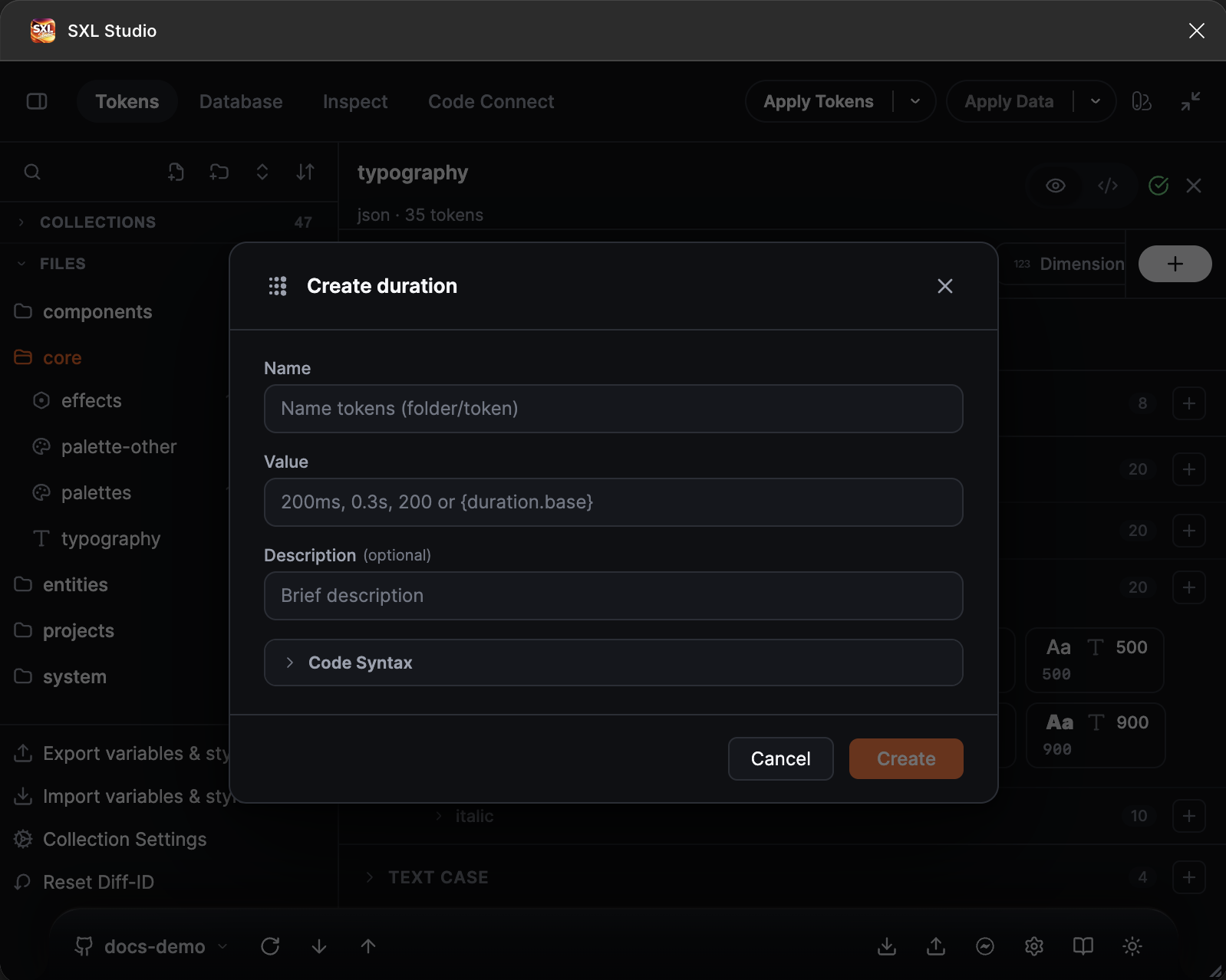
The Create duration form: name, value with a format hint, description and Code Syntax.
| Accepted | Example |
|---|---|
| Milliseconds | "200ms" |
| Seconds | "0.2s" |
| A number, read as milliseconds | 200 |
| A reference to another duration | "{duration.base}" |
| A formula over references, in milliseconds | "{duration.base} * 2", "({duration.fast} + 50ms) * 2" |
| A DTCG object | { "value": 250, "unit": "ms" } |
In the editor a bare number gets ms appended automatically. Negative values are rejected. Formulas are evaluated in milliseconds: references to duration tokens and bare numbers are read as ms, literals such as 0.5s are converted to milliseconds, and the result must not be negative.
Figma stores Timing in seconds: "200ms" becomes 0.2 on export and comes back as "200ms" on import from Figma.
{ "duration": { "$type": "duration", "fast": { "$value": "120ms" }, "base": { "$value": "200ms" }, "slow": { "$value": "320ms" } } }
Cubic Bezier
An acceleration curve as four numbers.
| Accepted | Example |
|---|---|
| An array of four numbers | [0.4, 0, 0.2, 1] |
| The same as a string | "[0.4, 0, 0.2, 1]" |
| The CSS function | "cubic-bezier(0.2, 0, 0, 1)" |
| A reference | "{cubicBezier.standard}" |
The first and third numbers, x1 and x2, must be between 0 and 1, as in CSS. The create form shows the curve in an interactive preview.
{ "cubicBezier": { "$type": "cubicBezier", "standard": { "$value": [0.4, 0, 0.2, 1] }, "emphasized": { "$value": [0.2, 0, 0, 1] } } }
Easing
A Figma Easing variable in any of three forms: a preset, a custom curve or a spring.
| Accepted | Example |
|---|---|
| Preset | "linear", "ease-in", "ease-out", "ease-in-out", "ease-in-back", "ease-out-back", "ease-in-out-back", "gentle", "quick", "bouncy", "slow", "hold" |
| Custom curve | "cubic-bezier(0.4, 0, 0.2, 1)" or [0.4, 0, 0.2, 1] |
| Figma spring | "spring(0.3)": one bounce parameter from 0 to 1 |
| Physical spring | "spring(1, 170, 26, 0)": mass, stiffness, damping, initial velocity. Converted to a Figma bounce on export; the initial velocity does not reach Figma |
| Reference | "{easing.standard}" |
The spelling ease-in-and-out is accepted too. Presets match Figma's built-in curves and turn into equivalent cubic-bezier values in CSS.
{
  "easing": {
    "$type": "easing",
    "standard": { "$value": "cubic-bezier(0.4, 0, 0.2, 1)" },
    "enter": { "$value": "ease-out" },
    "playful": { "$value": "spring(0.4)" }
  }
}
On import from Figma a custom curve comes back as a cubicBezier token, presets and springs as an easing token.
Transition
A composite transition description for code: duration, delay and curve. Write an object or a reference to another transition.
| Key | Value |
|---|---|
duration | A number, a time string or a reference to a duration |
delay | The same for the delay |
easing | A preset, cubic-bezier(...), spring(...) or a reference to an easing |
The create form has the Delay, Duration and Curve fields with a preset list and a spring preview.
{
  "transition": {
    "$type": "transition",
    "default": { "$value": { "duration": "200ms", "delay": "0ms", "easing": "ease-in-out" } },
    "emphasized": { "$value": { "duration": "{duration.slow}", "delay": "0ms", "easing": "cubic-bezier(0.2, 0, 0, 1)" } },
    "spring": { "$value": { "duration": "260ms", "delay": "0ms", "easing": "spring(1, 170, 26, 0)" } }
  }
}
A transition token describes a reusable transition for code. Prototype interactions inside a component, such as on-hover and smart-animate, are defined in the composition file: see Composition.
Full example
{
  "duration": { "$type": "duration", "base": { "$value": "200ms" }, "slow": { "$value": "320ms" } },
  "cubicBezier": { "$type": "cubicBezier", "standard": { "$value": [0.4, 0, 0.2, 1] } },
  "easing": { "$type": "easing", "enter": { "$value": "ease-out" } },
  "transition": {
    "$type": "transition",
    "default": { "$value": { "duration": "{duration.base}", "easing": "{easing.enter}" } }
  }
}
If something does not work
| What you see | Cause |
|---|---|
| Cannot parse duration on export | The value has an unknown unit. Only ms, s, a number, a { "value", "unit" } object or a formula over those is allowed |
| The curve is rejected | x1 or x2 is outside 0..1 |
| The spring is rejected | The bounce in spring(bounce) must be between 0 and 1 |
| Timing and Easing variables did not appear in Figma | Check the Timing and Easing switches in the Export to Figma window |