Bridge
SXL Studio Bridge: connecting AI agents and IDEs to Figma via MCP, WebSocket, and HTTP. Installation, setup, and commands.
What is Bridge
SXL Studio Bridge is magic for the user. Launch Bridge, enable Remote Connect in the plugin — and your AI agent in Cursor (or any MCP-compatible tool) gets full access to Figma through SXL Studio: creating components, exporting tokens, applying data, managing canvas nodes, running the exact same Dev Mode code generators, and much more.
Bridge is a Node.js process that connects IDEs and HTTP clients to the SXL Studio plugin in Figma. It runs on a single port and supports three protocols simultaneously:
- WebSocket — for plugin UI connection
- HTTP REST API — for integration with scripts and tools
- MCP (Model Context Protocol) — for AI agents in Cursor, VS Code, and others
Why it's needed
The official Figma MCP does not execute your plugin code. Bridge is needed for SXL Studio-specific operations:
- Generating and applying Composition components
- Exporting/importing tokens and variables
- Managing Database data
- Git operations (Push, Pull)
- Creating and modifying canvas nodes
- Binding variables, importing components, CRUD on local styles
- Running the plugin's Dev Mode codegen (Designer JSON / Vue3 / SwiftUI / Kotlin) with no drift
- And dozens of other commands
Installation and launch
From npm (recommended)
npm install -g @sxl-studio/bridge
sxl-bridge
From source (monorepo)
cd Utils/bridge
npm install
npm run build
npm start
Port
By default, Bridge runs on port 37830. If the port is occupied, specify another via an environment variable:
BRIDGE_PORT=38000 sxl-bridge
When changing the port, update the MCP client and plugin configuration.
Optional: authentication
Set BRIDGE_AUTH_TOKEN to require a shared secret on every request (REST and MCP):
BRIDGE_AUTH_TOKEN=s3cret sxl-bridge
Clients must then send Authorization: Bearer s3cret. Without the token, requests get 401 BRIDGE_UNAUTHORIZED. By default the token is not set and Bridge is localhost-only and unauthenticated.
Connecting to Figma
- Launch Bridge — make sure it's running (check terminal logs)
- Open SXL Studio in Figma
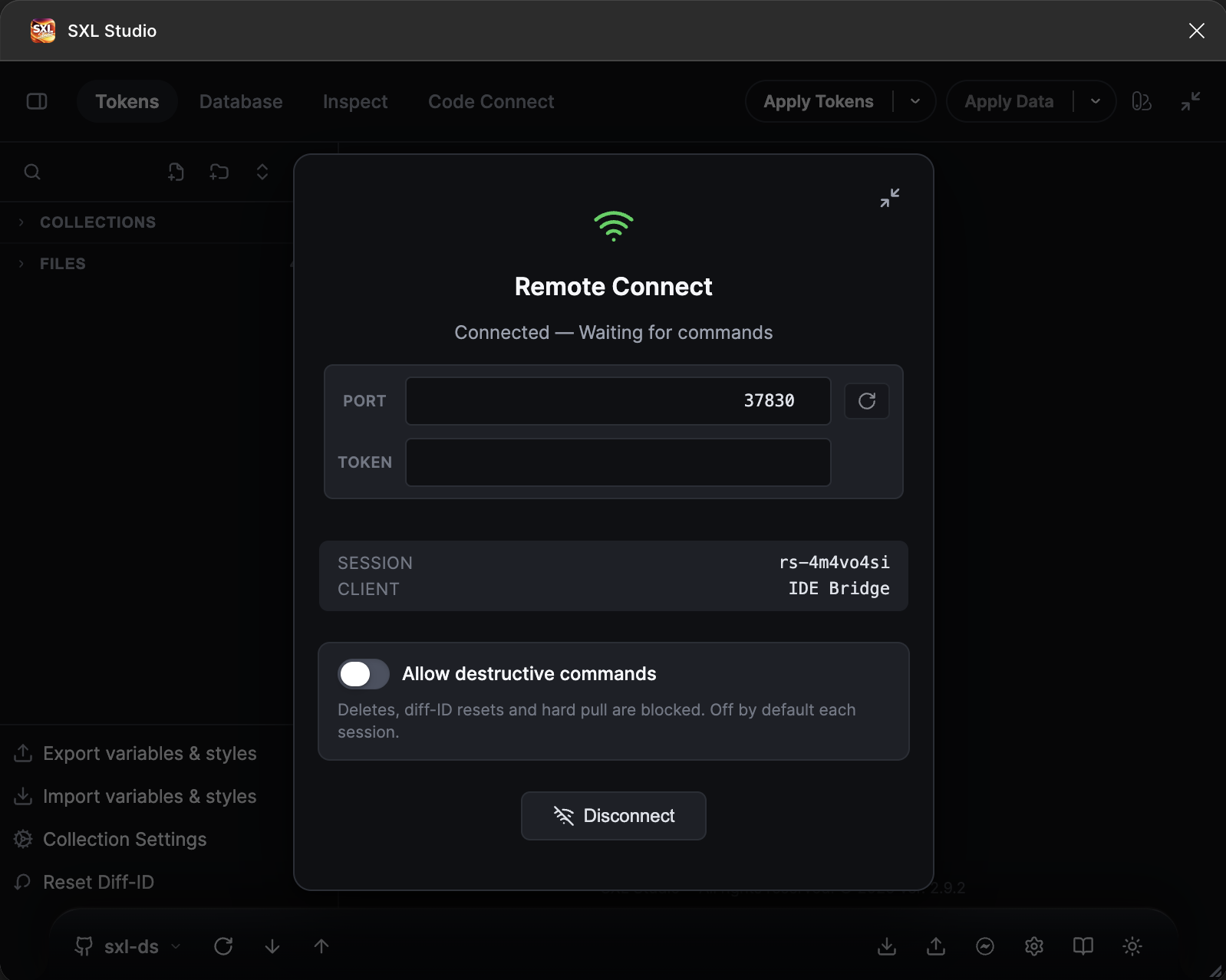
- Enable Remote Connect — connection status appears in the plugin
- Bridge shows a connected session message
Checking status
curl http://127.0.0.1:37830/api/status
Response:
{
"ports": { "websocket": 37830, "http": 37830 },
"mcpStreamableHttp": "http://127.0.0.1:37830/mcp",
"session": { "connected": true, "sessionId": "abc123" },
"queueLength": 0,
"currentCommand": null,
"authEnabled": false
}
Configuring MCP for Cursor
Option 1 — URL (recommended)
In .cursor/mcp.json:
{
"mcpServers": {
"sxl-studio": {
"url": "http://127.0.0.1:37830/mcp"
}
}
}
Option 2 — stdio
{
"mcpServers": {
"sxl-studio": {
"command": "node",
"args": ["/path/to/sxl-studio/Utils/bridge/dist/index.js"]
}
}
}
When using stdio, Bridge launches the MCP server via stdin/stdout. Stdout is occupied by JSON-RPC — logging only through
console.error.
Tool discovery
Use list_tools (MCP) or GET /api/tools (HTTP) to get an authoritative catalogue of every tool Bridge exposes, grouped by category, with flags for requiresDesignMode and requiresComposition.
# Every tool
curl http://127.0.0.1:37830/api/tools
# Only tools usable in Figma Dev Mode (reads + file ops)
curl 'http://127.0.0.1:37830/api/tools?devModeReadableOnly=true'
Available commands
Bridge provides dozens of tools for AI agents. Main categories:
Diagnostics
| Command | Description |
|---|---|
get_plugin_status | Plugin session state: editorType, mode, isDevMode, isCodegenSandbox, writesAllowed, current page, selection, sessionActive. Call this before destructive actions. |
is_dev_mode | Quick read-only check of editorType / mode. Writes are blocked when isDevMode === true. |
get_selection_summary | Selected nodes with composition / template bindings |
get_drift_status | Drift state for selected compositions |
list_token_files | List every token / composition file in the plugin workspace |
get_tokens_config | Read plugin tokens workspace config + folder layout |
get_applied_tokens | Read applied token bindings stored on a node |
list_tools | Discover all MCP tools with category + mode flags |
Tokens + config (workspace CRUD)
| Command | Description |
|---|---|
export_variables | Export tokens to Figma Variables |
reset_diff / reset_diff_collection / reset_diff_file | Reset diff-id scopes |
reapply_token_bindings | Reapply token bindings (scope: selection/page/document) |
cross_file_sync_fetch / cross_file_sync_apply | Cross-file sync of variables |
save_token_file | Upsert JSON body into a token file (by fileId or name+folder) |
create_token_file | Create a new token file in the plugin workspace |
delete_token_file | Delete a token file (queues gitPath removal if tracked) |
move_token_file / rename_token_file | Move/rename a token file |
save_tokens_config | Overwrite config.json (collections, modes, file enablement) |
get_token_file_content | Raw JSON content of a token file |
Compositions and Dev Mode codegen
| Command | Description |
|---|---|
export_composition_json | Export a Figma node as a composition JSON — the single source of truth, produces the exact same output as Dev Mode → Get Code → Designer JSON. Always use this tool instead of hand-crafting JSON. |
get_codegen | Run Figma Dev Mode codegen for any node and return all generated tabs. Supports designer-json (Props / Structure / Styles / Variables / Transitions / Theme / Code Connect), vue3 (SFC + CSS vars), swiftui, kotlin. Optional viewMode: styled / decomposed / raw. The plugin saves and restores the active Dev Mode viewMode so parallel Inspect panels are not disturbed. |
list_compositions | List every composition JSON file ($type: "composition") in the workspace with id/path/name/component flag. |
generate_composition / apply_composition / preview_composition | Composition lifecycle against the active Figma document. |
check_composition_linked | Check whether a composition name is linked to an existing Figma component. |
Why this matters: Bridge uses the exact same codegen pipeline as Dev Mode. When an agent asks for "JSON" or "the same code Get Code produces", it MUST call
export_composition_jsonorget_codegen. Synthesising JSON fromget_node_tree/get_selectionproduces drift-prone output that the plugin parser cannot round-trip.
Variables (full CRUD)
| Command | Description |
|---|---|
get_variables | List local variable collections and variables |
create_variable_collection / create_variable / bind_variable | Creation primitives |
rename_variable / delete_variable | Variable lifecycle |
rename_variable_collection / delete_variable_collection | Collection lifecycle |
add_variable_mode / remove_variable_mode / rename_variable_mode | Mode management |
set_variable_mode_value | Set value for a specific mode (COLOR accepts #hex) |
set_variable_scopes | Set Variable.scopes array |
set_variable_code_syntax | Set/remove codeSyntax per platform (WEB/iOS/ANDROID) |
Styles
| Command | Description |
|---|---|
get_local_styles | Enumerate local paint/text/effect styles |
create_paint_style / create_text_style / create_effect_style | Create new local styles |
set_text_style / set_effect_style / set_stroke_style / set_fill_style | Assign a style to a node |
import_style_by_key | Import a published style by key |
Data and mapping
| Command | Description |
|---|---|
apply_mapping / apply_all_mappings / count_apply_targets | Dataset-driven content updates |
generate_instances / apply_image / rebind_instance | Instance lifecycle |
codeconnect_* | Full Code Connect bridge (get/save binding, registry, global settings) |
Canvas operations
create_frame, create_rectangle, create_text, create_ellipse, create_line, create_svg_node, create_vector, create_component, create_component_set, create_component_instance, detach_instance, clone_node, duplicate_subtree, delete_node, delete_nodes, set_auto_layout, modify_node, rename_node, set_node_text, set_node_property, set_node_visibility, set_node_size, set_node_fill, set_node_fill_variable, set_stroke, set_effects, set_fill, set_image_fill, set_constraints, style_text_range, move_to_parent, import_component_by_key, boolean_operation, flatten_nodes, apply_documentation_payload, and more.
Git
| Command | Description |
|---|---|
git_pull | Pull from the active Git connection |
git_push | Push to the active Git connection |
git_hard_pull | Hard pull (overwrite local with remote) |
High-level orchestration
| Command | Description |
|---|---|
generate_code_from_url | Parse a Figma URL → run get_codegen on the referenced node → return every generated tab. Works for agents that receive raw Figma links. |
compose_from_url | Parse a Figma URL → run export_composition_json → save the result as a composition token file. Optional generate: true runs generate_composition immediately. |
document_component | Run get_codegen on a component and apply an SXL documentation payload with the resulting context. |
build_token_documentation | Doc Spec v1 / tokenTable: resolve DTCG paths and fill TEXT layers by name (targetRootId). Equivalent to apply_token_doc_spec or a single tokenTable section in apply_doc_spec. |
apply_doc_spec | Doc Spec v2: generic entry point. Accepts an array of sections (title, description, variants, props, tokenTable, palette, measure) and applies them under frame.targetParentId / targetRootId. |
bind_variable_palette | Cards from a local Figma variable collection: { collectionName, parentNodeId, templateNodeId, swatchLayerName, labelLayerName?, valueLayerName?, type? }. Replaces ad-hoc use_figma scripts that cloned templates and called figma.variables.* directly. |
build_component_doc | Single call for component / component-set docs: title + variants + props (+ optional measure). |
build_doc_flow | Multi-page scenario: pages[] (nodeId / compositionFileId, optional title + description). |
Agent recipes (MCP Resources, JSON):
sxl://agent/recipes/index— intent router (user phrases → recipe). Always start here.sxl://agent/recipes/doc-spec-v2— section vocabulary.sxl://agent/recipes/template-discovery— finding thetemplateNodeIdwithoutuse_figma.sxl://agent/recipes/doc-tokens,doc-component,doc-composition,doc-flow,variable-palette— concrete flows.
Full contract and architecture: Plugin/sxl/docs/22-doc-spec-v1.md, Plugin/sxl/docs/24-doc-builder-architecture.md.
Doc Builder — three flows in one tool each
- Variable-collection palette. "Fill content with all colors of the Projects collection" → one call to
bind_variable_palette { templateNodeId, collectionName: "Projects", swatchLayerName: "swatch" }. Bridge enumerates the variables, clones the card, binds the fill — nouse_figma, no/tmp/*.jsonpayloads. - Component documentation. "Document WButton" →
build_component_doc { componentNodeId, targetParentId, includeMeasure: false }. Bridge composestitle + variants + propsand applies sections in order. - Multi-page scenario. "Build a flow from these URLs" →
build_doc_flow { pages: [{ nodeId, title, description }, ...], targetParentId }. Pages land in an auto-layout container with captions.
Audit & Usage — analyse a Figma file
Category audit (see list_tools?category=audit). Every command runs over MCP — no use_figma, no /tmp payloads. By default each call returns a compact summary; the matching find_* sibling streams details with cursor + limit.
| Command | Purpose |
|---|---|
analyze_variable_usage | "How often is this variable used?" — counts byProperty / byPage / byNodeType plus the alias chain (transitive variables included). |
find_variable_usages | Paginated list of nodes that bind the variable. |
render_variable_usage_page | Creates Usage: <variableName> page and clones every owner into an auto-layout container (canvas write — Design mode). |
audit_variable_coverage | Where the file still has raw #hex / numeric values on properties that should be variable-bound. With suggest=true (default) returns topOffenders with ready suggestions. |
find_variable_coverage_misses | Detail list with suggestion: { variableId, variableName } — feed straight into batch_bind_variables. |
audit_style_coverage / find_style_coverage_misses | Same idea for paint / stroke / effect styles (no styleId AND no variable binding). |
find_unused_variables / find_unused_styles | Local variables / styles that nothing references (checks node bindings and alias graphs). |
Audit scopes: "page" (default), "file", "selection", { type: "node", nodeId }. Always start with page or selection; widen to file only after the summary confirms it is worth the cost.
Recipe routers for agents:
sxl://agent/recipes/variable-usage— picking betweenanalyze/find/render.sxl://agent/recipes/audit-coverage—audit_*→find_*→batch_bind_variables.sxl://agent/recipes/find-unused—find_unused_*(deletion only after explicit user confirmation).
Variables orchestration — bulk variable CRUD (Phase B)
Category variables-orchestration (Bridge 1.6.0+ / Plugin 2.3.0+). "Thick" commands for the most common Figma Variable refactors — without use_figma and without atomic-create_variable loops. Every write command supports dryRun (or apply: false) so the agent can preview the plan before committing.
| Command | Purpose |
|---|---|
import_variable_spec | Idempotent bulk create / update of collections, modes, variables and aliases from a single declarative spec. Cross-collection aliases ({ alias: { variableName } }) resolve in a second pass. Per-item errors do not abort the import. |
analyze_variable_order | Read-only analysis of a desired collection ordering (alphabetical / byPath / explicit). Returns moves[]; apply manually in the Figma Variables panel. |
dedupe_variables | Detect (and merge under apply: true) duplicate variables by name or default value. Survivor is picked by alias incoming-link count. |
rebind_variable_aliases | Bulk rewrite { fromVariableId → toVariableId } across all modes — handy for design-system refactors. |
apply_coverage_suggestions | Convert Phase A find_variable_coverage_misses suggestions into real setBoundVariableForPaint / setBoundVariableForEffect / setBoundVariable writes. Default dryRun: true with preview[]. |
Recipes:
sxl://agent/recipes/bulk-variables— picking betweenimport_variable_spec/dedupe_variables/rebind_variable_aliases/analyze_variable_order(always dry-run first).sxl://agent/recipes/auto-bind-from-audit— Phase A → Phase B:find_variable_coverage_misses→apply_coverage_suggestions(always dry-run preview).
Styles orchestration — bulk style CRUD (Phase C)
Category styles-orchestration (Bridge 1.6.0+ / Plugin 2.3.0+). Mirror of Phase B for local Figma styles (PaintStyle / TextStyle / EffectStyle). Every write command supports dryRun (or apply: false) so the agent can preview the plan before committing. audit_style_drift is read-only and works in Dev Mode.
| Command | Purpose |
|---|---|
import_style_spec | Idempotent bulk create / update of local styles from a single declarative spec (paintStyles[] + textStyles[] + effectStyles[]). SOLID paints accept the color: "#rrggbb[aa]" shortcut. Match by name; re-running with the same spec is a no-op. Per-item errors do not abort the import. |
dedupe_styles | Find (and merge under apply: true) duplicate styles within the same style type via byName or bySignature. Survivor = style with most consumers; consumers are first rebound via rebind_style_consumers, then duplicates are deleted. styleType narrows the scan (`PAINT |
rebind_style_consumers | Bulk rewrite { fromStyleId → toStyleId } on every consumer node (fillStyleId / strokeStyleId / textStyleId / effectStyleId auto-detected from source style type). dryRun: true counts rewrites without writing. |
audit_style_drift | Read-only drift detector: compares local PaintStyles against the source of truth (byName-vs-variables — like-named local Variable; explicit — expectations[] of { styleId, expectedColor }). tolerance is per-channel deviation in 0..1. Dev-Mode-safe. |
apply_style_coverage_suggestions | Converts find_style_coverage_misses (Phase A) suggestions into setFillStyleIdAsync / setStrokeStyleIdAsync / setTextStyleIdAsync / setEffectStyleIdAsync writes. Per-node by (nodeId, field) — duplicate suggestions for the same field land in skipped[]. Default dryRun: true returns preview[]. |
Recipes:
sxl://agent/recipes/bulk-styles— picking betweenimport_style_spec/dedupe_styles/rebind_style_consumers/apply_style_coverage_suggestions(always dry-run first).sxl://agent/recipes/style-drift—audit_style_driftbyName-vs-variables / explicit; pair withimport_style_specfor the fix.
Mockup-from-DesignSystem — assemble screens from components (Phase D)
Category mockup (Bridge 1.6.0+ / Plugin 2.3.0+). Thick commands that assemble pages / cards / lists out of existing design-system components — no use_figma, no hand-rolled figma.createInstance + setProperties loops. Write commands support dryRun: true; find_components is Dev-Mode compatible.
| Command | Purpose |
|---|---|
find_components | Read-only catalogue of local COMPONENT / COMPONENT_SET plus (optionally) library components instantiated in this file. Returns id, key, name, parentSet, defaultVariantId, and propertyDefinitions (variants / boolean / text / instance-swap). Cursor + limit pagination. Run before build_mockup so the agent never guesses names. |
build_mockup | Assemble one auto-layout frame from a MockupItem[] tree: instance (resolves by componentId / componentKey / componentName, properties keyed by human names, textOverrides by layer name, fillBindings to Figma Variables), section (recursive auto-layout), spacer, text. dryRun: true returns the resolved plan without writing to canvas. Per-item errors land in errors[] and never abort the whole call. |
apply_mockup_dataset | Clone a templateNodeId (instance / frame / component) once per dataset row applying row-specific propertyOverrides / textOverrides / fillBindings. removeTemplate: true deletes the placeholder afterwards. dryRun: true for preview. |
Recipe: sxl://agent/recipes/mockup-builder — pipeline find_components → build_mockup (dryRun → commit) → optional apply_mockup_dataset. Architecture and rules: Plugin/sxl/docs/29-mockup-builder.md.
Compositions orchestration — bulk work with composition files (Phase E)
Category compositions-orchestration (Bridge 1.6.0+ / Plugin 2.3.0+). Thick commands that drive the per-file generate_composition / apply_composition pipeline in one MCP call: SXL DS tokens/components/W*.json go from chat instruction to Figma without hand-rolled for-of loops or per-file check_composition_linked polling. The write command supports dryRun: true; audit_composition_drift is fully read-only and Dev-Mode safe.
| Command | Purpose |
|---|---|
bulk_generate_compositions | Bulk generate / apply of composition files. Filters: fileIds[], names[], prefix (e.g. "W"). operation: "auto" | "generate" | "apply" (auto decides per-file from diff-id.json). continueOnError: true (default) isolates per-item errors. dryRun: true returns the plan without canvas writes. anchorNodeId keeps newly-created componentSets near a chosen node. Reports summary: { total, processed, created, updated, failed, skipped, elapsedMs } and per-item items[]: { fileId, fileName, compositionName, operation, success, variantsCreated, variantsUpdated, errors, warnings, elapsedMs }. |
audit_composition_drift | Read-only drift detector between workspace composition files and the Figma components they tracked via diff-id.json. Statuses: linked (tracking valid, name + variant count match), unlinked (no tracking entry yet), drift (tracked node renamed / variant count differs / type changed), missing (tracked node deleted from Figma). Filters: fileIds, names, prefix, includeUnlinked, includeLinked. Compatible with Dev Mode. |
Recipes:
sxl://agent/recipes/bulk-compositions— pipelineaudit_composition_drift(target list) →bulk_generate_compositions { dryRun: true }(preview) → commit.sxl://agent/recipes/composition-drift— read-only audit before any write. Use this when the user asks "what's out of sync?" before touching canvas.
Architecture and rules: Plugin/sxl/docs/30-compositions-orchestration.md.
HTTP API
Besides MCP, Bridge exposes an HTTP REST API:
| Method | Path | Description |
|---|---|---|
GET | /api/status | Bridge + plugin session snapshot (+ authEnabled) |
GET | /api/session | Detailed session info |
GET | /api/tools | Authoritative catalogue of MCP tools (same as list_tools). Supports ?category=…&devModeReadableOnly=true. |
GET | /api/log?limit=N | Audit trail of recent commands (ring buffer, default 50) |
POST | /api/command | Execute a plugin command |
POST | /api/disconnect | Close the plugin socket |
Idempotency
Pass an Idempotency-Key header (or idempotencyKey field in the JSON body) on POST /api/command. Repeating the same key within 10 minutes returns the cached result without re-dispatching the command to the plugin — safe for network retries.
HTTP command example
curl -X POST http://127.0.0.1:37830/api/command \
-H "Content-Type: application/json" \
-H "Idempotency-Key: ab12cd34" \
-d '{
"commandType": "get_codegen",
"payload": { "nodeId": "123:456", "language": "vue3" }
}'
Typed errors
Every failure comes back with a structured envelope:
{
"status": "failed",
"error": "{\"code\":\"EDITOR_MODE_READONLY\",\"message\":\"Command \\\"create_frame\\\" requires Figma Design mode.\",\"retryable\":false,\"details\":{\"editorType\":\"dev\",\"isDevMode\":true}}"
}
MCP tools parse this envelope and surface { code, message, retryable, details } to the agent. Known codes: EDITOR_MODE_READONLY, BRIDGE_TIMEOUT, BRIDGE_CANCELLED, BRIDGE_UNAUTHORIZED, BRIDGE_ERROR.
MCP Resources
Bridge also exposes addressable resources — Cursor and Claude Desktop can attach them as context without calling tools:
| URI | Content |
|---|---|
sxl://figma/status | Plugin status snapshot (editor, mode, session, selection) |
sxl://figma/selection | Current Figma selection summary |
sxl://tokens/config | config.json body |
sxl://tokens/files | Token file index |
sxl://tokens/files/{fileId} | Raw body of a specific token file |
sxl://compositions/index | Composition JSON index |
sxl://agent/recipes/index | Intent router: user phrases → specific Doc Builder recipe (RU + EN). |
sxl://agent/recipes/doc-spec-v2 | Section vocabulary for apply_doc_spec (Doc Spec v2). |
sxl://agent/recipes/template-discovery | How to locate templateNodeId / swatch layer via get_node_tree without use_figma. |
sxl://agent/recipes/doc-tokens | Recipe: token documentation (Doc Spec v1 / v2 tokenTable) |
sxl://agent/recipes/doc-component | Recipe: component documentation (build_component_doc) |
sxl://agent/recipes/doc-composition | Recipe: from composition, no hand-written JSON |
sxl://agent/recipes/doc-flow | Recipe: multi-page / flow (build_doc_flow) |
sxl://agent/recipes/variable-palette | Recipe: color cards from a Figma variable collection (bind_variable_palette, not use_figma scripts) |
sxl://agent/recipes/variable-usage | Recipe: variable usage analysis (analyze_variable_usage → find_variable_usages → render_variable_usage_page) |
sxl://agent/recipes/audit-coverage | Recipe: find nodes lacking variable / style bindings (audit_* → find_* → batch_bind_variables) |
sxl://agent/recipes/find-unused | Recipe: find unused variables and styles (find_unused_*) |
sxl://agent/recipes/bulk-variables | Recipe: bulk variable CRUD (import_variable_spec / dedupe_variables / rebind_variable_aliases / analyze_variable_order) |
sxl://agent/recipes/auto-bind-from-audit | Recipe: auto-bind from audit (find_variable_coverage_misses → apply_coverage_suggestions) |
sxl://agent/recipes/bulk-styles | Recipe: bulk style CRUD (import_style_spec / dedupe_styles / rebind_style_consumers / apply_style_coverage_suggestions) |
sxl://agent/recipes/style-drift | Recipe: PaintStyle drift audit vs Variables / expectations (audit_style_drift) |
sxl://agent/recipes/mockup-builder | Recipe: assemble a mockup screen from existing components (find_components → build_mockup → apply_mockup_dataset) |
sxl://agent/recipes/bulk-compositions | Recipe: bulk generate / apply of composition files (bulk_generate_compositions with filters + dryRun) |
sxl://agent/recipes/composition-drift | Recipe: read-only drift audit between workspace composition files and Figma components (audit_composition_drift) |
Dev Mode support
The plugin runs in two Figma contexts:
| Context | Remote Connect | Reads | Canvas writes | File ops (tokens/config/git) |
|---|---|---|---|---|
Figma Design (editorType: "figma") | Full | ✔︎ | ✔︎ | ✔︎ |
Figma Dev Mode — plugin UI (editorType: "dev", mode: "default") | Full | ✔︎ | ✘ (blocked by Figma — plugin returns EDITOR_MODE_READONLY) | ✔︎ |
Figma Dev Mode — Inspect → Code sandbox (mode: "codegen") | ✘ not available | ✔︎ (native Figma codegen only) | ✘ | ✘ |
Recommended Dev Mode workflow for developers:
- Open the plugin in Dev Mode.
- Enable Remote Connect — the session works identically to Design mode.
- Use
get_codegen/export_composition_json/get_variables/list_token_files/get_applied_tokensfor introspection. - Use
git_pull/git_push/save_token_file/save_tokens_configon the plugin workspace — these operate on files, not the canvas, so Dev Mode restrictions do not apply. - Canvas-write commands (
create_frame,modify_node,bind_variable, …) return a typedEDITOR_MODE_READONLYerror — surface that error to the user.
Version compatibility
| Bridge | Plugin | Key features |
|---|---|---|
| 1.0.x | Base build | Tokens, data, Git |
| 1.1.x | + Extended RC | Extended canvas commands |
| 1.2.x | Composition, Code Connect, diagnostics | |
| 1.3.x | 2.1.0+ | Dev Mode codegen bridge (get_codegen, export_composition_json parity), full token/config CRUD, Variables CRUD (modes, scopes, codeSyntax), Styles CRUD, orchestration (compose_from_url, generate_code_from_url, document_component), MCP Resources (sxl://…), typed errors (EDITOR_MODE_READONLY…), BRIDGE_AUTH_TOKEN, idempotency keys, /api/log, /api/tools, Dev Mode editor-mode guard. |
| 1.4.x | 2.1.0+ (plugin with apply_token_doc_spec) | Doc Spec v1, build_token_documentation / apply_token_doc_spec, sxl://agent/recipes/* resources. |
| 1.5.x | 2.2.0+ | Doc Builder v2: apply_doc_spec, bind_variable_palette, build_component_doc, build_doc_flow. Intent router sxl://agent/recipes/index plus template-discovery, doc-spec-v2. Reinforced anti-patterns (/tmp payloads, base64 loaders, use_figma scripts) in MCP instructions. |
| 1.6.x | 2.3.0+ | Audit & Usage (Phase A) + Variables orchestration (Phase B) + Styles orchestration (Phase C) + Mockup-from-DesignSystem (Phase D) + Compositions orchestration (Phase E). Phase A — audit category: analyze_variable_usage, find_variable_usages, render_variable_usage_page, audit_variable_coverage, find_variable_coverage_misses, audit_style_coverage, find_style_coverage_misses, find_unused_variables, find_unused_styles (chunked traversal + transitive aliases, summary by default + paginated find_*). Phase B — variables-orchestration category: import_variable_spec, analyze_variable_order (read-only), dedupe_variables, rebind_variable_aliases, apply_coverage_suggestions (every write command supports dryRun / apply: false). Phase C — styles-orchestration category: import_style_spec, dedupe_styles, rebind_style_consumers, audit_style_drift (read-only), apply_style_coverage_suggestions (write commands are dryRun-aware). Phase D — mockup category: find_components (read-only, Dev-Mode-friendly), build_mockup, apply_mockup_dataset (dryRun-aware, no use_figma). Phase E — compositions-orchestration category: bulk_generate_compositions (filters `fileIds |
When updating Bridge, check the minimum supported plugin version. Bridge 1.6.x requires plugin 2.3.0+ for the new
audit,variables-orchestration,styles-orchestration,mockup, andcompositions-orchestrationcategories (additional whitelisted commands +dryRun-aware editor mode).
Related sections
- Git — Integration — Git operations through Bridge
- Composition — component generation
- Transformer — code generation from tokens