Inspect tab
What the Inspect tab shows for the selected layers: token bindings, instance state, modes, composition link. The panel sections, header buttons and typical tasks: Swap, Rebind, Ghost Heal.
The Inspect tab answers the question "what is bound to this layer and is it all right". Select an object on the canvas and the plugin shows its bindings to tokens and variables, the instance state, explicit modes and the link to a composition. The repair tools live here as well: rebinding instances, swapping variables and styles, healing stale references.
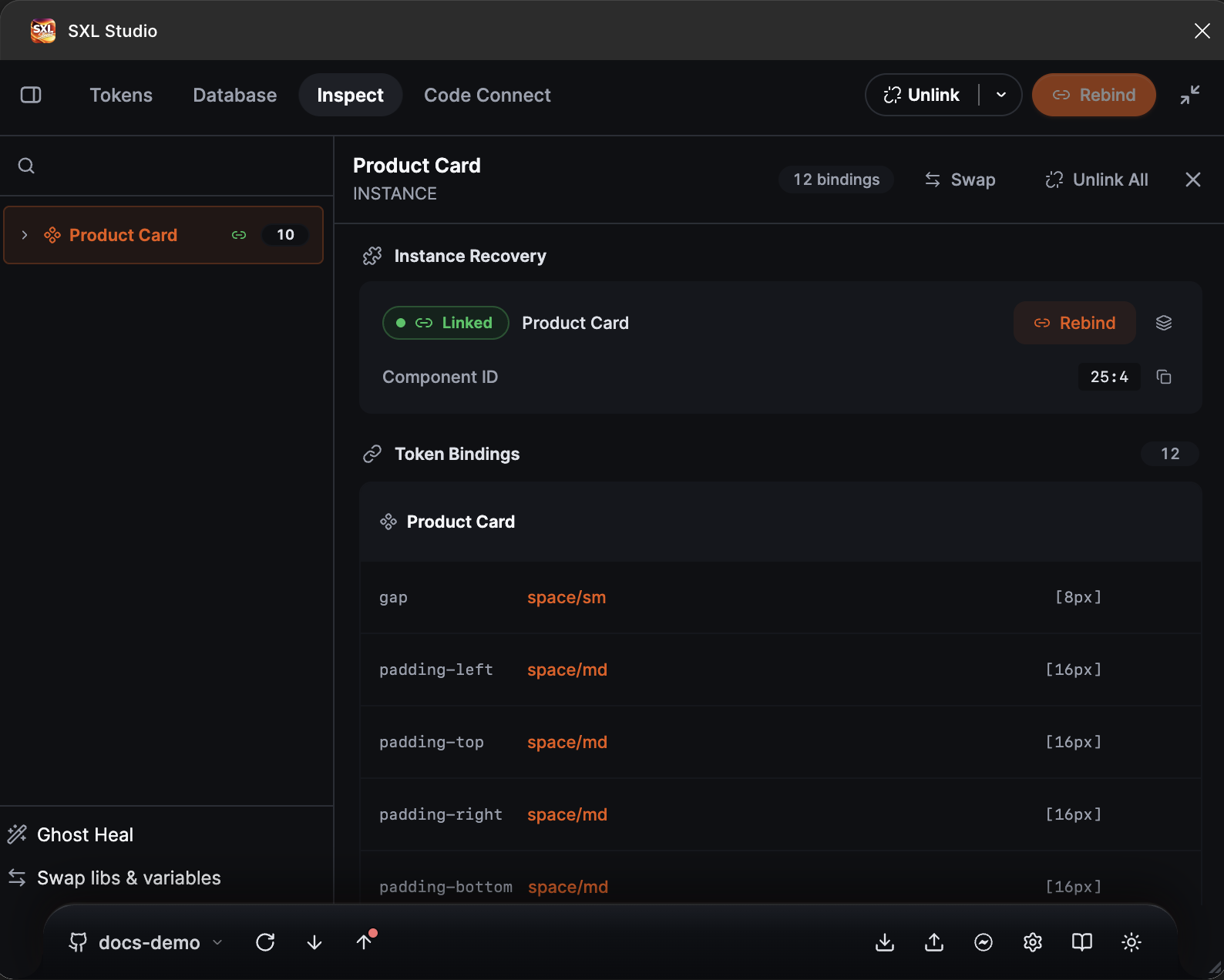
Inspect for a card instance: the Instance Recovery section and the Token Bindings list.
How to open
- Select a layer, instance, component or frame on the canvas.
- Open the Inspect tab. The panel updates on every selection change.
The panel header shows the layer name, the number of bindings, and the Swap and Unlink All buttons. On this tab the plugin header gets Unlink with the Selection or Page scope and Rebind. At the bottom left are two file-wide buttons: Ghost Heal and Swap libs & variables.
Panel sections
The set of sections depends on the type of the selected layer.
| Section | When it appears | Contents |
|---|---|---|
| Instance Recovery | For instances | The Linked, Remote or Broken state, the main component name, Component ID or Library Key with a copy button, the Rebind and Rebind All buttons |
| Token Bindings | For any layer with bindings | Rows "property → token → value" for every layer of the subtree, with Override and Unlink buttons per row |
| Mode Diagnostics | If the layer or page has explicit variable modes | The Node explicit modes, Page explicit modes and Ghost references counters and cleanup buttons |
| Composition Tracking | For components generated from a composition | The Linked or Unlinked state and the Re-link button |
| Out of Sync | If the component diverged from its composition JSON | The number of differences, categories, the Show Diff and Re-apply buttons |
Typical tasks
| Task | Where |
|---|---|
| See which tokens are bound to a layer | Token Bindings, see Token bindings |
| Replace one token with another in a specific row | Override in the binding row |
| Remove bindings from the selection or the page | Unlink in the plugin header, Unlink All in the panel |
| Move instances to another component or fix a Broken one | Instance Recovery → Rebind, see Rebind |
| Move variables and styles to another library or collection | Swap for an instance or Swap libs & variables for a page or file, see Swap |
| Remove stale modes, duplicate collections and ghost references | Ghost Heal, see Ghost Heal |
| Check whether a component matches its composition | Composition Tracking and Out of Sync, see Composition and Drift |
| Bring variables over from another file | Synchronization settings → Cross-file, see Cross-file Sync |
Figma limits
- References to deleted modes and collections can sometimes only be seen, not removed, by a plugin. Ghost Heal reports such cases.
- Navigating to a main component in another library depends on your access to that library and on whether it is published.
- If a main component was deleted but can still be restored in Figma, the instance stays Linked. The Broken state appears when the component is no longer available.