Swap
How to move variables and styles to another collection or library: Swap for the selected instance and all its copies on the page, and Swap libs & variables for a page or the whole file in two columns.
Swap rebinds variables and styles from one source to another without rebuilding components. Typical cases: moving a file from local variables to a library, moving between collections, cleaning up after pasting from someone else's file.
Swap does not change the main component of an instance. That is what Rebind is for.
Two modes
| Mode | Where | Purpose | Scope |
|---|---|---|---|
| Swap | The Swap button in the Inspect panel header | A targeted replacement for the selected instance or component | Selected or All: every instance of the same component on the page |
| Swap libs & variables | The button at the bottom of the left Inspect pane | Moving a page or a file to another library in bulk | Page or Document |
Swap for an instance
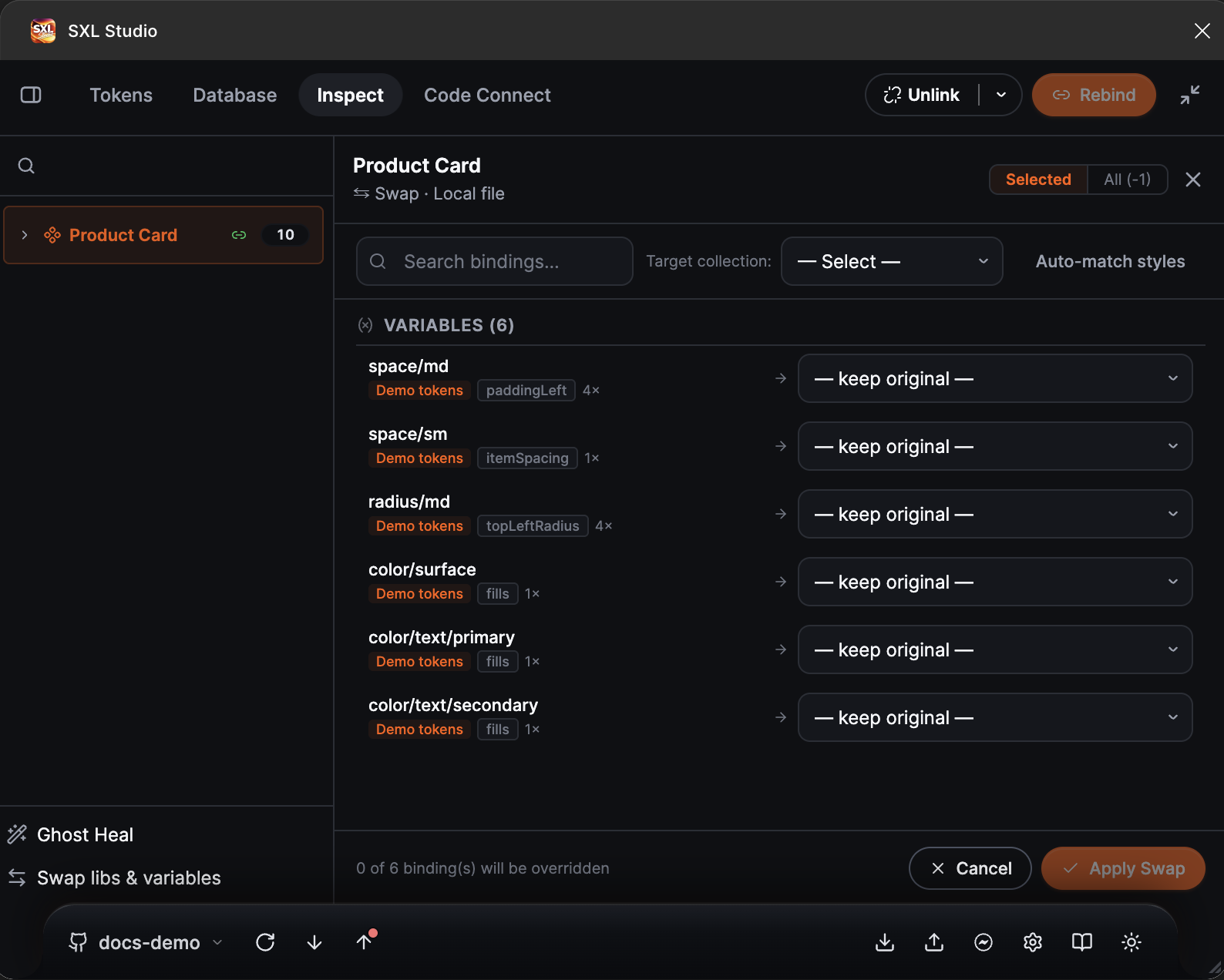
The Swap panel for an instance: the variable list with usage counts, the target collection and the replacement choice in every row.
- Select an instance, a component or a component set and press Swap in the panel header.
- The plugin collects the bindings into the Variables and Styles groups. Every row shows which collection the variable comes from, which properties it sets and how many times it is used.
- Choose the Target collection. Rows with a variable of the same name in the target get a replacement automatically; the rest stay marked keep original. The replacement in any row can be chosen by hand.
- For styles press Auto-match styles to pick local styles by name.
- Choose the scope: Selected for the current instance or All for every instance of this component on the page.
- Check the counter in the footer, how many bindings will be overwritten, and press Apply Swap.
The plugin remembers the replacement for the component, so the bindings do not roll back after a library update or a repeated token apply.
Swap libs & variables
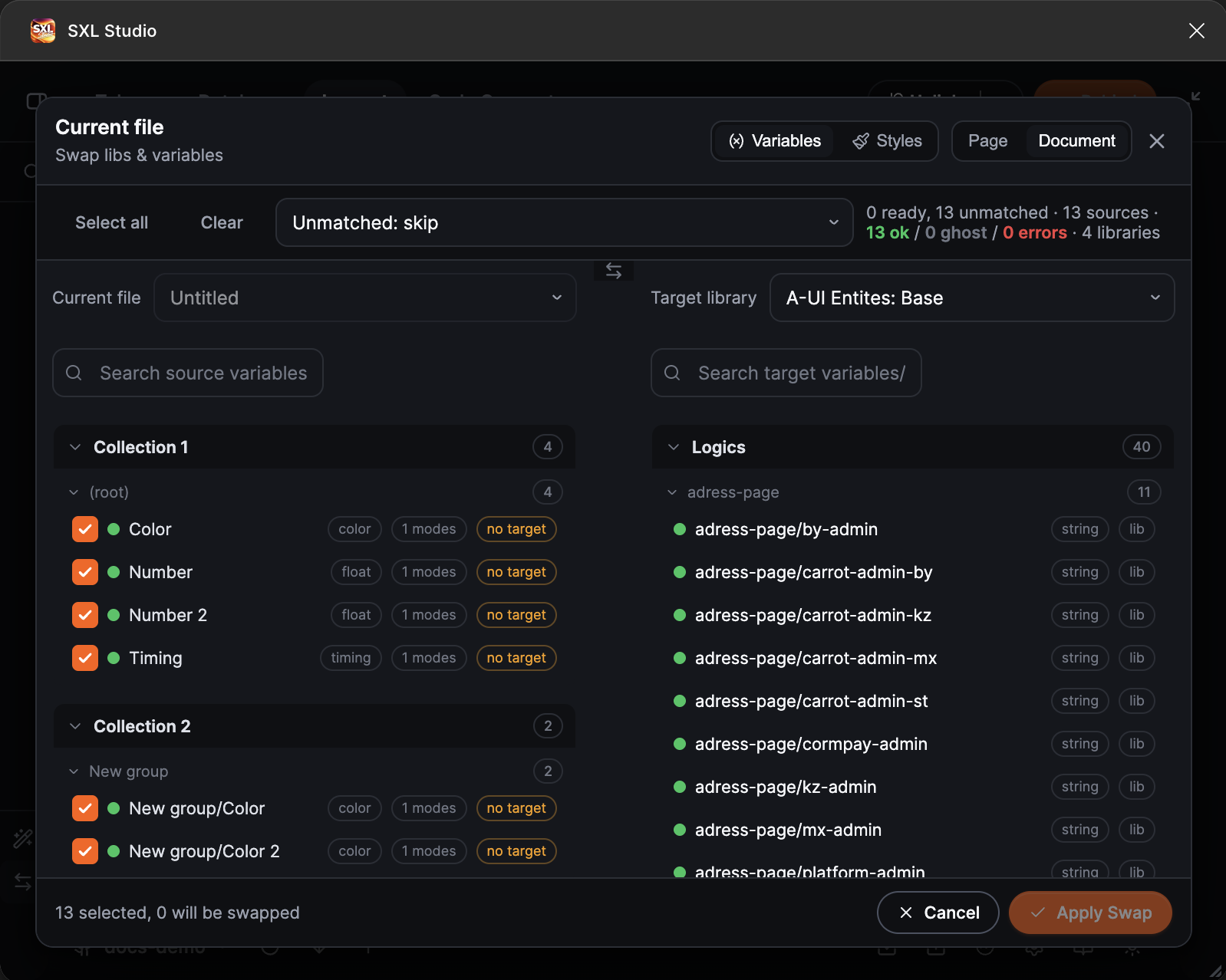
The two-column mode: the current file's variables by collection on the left, the target library on the right, and the number of selected and swapped bindings in the footer.
- At the bottom of the left Inspect pane press Swap libs & variables.
- Choose the data type, Variables or Styles, and the scope, Page or Document.
- In the Current file column tick what to replace. Rows with the ghost status belong to orphaned local collections; rows with the error status cannot find their source and are not applied until fixed.
- In the Target library column choose the library or the local variables and styles to move to. Matching by name fills in the matches; unmatched rows need a manual choice.
- Check the preview and press Apply Swap.
This mode applies the change to the whole scope at once and does not store remembered replacements for individual components.
What is replaced
- Variables bound to layer properties: fills, strokes, radii, spacing, typography.
- Figma styles: colours, text, effects, grids.
If the file has ghosts
If the list has many rows with the ghost or error status, run Ghost Heal first and then come back to Swap. The replacement then runs against up-to-date sources.
If something does not work
| What happened | What to do |
|---|---|
| The target library is not visible | Make sure the library is published and enabled for the file in Figma |
| Matching found nothing | Variable names in the source and the target differ. Choose replacements by hand or align the names |
| Rows with the error status | The source cannot be found. Run Ghost Heal or remove the stale binding with Unlink |