Local Storage
When the plugin's internal storage is not enough: how to enable Local Storage in a Git connection, what SXL Bridge needs, where the cache lives and why a Bridge Auth Token exists.
Figma gives every plugin about 5 MB of internal storage. For a large set of tokens and Database data that is not enough: Pull can stop with a storage message and the plugin becomes slow. Local Storage solves this: heavy files are kept on your computer's disk through SXL Bridge while the plugin keeps working as usual.
Local Storage is a setting of a specific Git connection. Plugin Local and Local Workspace do not use it: Local Workspace already works with files on disk.
When to enable it
- The plugin showed the Storage quota exceeded message.
- The repository has hundreds of token files or large data sets and images for Database.
- Pull and switching between files became noticeably slower.
Small projects do not need Local Storage; Git Sync works without Bridge.
What you need
A running SXL Bridge on this computer, port 37830 by default. Installing and starting Bridge is described on the Bridge utility page. You can check that Bridge answers with the bridge command on the Diagnostics tab.
How to enable it
- Open Sync settings → Git Sync and click the connection.
- Find the Local Storage card in the form and turn the switch on.
- Press Save.
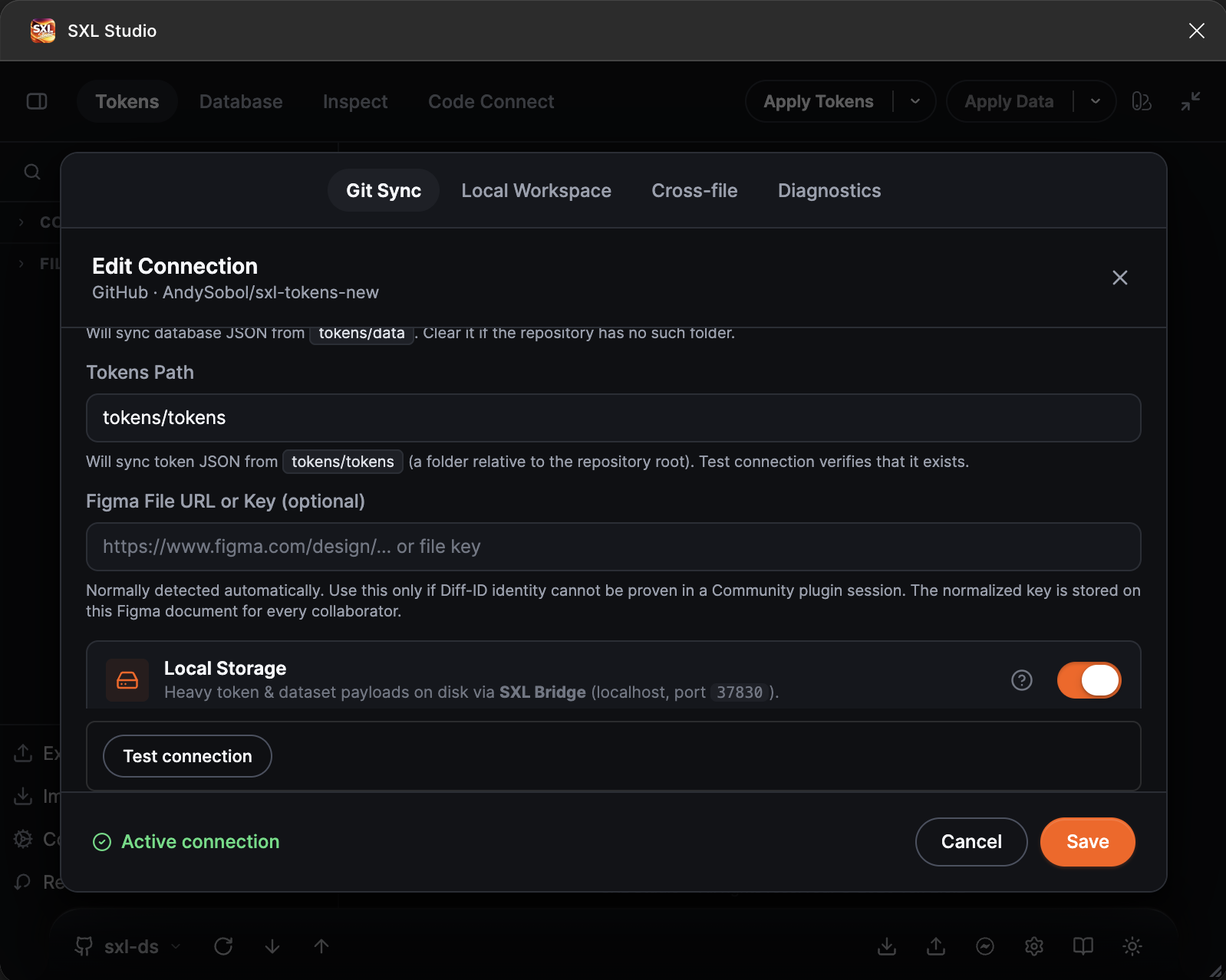
The Local Storage card in the connection form: the switch, the documentation link and the Bridge settings.
If Bridge is not running, the plugin refuses to turn the switch on and shows Local Storage requires SXL Bridge on http://127.0.0.1:37830 — start Bridge, then enable again. Start Bridge and try again.
After enabling it, run Pull: the files are loaded from the repository again, this time to disk.
Settings in the card
| Element | Purpose |
|---|---|
| Bridge Auth Token | Appears when the switch is on. Fill it in only if Bridge was started with the BRIDGE_AUTH_TOKEN environment variable; enter the same value. In a normal installation the field stays empty. It is neither a GitHub token nor a Figma token |
| Cache folder | Shown for a saved connection: the exact path to the folder where Bridge keeps this connection's files. Every connection has its own folder, they never overlap |
| Open | Opens the cache folder in Finder or Explorer. If Bridge is not running, the hint Start SXL Bridge to locate the folder is shown instead of the path and the button is disabled |
Cache files stay on your computer only and are never sent anywhere.
What changes in daily work
- Pull and Push work as before, but the plugin checks that Bridge is available before the operation. If Bridge is off, the operation stops before anything changes, with the message Local Storage requires SXL Bridge at http://127.0.0.1:37830 — start it, then retry Pull. Start Bridge and try again.
- The next time the plugin opens, the known state appears immediately and only changed files are fetched from the repository.
- Remote Connect is not required for Local Storage: a running Bridge is enough.
If something does not work
| What you see | What to do |
|---|---|
| The switch cannot be turned on | Bridge is not running or listens on another port. Run bridge on the Diagnostics tab |
| Pull stops with a message about Bridge | Start Bridge, check the port and the Bridge Auth Token, retry Pull. If you do not need Bridge right now, temporarily turn Local Storage off in the connection |
| You need to clear the cache | Press Open and delete the folder contents. The next Pull loads the files again |