Exporting variables and styles
How Figma variables and styles are created from token JSON: collections and modes in Collection Settings, the Export to Figma window, export settings, reading the result, re-exporting without duplicates, references between collections and libraries.
Export variables & styles creates and updates Figma variables and styles from the token files. Simple tokens become variables: Color, Number, String, Boolean, Timing and Easing. Composite tokens become styles: paint, effect, text and grid. You can export as often as you like: the plugin remembers which variable belongs to which token and updates it instead of creating it again.
Before the first export: collections and modes
Figma variables live in collections, and a collection can have several modes, for example Light and Dark. Which token files go into which collection and mode is defined by config.json in the token folder. It is easier to edit in the Collection Settings window, the button at the bottom of the file tree.
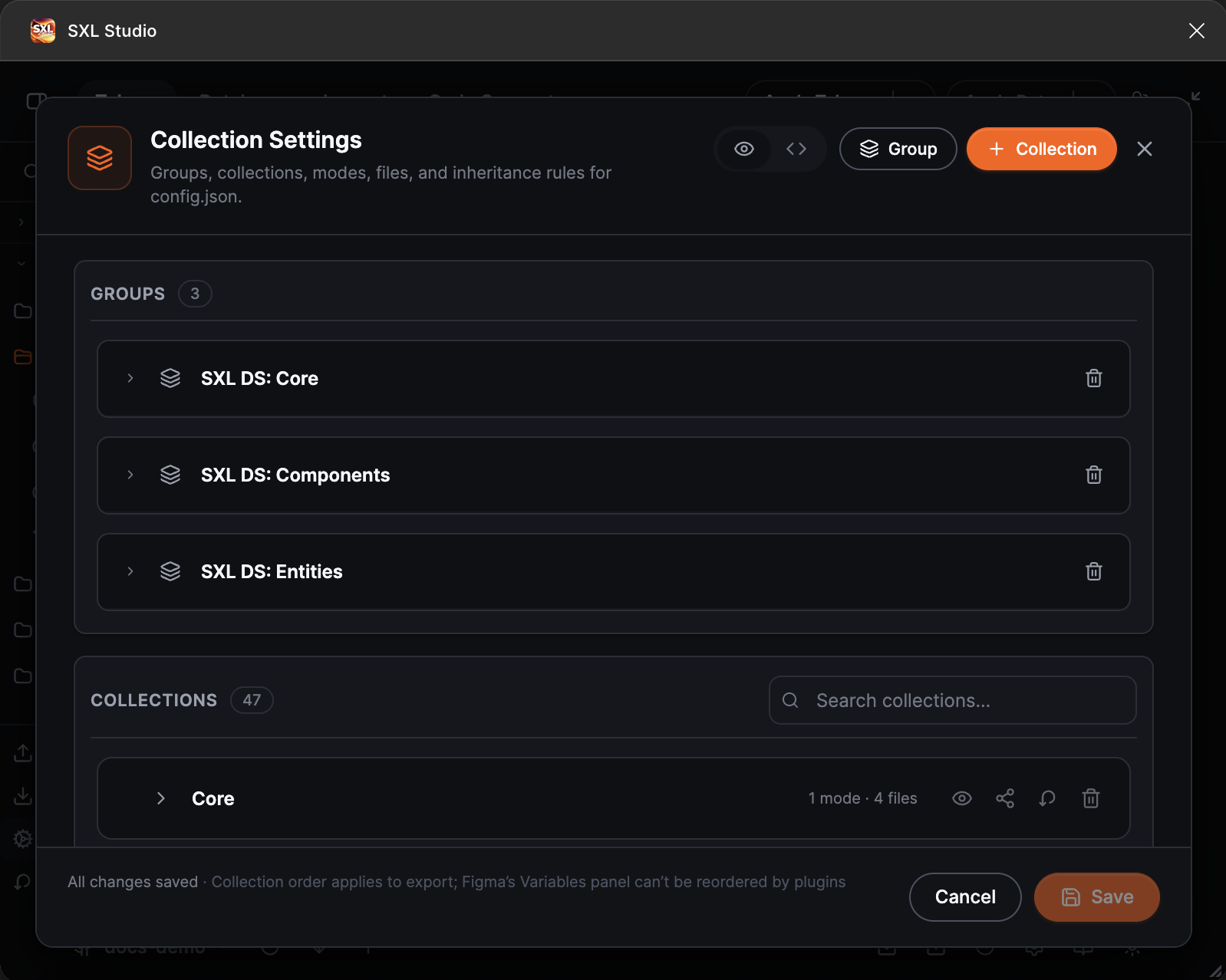
Collection Settings: groups, the collection list with mode and file counts, buttons to create a group and a collection.
In the window you can:
- create a collection with the Collection button and a mode inside it, and assign files to the mode;
- drag collections and modes to change their order in the configuration; this does not move existing objects in Figma;
- disable a collection, mode or file without removing it from the configuration;
- add a reference to another collection or a library to resolve aliases;
- combine collections into groups: a group corresponds to a separate Figma file that receives its own part of the tokens, for example Core and Components.
The same config.json in JSON:
{
  "$schema": "sxl-studio/config",
  "$version": "1.0",
  "settings": { "remBase": 16, "autoExportOnPull": false },
  "collections": [
    {
      "name": "Primitives",
      "hiddenFromPublishing": true,
      "modes": [
        { "name": "Default", "files": { "colors.json": "enabled", "spacing.json": "enabled" } }
      ]
    },
    {
      "name": "Semantic",
      "ref": [{ "type": "local", "collection": "Primitives" }],
      "modes": [
        { "name": "Light", "files": { "semantic-light.json": "enabled" } },
        { "name": "Dark", "files": { "semantic-dark.json": "enabled" } }
      ]
    }
  ]
}
| Field | Meaning |
|---|---|
settings.remBase | The base size for converting rem, em and percentages to pixels, 16 by default |
settings.autoExportOnPull | Run the export automatically after every Pull from Git |
collections[].name | The collection name in Figma, must be unique |
collections[].enabled | false excludes the collection from export |
collections[].hiddenFromPublishing | The collection is created but not published in the library. Handy for primitives |
collections[].ref | Where to look for the targets of references from another collection, see below |
modes[].name, modes[].enabled | The mode name in Figma and whether it is enabled |
modes[].files | The mode's files with the status enabled, disabled or source |
A file with the source status takes part only in reference resolution: its tokens can be alias targets, but they do not become variables themselves. That is how base sets referenced by semantic files are set up.
Files of different modes hold the same token paths with different values: text.primary in semantic-light.json and in semantic-dark.json. If a mode lacks a token, the variable is still created and Figma supplies the value for that mode; such gaps are listed in the export report.
How to export
- At the bottom of the tree press Export variables & styles. The Export to Figma window opens with four collapsible blocks: Collections, What to export, Export settings and Delete variables & styles. The list and the Export button appear once the saved settings have loaded, usually instantly.
- In the Collections block tick the collections. The header checkbox selects all, the Filter by name… field searches by name, and the Show selected only switch keeps only the selected ones in the list. A pinned Selected: N of M line above the list names the selected collections.
- In the What to export block keep the variable and style types you need enabled.
- Change Export settings if needed; a regular export needs no changes.
- Press Export. The line at the bottom of the window shows how many collections and types are selected.
While the export runs, the notification shows its progress: a bar, an "N / total" counter and the current stage. The Cancel export button stops the run: the plugin finishes the current variable, saves the ledger for what was written, skips deletions, reorder and styles, and shows Export cancelled with the created and updated counts. The next export after a cancel continues from the same place.
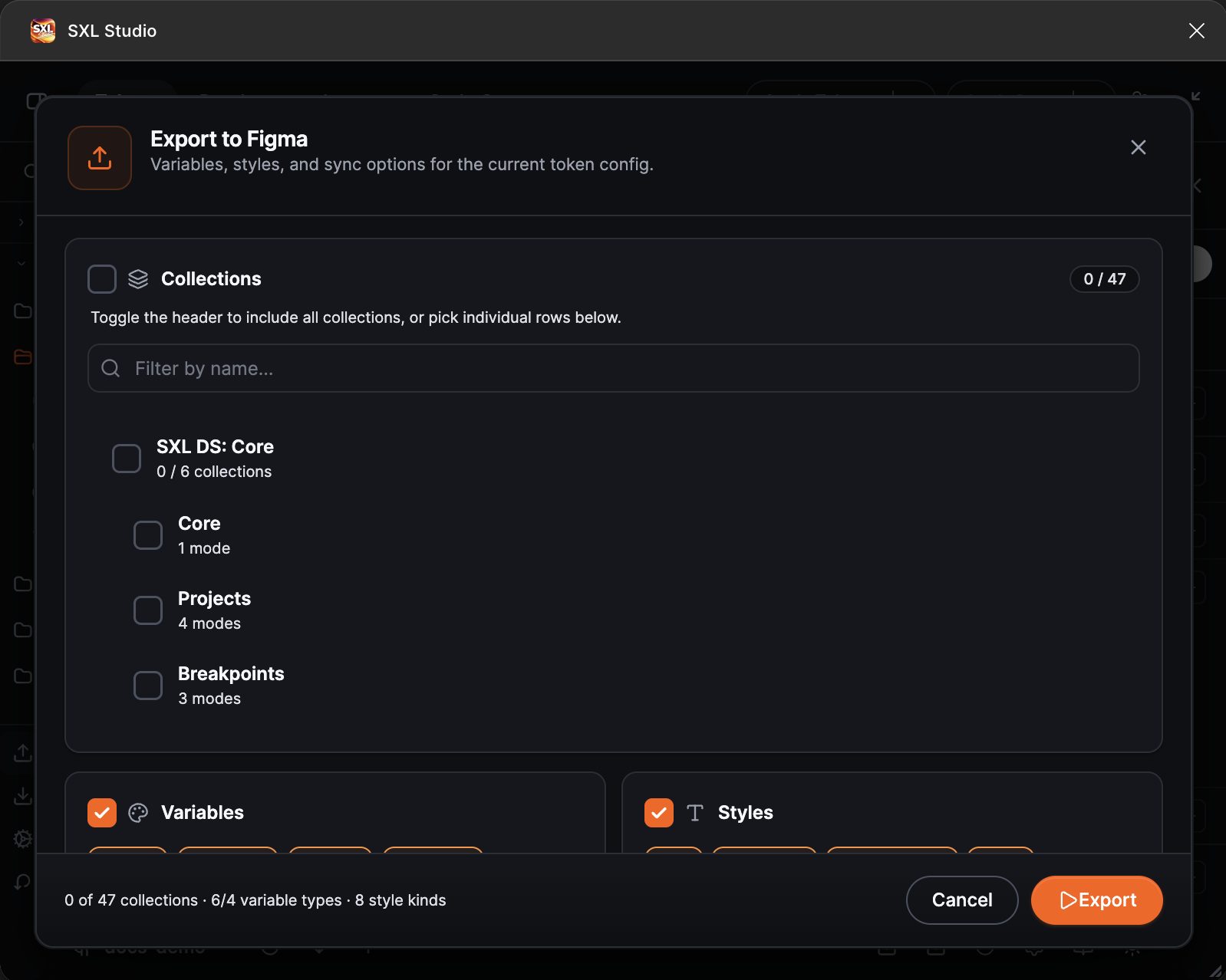
The Export to Figma window: the Collections section with search and collection groups.
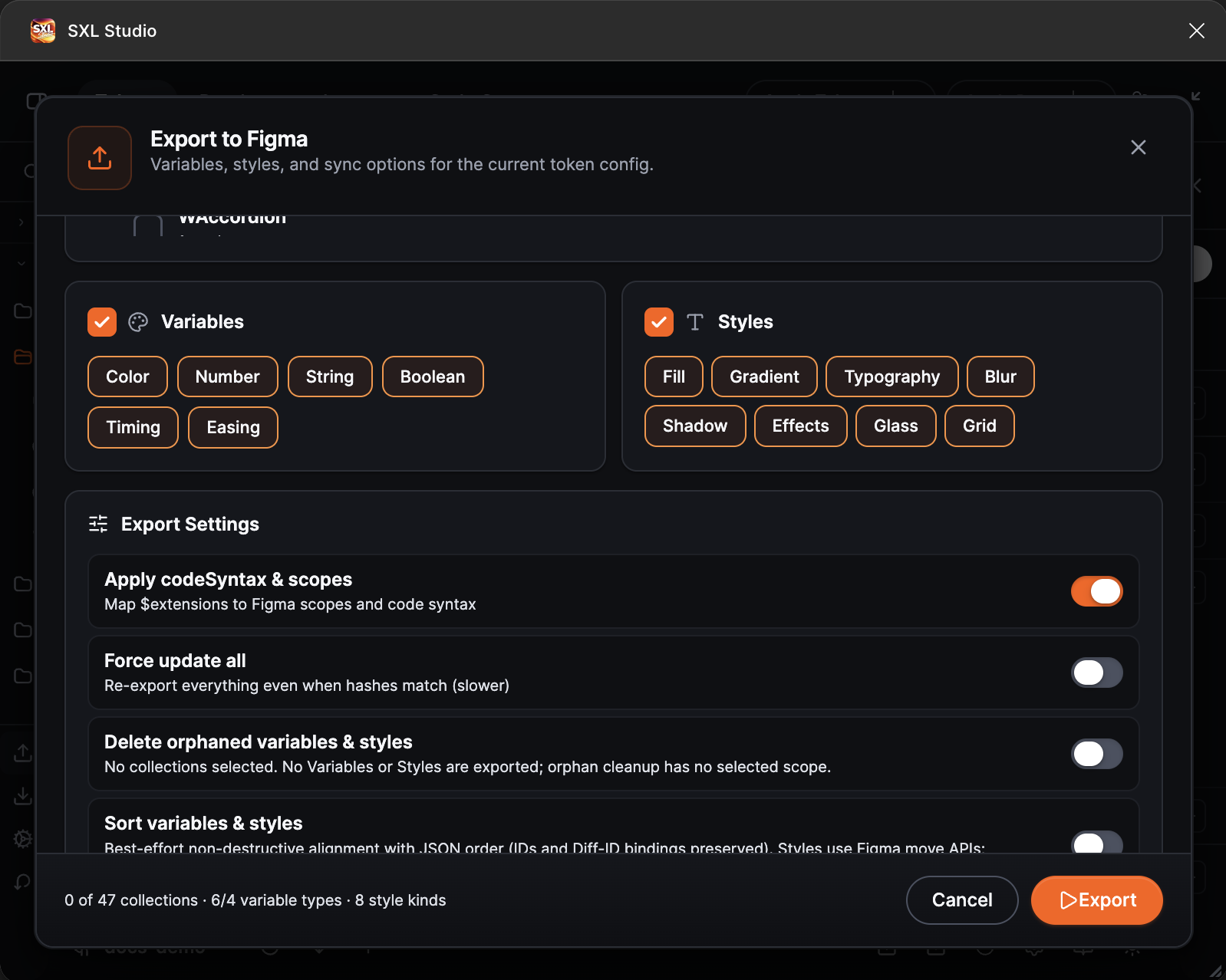
Variable and style types, the start of the export settings.
After the export open the Variables panel in Figma: the collections, modes and variables appear there, and the styles in the styles panel. A repeated export updates only what changed in JSON.
Types
| Section | Switches |
|---|---|
| Variables | Color, Number, String, Boolean, Timing, Easing |
| Styles | Fill (including images), Gradient, Typography, Blur (both blur kinds), Shadow, Effects, Glass, Grid |
All switches are on by default. Turn a type off to skip it entirely, for example to export only variables without styles.
Export Settings
| Setting | What it does | When to enable |
|---|---|---|
| Apply codeSyntax & scopes | Writes scopes, code syntax and the hide flag from $extensions to Figma, plus the Code Syntax block in style descriptions. Off by default | Turn it on when these settings should be updated together with the values |
| Force update all | Rewrites every variable and style, even unchanged ones | After manual edits in the Variables panel or when a style is "stuck" with an old value |
| Delete orphaned variables & styles | Deletes variables and styles from the selected collections that no longer exist in JSON. Irreversible | When renames and deletions in JSON are final and Figma should match them |
| Sort | Arranges local styles and style folders in source order, preserving their identifiers and bindings | When the order of styles in the token files has changed |
Ready-made combinations:
- Daily export: everything default. Fast, only changed values are updated.
- Tidy the order: Sort on, the rest default.
- Sync deletions: Delete orphaned variables & styles on for one run.
- Full refresh: Force update all on for one run, then turn it off.
Sort never deletes or recreates objects. Figma lets plugins move existing styles and style folders, but does not provide a way to reorder existing collections, modes or variables. Reordering them in Collection Settings or JSON therefore does not rearrange them in Figma. Figma controls the final display order. Set the order of existing collections, modes and variables manually in Figma.
Destructive actions
The block at the bottom of the window deletes whole variable collections and style groups from the Figma file. Both lists have search and multi-select; the button reads Delete all … or Delete N selected …. Deletion is irreversible: variables bound to layers lose their bindings. Save a Figma file version and commit the tokens before a mass deletion.
Reading the result
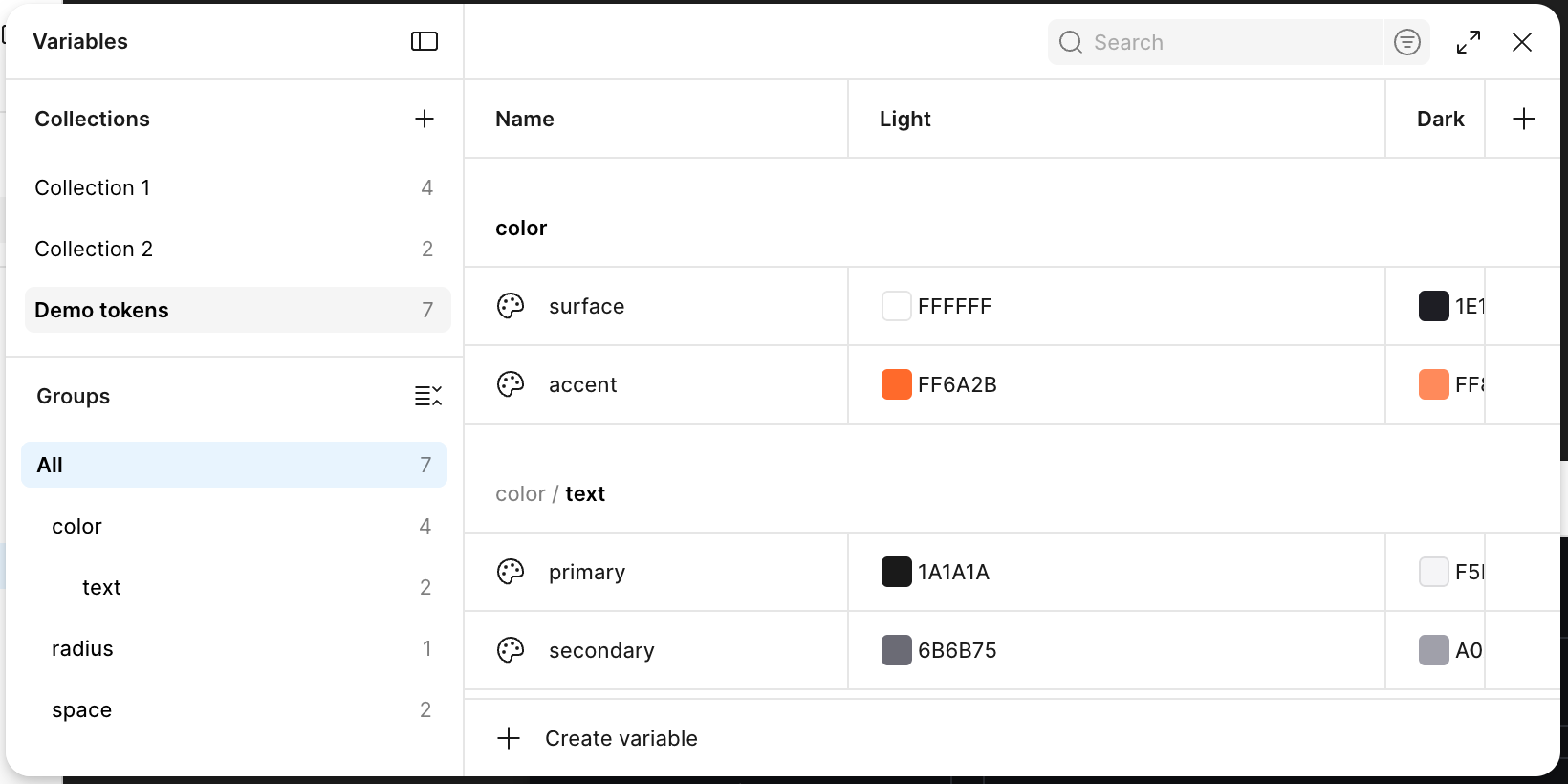
The Variables panel in Figma after an export: a collection with the Light and Dark modes and the color, radius and space groups, as in the token files.
After the export the plugin shows a notification with a headline:
| Headline | Meaning |
|---|---|
| Export complete | Everything was exported |
| Export completed with N notice(s) | The export passed with remarks, for example missing mode cells or a token kept as custom |
| Partial export | Some variables or styles were not exported. Expand Details to see which and why |
| Export failed | The export stopped and nothing changed. The reason is in the details |
| Export cancelled | The export was stopped with Cancel export. The subtitle says how many variables were written before the stop |
Copy all copies the whole report, Retry runs the export again. One token's error does not stop the others: a wrong value, an unresolved reference or an incompatible type skips only that token, and the report names its path.
Notices and errors are listed as items: a severity glyph (a red cross for an error, a yellow triangle for a notice, a grey “i” for an informational line), errors first, then notices. An item may carry a collection or path label and the number of affected variables or styles (×N), with the recommendation (“→ what to do”) under it; a recommendation shared by several items is shown once above the list. A list longer than eight items collapses behind Show N more.
Re-exporting without duplicates
When a style (text, fill, gradient, shadow, blur or grid) references a variable that does not exist in Figma yet (for example its collection has not been exported), the style is created with a literal value and the notification lists the fields and variables in a notice. Export the collection with those variables and run an ordinary export again: the bindings are restored automatically, the style ID and its consumers are kept, Force update all is not needed.
A fill layer whose colour is bound to a variable can carry its own opacity: the export verifies the written value and repeats the write when needed, so the opacity is right after the first export. Figma does not keep a blend mode on such a layer — the export leaves NORMAL and adds a notice naming the layer; use a literal colour on the layer to keep the blend mode.
The plugin keeps the link between tokens and the variables of this Figma file in the service file diff-id.<file key>.json next to the tokens. Thanks to it:
- a value change updates the same variable;
- renaming a token in JSON renames the variable when the replacement can be proven unambiguously;
- a token deleted from JSON does not delete the variable until Delete orphaned variables & styles is on;
- references between variables are preserved.
The file is synchronized through Git together with the tokens: do not edit or delete it by hand, and if you use Prettier, add diff-id.*.json to .prettierignore. If the link is lost, for example after copying the Figma file, a regular export finds the single matching variable with the same name and type and reconnects it. Ambiguous matches are never picked at random; the plugin reports them.
Reset Diff-ID at the bottom of the tree breaks the link for the whole file, or for one collection in Collection Settings: the next export creates the variables anew. Rarely needed, for example when a Figma file starts from scratch.
References between collections and libraries
A token may reference a token from another collection: {color.blue.500} in a semantic collection points to a primitive. For the export to find the target, the collection needs a ref entry:
{ "name": "Semantic", "ref": [{ "type": "local", "collection": "Primitives" }] }
For variables from a linked Figma library give the library and collection names:
{ "ref": [{ "type": "library", "library": "Design System Core", "collection": "Primitives" }] }
| Field | Value |
|---|---|
type | local for a collection of this file, library for a library |
collection | The collection name |
library | The Figma library name, library only |
mode | The mode name, optional |
A reference is set for the whole collection or for one mode. A library reference is an exact address: the plugin looks for the variable only in the named library and collection and never substitutes a similar one from elsewhere. The library must be linked to the file.
Declare a ref for every collection whose tokens are referenced, even when that collection is exported in the same run. Without it, a target that does not exist yet in the current export may be found in a published library through the diff-id memory of other files: the variable then aliases the library, and only the next export rebinds it to the local variable.
Reference compatibility is checked by the Figma variable kind: number may reference borderWidth because both become Number variables, while a reference from number to color is skipped with a warning.
Automatic export after Pull
If config.json has "autoExportOnPull": true, the plugin exports tokens right after every Pull from Git with the default settings: all types on, export settings off, including Apply codeSyntax & scopes.
If something does not work
| What happened | What to do |
|---|---|
| Variables are duplicated after export | The link is lost or ambiguous: two variables with one name. Delete the extra one in Figma and export again |
| A value did not update | Export with Force update all |
| A reference does not resolve | Check the collection's ref, the status of the file with the target (enabled or source) and the exact library and collection names |
| Collections, modes or variables did not move after Sort | Figma does not expose this operation to plugins. Sort changes only the order of styles and style folders |
| A token was kept as custom and not exported | The value resembles no type. Set $type explicitly |
| Export does not start in Local Workspace | Writing the Diff-ID service file needs an existing file in the folder. Do the first export from a Git source or check that Bridge is active |