Token types
The map of all 39 SXL Studio token types: how they are grouped in the create menu, what each becomes in Figma, which export switch owns it, the value shape and aliases.
SXL Studio supports 39 token types. The type is set by the $type field; on export a token becomes a Figma variable, a Figma style, or stays internal: such tokens take part in Apply, composition generation and code, but are not exported to Figma themselves.
| Export target | Types | What it becomes |
|---|---|---|
| Figma variable | 20 | A variable in a collection: Color, Number, String, Boolean, Timing or Easing |
| Figma style | 10 | A local style: Paint, Effect, Text or Grid |
| Internal | 9 | Used by the plugin and code, never reaches Figma |
Pick the type by what you want in Figma: a reusable variable for colours, sizes, strings and flags, a shared style for gradients, shadows, typography and grids, or an internal contract for borders, transitions, compositions and arbitrary data.
How to create a token
In the visual editor of a file, above the token list, there is a type bar: Color, Gradient, Images, Fill, Opacity, Dimension and a + button with all other types. The + menu is grouped into seven sections and has a type search.
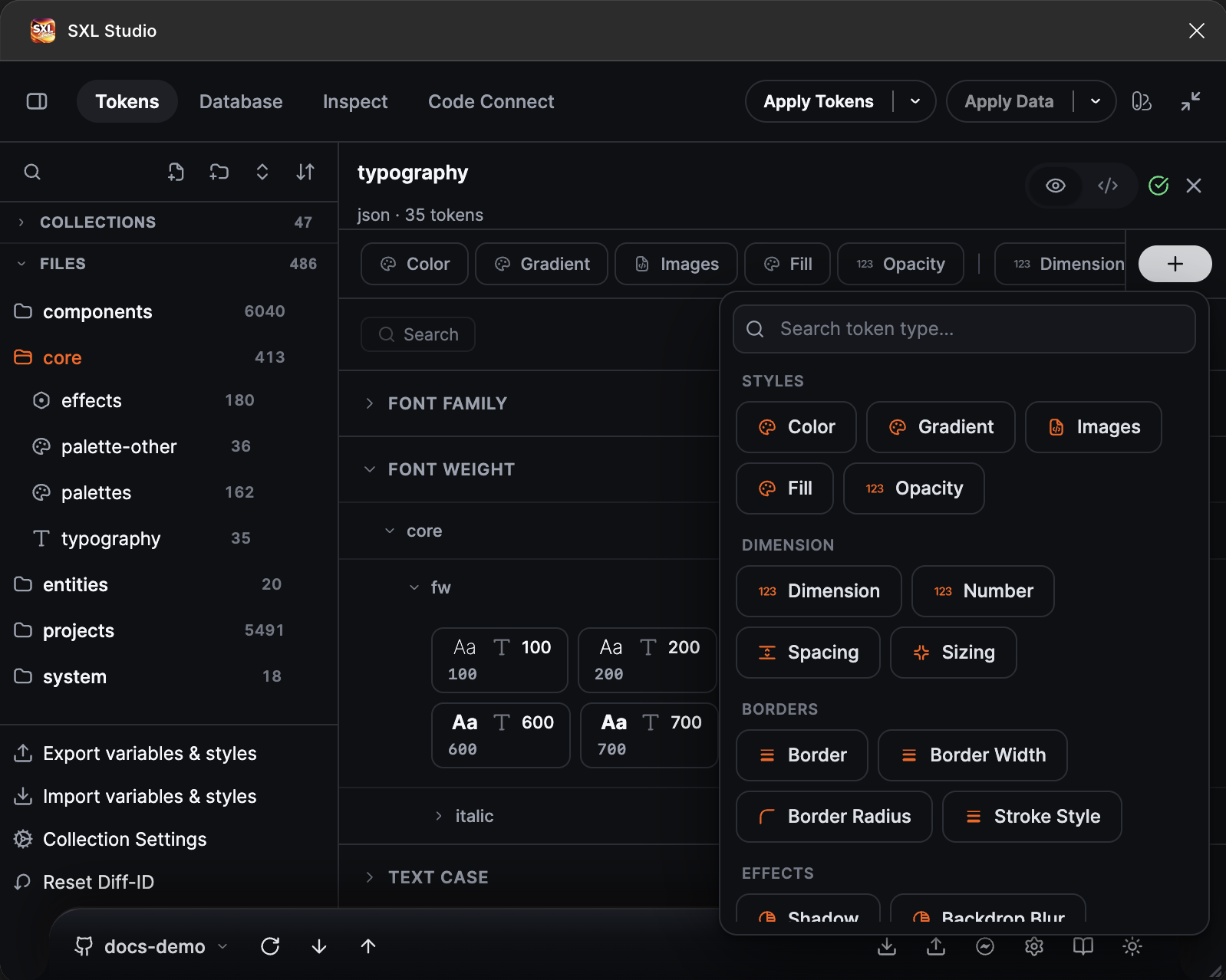
The Add token menu: the Styles, Dimension, Borders groups and the start of Effects.
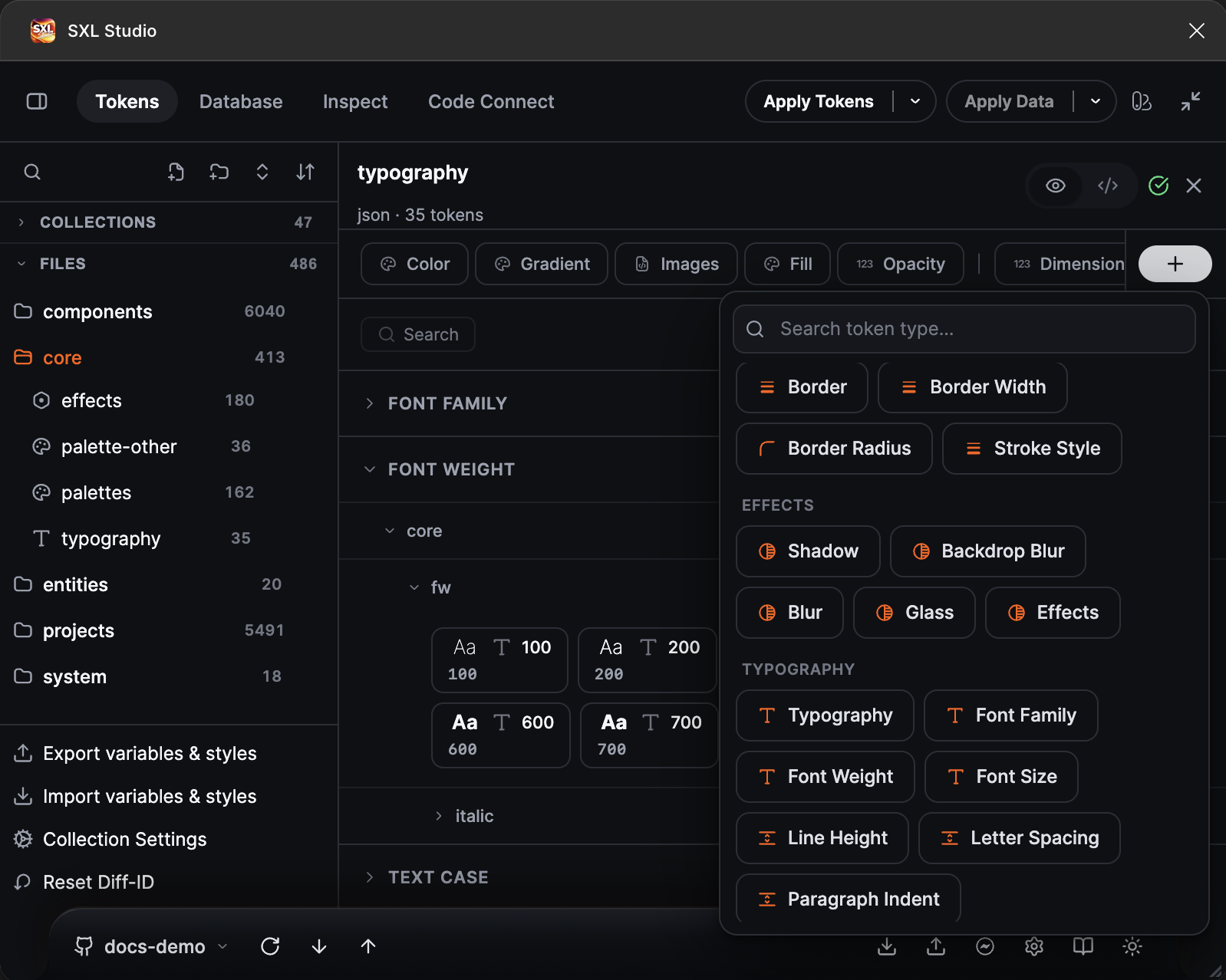
The Effects and Typography groups.
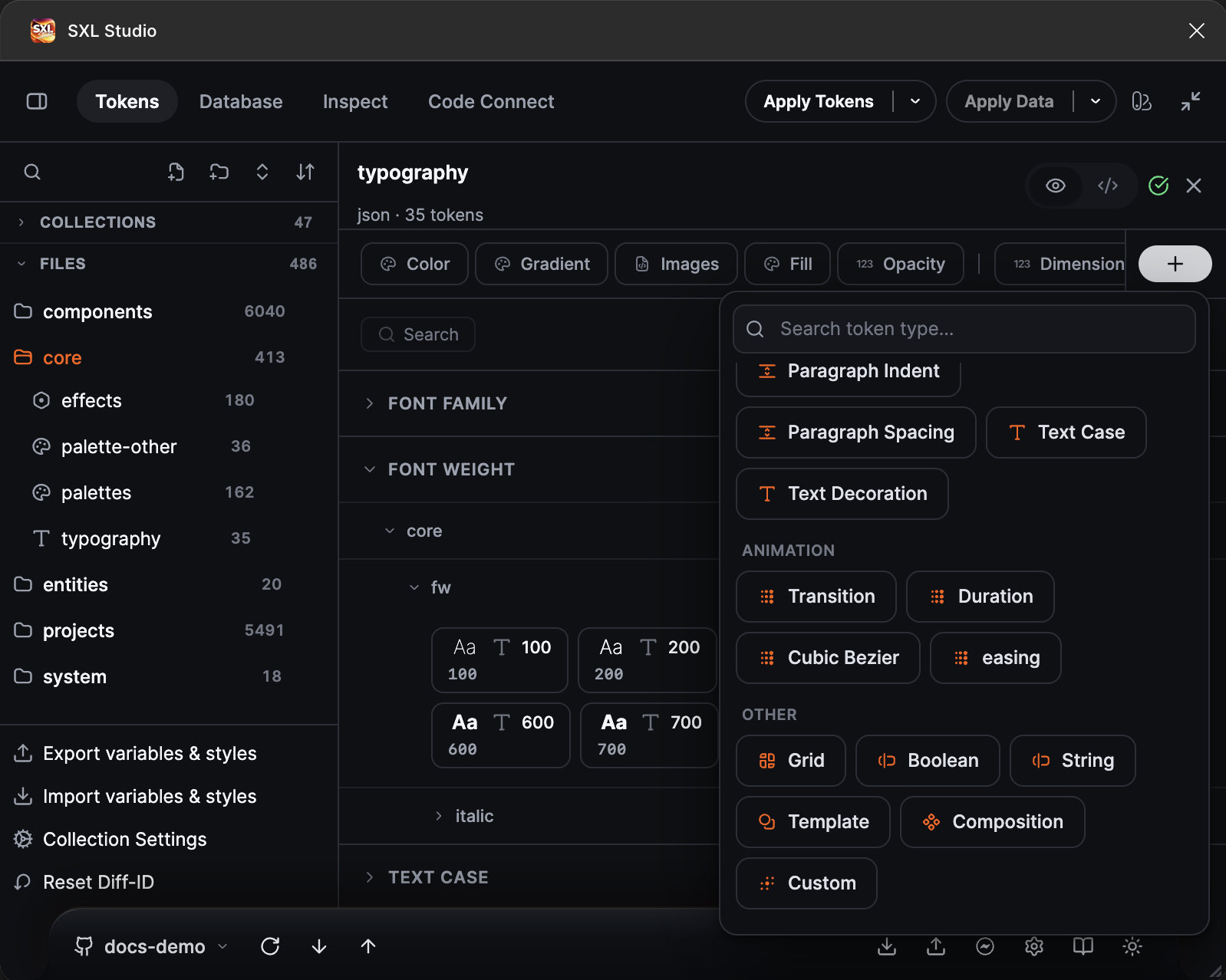
The Animation and Other groups.
Every type opens its own form: name, value with a format hint, description, and for variables also scopes, code syntax and the Hide from publishing flag. Details for every group are on its page.
Export targets
| Target | Types |
|---|---|
| Color variable | color |
| Number variable | opacity, dimension, number, spacing, sizing, borderWidth, borderRadius, fontSize, lineHeight, letterSpacing, paragraphIndent, paragraphSpacing |
| String variable | fontFamily, fontWeight, text |
| Boolean variable | boolean |
| Timing variable | duration |
| Easing variable | cubicBezier, easing |
| Paint style | gradient, img, fill |
| Effect style | shadow, backdrop-blur, blur, glass, effects |
| Text style | typography |
| Grid style | grid |
| Internal | border, strokeStyle, fontStyle, textCase, textDecoration, transition, template, composition, custom |
Which export switch owns a type
In the Export to Figma window types are enabled in groups. If a type does not export, check the matching switch.
| Switch | Types |
|---|---|
| Variables → Color | color |
| Variables → Number | all Number variable types from the table above |
| Variables → String | fontFamily, fontWeight, text |
| Variables → Boolean | boolean |
| Variables → Timing | duration |
| Variables → Easing | cubicBezier, easing |
| Styles → Typography | typography |
| Styles → Shadow | shadow |
| Styles → Blur | blur, backdrop-blur |
| Styles → Effects | effects |
| Styles → Glass | glass |
| Styles → Fill | fill, img |
| Styles → Gradient | gradient |
| Styles → Grid | grid |
Types by group
The seven groups of the Add token menu. Every row shows a minimal $value example.
Styles
$type | Exported as | $value example |
|---|---|---|
color | Color variable | "#635BFF" |
gradient | Paint style | "linear-gradient(90deg, #635BFF, #A78BFA)" |
img | Paint style | "url(https://…/cover.png)" |
fill | Paint style | [{ "type": "solid", "color": "#635BFF" }] |
opacity | Number variable | 0.6 or "60%" |
Dimension
$type | Exported as | $value example |
|---|---|---|
dimension | Number variable | "16px" |
number | Number variable | 8 |
spacing | Number variable | "16px" |
sizing | Number variable | "240px" |
Borders
$type | Exported as | $value example |
|---|---|---|
border | Internal | { "color": "#E7EAF1", "width": "1px", "style": "solid" } |
borderWidth | Number variable | "1px" |
borderRadius | Number variable | "8px" |
strokeStyle | Internal | { "style": "dashed", "dash": 4, "gap": 4 } |
Effects
$type | Exported as | $value example |
|---|---|---|
shadow | Effect style | [{ "offsetX": 0, "offsetY": 2, "blur": 8, "color": "#00000033" }] |
backdrop-blur | Effect style | "8px" |
blur | Effect style | "4px" |
glass | Effect style | { "lightIntensity": 0.3, "refraction": 0.2, "depth": 12, "radius": 8 } |
effects | Effect style | [{ "type": "DROP_SHADOW", "offsetX": 0, "offsetY": 2, "blur": 8, "color": "#00000033" }] |
Typography
$type | Exported as | $value example |
|---|---|---|
typography | Text style | { "fontFamily": "Inter", "fontSize": "16px", "fontWeight": 500, "lineHeight": 1.5 } |
fontFamily | String variable | "Inter" |
fontWeight | String variable | 500 or "Semi Bold" |
fontSize | Number variable | "16px" |
lineHeight | Number variable | "24px" |
letterSpacing | Number variable | "0.5px" |
paragraphIndent | Number variable | "8px" |
paragraphSpacing | Number variable | "12px" |
textCase | Internal | "uppercase" |
textDecoration | Internal | "underline" |
fontStyle | Internal | "italic". Temporarily hidden from the create menu, still supported in JSON |
Animation
$type | Exported as | $value example |
|---|---|---|
transition | Internal | { "duration": "200ms", "delay": "0ms", "easing": "ease-out" } |
duration | Timing variable | "200ms" |
cubicBezier | Easing variable | [0.4, 0, 0.2, 1] |
easing | Easing variable | "ease-out", "spring(0.3)" |
Other
$type | Exported as | $value example |
|---|---|---|
grid | Grid style | { "pattern": "grid", "sectionSize": 8 } |
boolean | Boolean variable | true |
text | String variable | "Checkout" |
template | Internal | an object describing template styles |
composition | Internal | an object describing a component |
custom | Internal or by value shape | any JSON |
A custom token, like any unknown $type, stays editable. On export the plugin looks at the value shape: a HEX colour becomes a Color variable, a number or math a Number variable, true/false a Boolean variable, a string a String variable, and an object that looks like typography, a shadow, a gradient or a grid becomes the matching style. A value that resembles nothing stays in JSON and is not exported to Figma; the plugin reports it in the export result.
Composite value examples
Typography:
{
  "$type": "typography",
  "$value": { "fontFamily": "Inter", "fontSize": "16px", "fontWeight": 500, "lineHeight": 1.5, "letterSpacing": "0px" }
}
Shadow with several layers:
{
  "$type": "shadow",
  "$value": [
    { "offsetX": 0, "offsetY": 1, "blur": 2, "spread": 0, "color": "#0000001F" },
    { "offsetX": 0, "offsetY": 8, "blur": 24, "spread": 0, "color": "#00000029" }
  ]
}
Gradient:
{ "$type": "gradient", "$value": "linear-gradient(135deg, #635BFF 0%, #A78BFA 100%)" }
Grid:
{ "$type": "grid", "$value": { "pattern": "grid", "sectionSize": 8 } }
Fill with several layers:
{
  "$type": "fill",
  "$value": [
    { "type": "image", "url": "https://…/photo.jpg", "scaleMode": "FILL", "opacity": 0.7 },
    { "type": "solid", "color": "#00000029" }
  ]
}
Default scopes
Variables get a default Figma scope; you can change it in the token form or through figma.scopes. Variable types not listed in the table get all scopes. boolean, duration, cubicBezier and easing have no scopes at all.
$type | Default scope |
|---|---|
color | All fills, Stroke color, Effect color |
sizing | Width and height |
spacing | Gap |
borderRadius | Corner radius |
borderWidth | Stroke width |
opacity | Opacity |
fontFamily | Font family |
fontWeight | Font style. Other scopes are not allowed for this type |
fontSize | Font size |
lineHeight | Line height |
letterSpacing | Letter spacing |
paragraphSpacing | Paragraph spacing |
paragraphIndent | Paragraph indent |
dimension, number, text | All scopes |
boolean, duration, cubicBezier, easing | Scopes not supported |
More: Scopes and Code Syntax.
Inheritance and type aliases
A group can declare $type once; every token inside inherits it:
{
  "spacing": {
    "$type": "spacing",
    "sm": { "$value": "8px" },
    "md": { "$value": "16px" }
  }
}
Legacy and alternative type names are mapped to the canonical ones:
| In the file | Canonical type |
|---|---|
string | text |
size | sizing |
space | spacing |
fontSizes, fontWeights, fontStyles and other plural forms | fontSize, fontWeight, fontStyle |
borderRadii | borderRadius |
boxShadow | shadow |
backgroundBlur, backdropBlur, background-blur | backdrop-blur |
layerBlur | blur |
motionEasing | easing |
Use the canonical names in production files. The full table is on the Token JSON format page.