Styles
Token types of the Styles group: Color, Gradient, Image, Fill, Opacity. Which values are accepted, how colour modifiers and the colour-to-opacity variable link work, and what each type exports to.
The Styles group holds colours, fills and opacity. color and opacity export as Figma variables, gradient, img and fill as paint styles.
$type | Exported as | Value |
|---|---|---|
color | Color variable | A colour string or a channel object |
gradient | Paint style | A CSS gradient, a gradient object or a reference |
img | Paint style | An image address or an image object |
fill | Paint style | One fill layer or an array of layers |
opacity | Number variable | A number from 0 to 1, a percentage or a reference |
In the Export to Figma window colours are enabled by the Variables → Color switch, opacity by Variables → Number, gradients by Styles → Gradient, and fill and img by Styles → Fill.
Color
A Figma Color variable. Default scopes: All fills, Stroke color, Effect color.
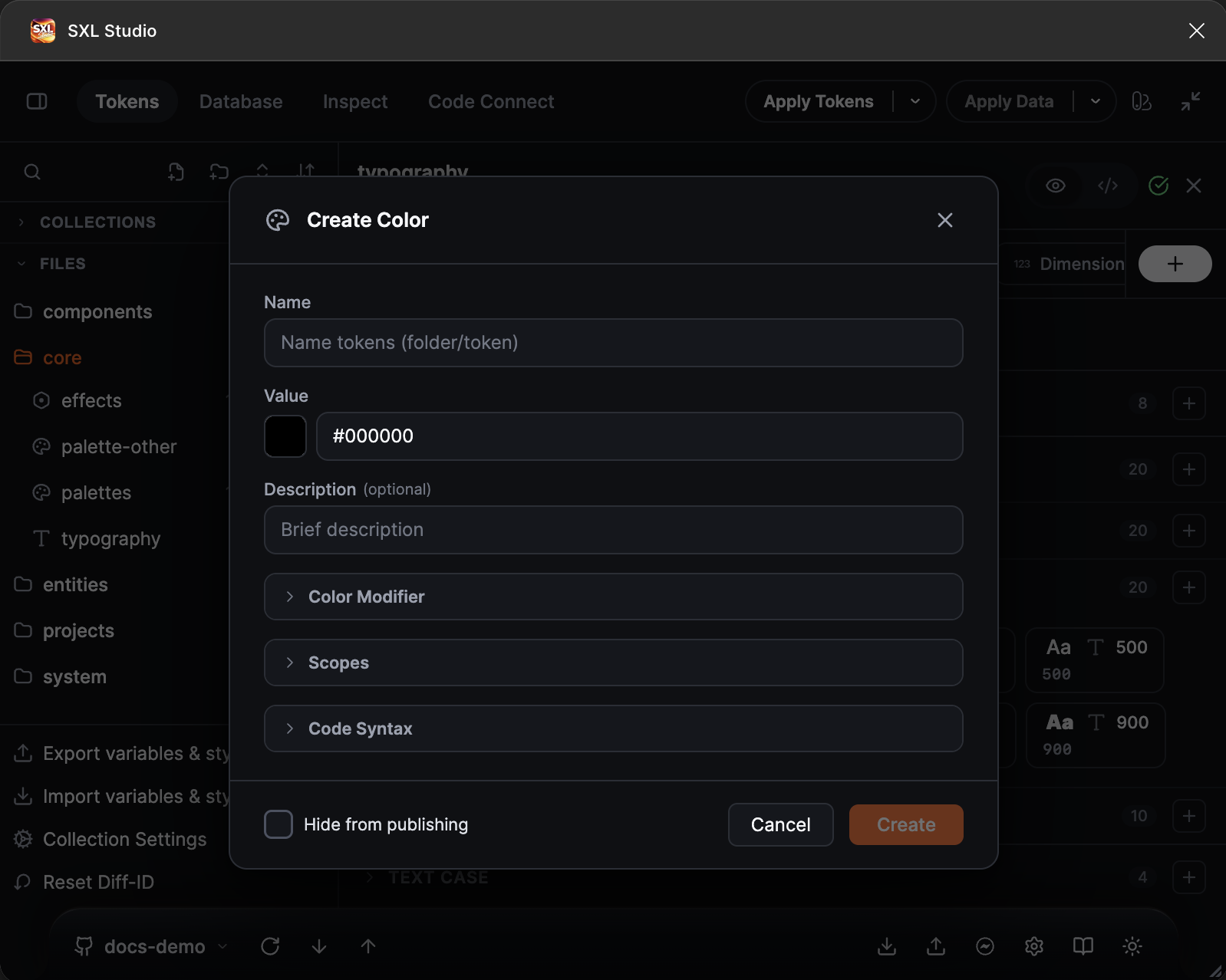
The Create Color form: the value with a colour swatch, description, the Color Modifier, Scopes and Code Syntax sections, the Hide from publishing flag.
| Accepted | Example |
|---|---|
| HEX with 3, 4, 6 or 8 digits | "#635BFF", "#635BFF80", "#FFF" |
rgb() and rgba() | "rgba(99, 91, 255, 0.8)" |
hsl() and hsla() | "hsl(244, 100%, 68%)" |
lch(), oklch(), color() | "oklch(0.62 0.2 280)", "color(display-p3 0.4 0.36 1)" |
| A channel object | { "r": 0.39, "g": 0.36, "b": 1, "a": 1 } — channels 0..1 as in Figma |
| A DTCG-style colour object | { "colorSpace": "srgb", "components": [0.39, 0.36, 1], "alpha": 0.5 } |
A CSS colour name and transparent | "white", "transparent" |
| A channel object from 0 to 255 in token JSON | { "r": 51, "g": 102, "b": 153, "a": 0.16 } — normalized when the JSON is loaded |
| A reference to another colour | "{color.brand.primary}" |
| A colour with an opacity reference | "rgba({color.brand.primary} {opacity.medium})" |
{ "$type": "color", "$value": "#635BFF" }
RGB objects accept numeric a; colour-space objects accept numeric alpha. Token references in these fields are not supported and may be ignored during normalization. Use a single figma.modify alpha step or reference the object-valued base token from an inline expression instead. The supported colorSpace values are srgb, display-p3, hsl, lch and oklch; this is not full DTCG colour support. A standalone { "hex": "#635BFF" } object is not accepted: use the string "#635BFF".
Unsupported forms include lab(), oklab(), hwb(), percentage RGB channels, percentage OKLCH lightness, currentColor, CSS var() / calc() / color-mix(), and other color() spaces.
Colour modifiers
A modifier derives a colour from another one: lightens, darkens, changes opacity or mixes. In the token form open the Color Modifier section and press Add Color Modifier: every step has a method, a colour space and an amount, and the result is shown in a live preview. Steps apply in order.
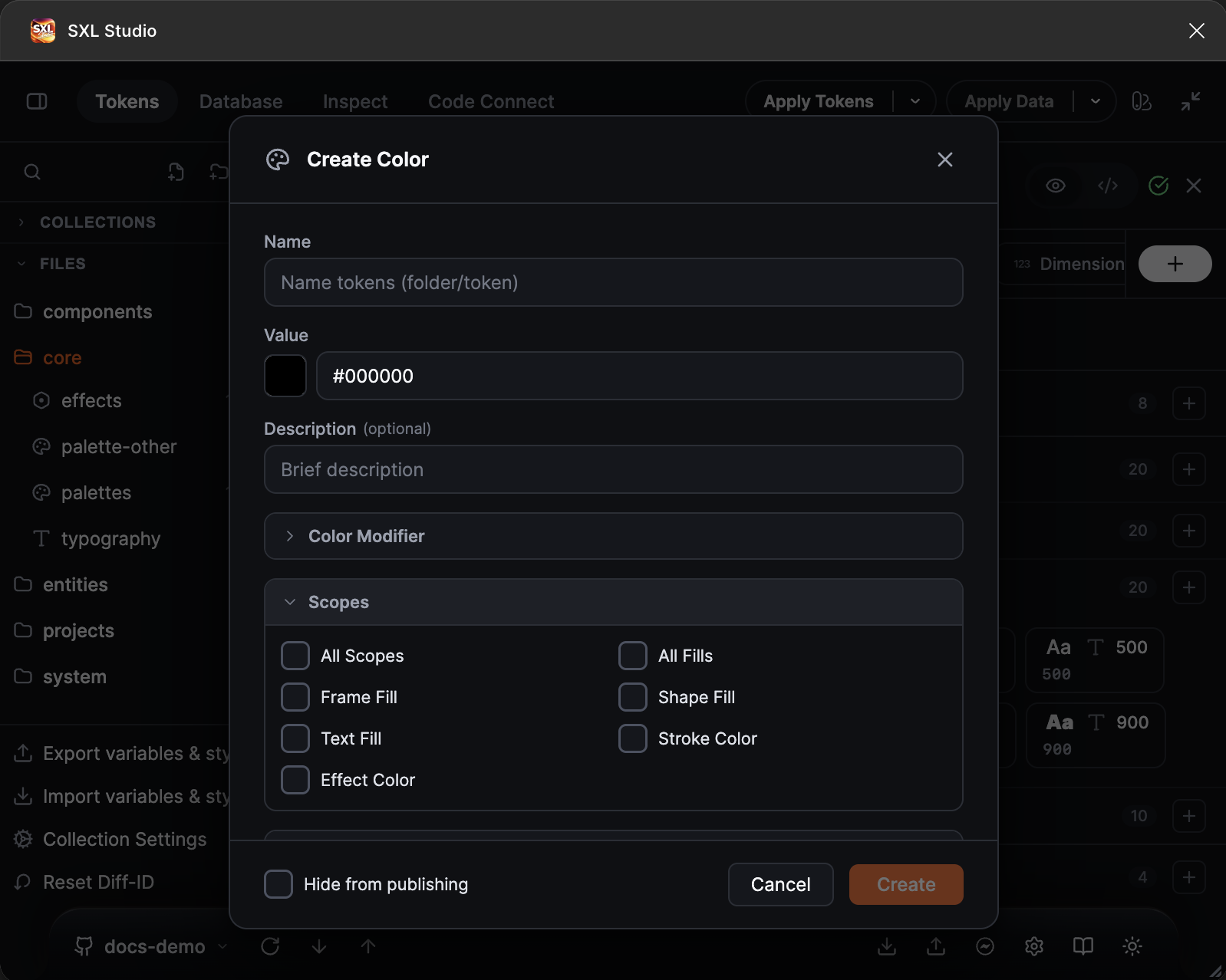
The Scopes section: All Scopes, All Fills, Frame Fill, Shape Fill, Text Fill, Stroke Color, Effect Color.
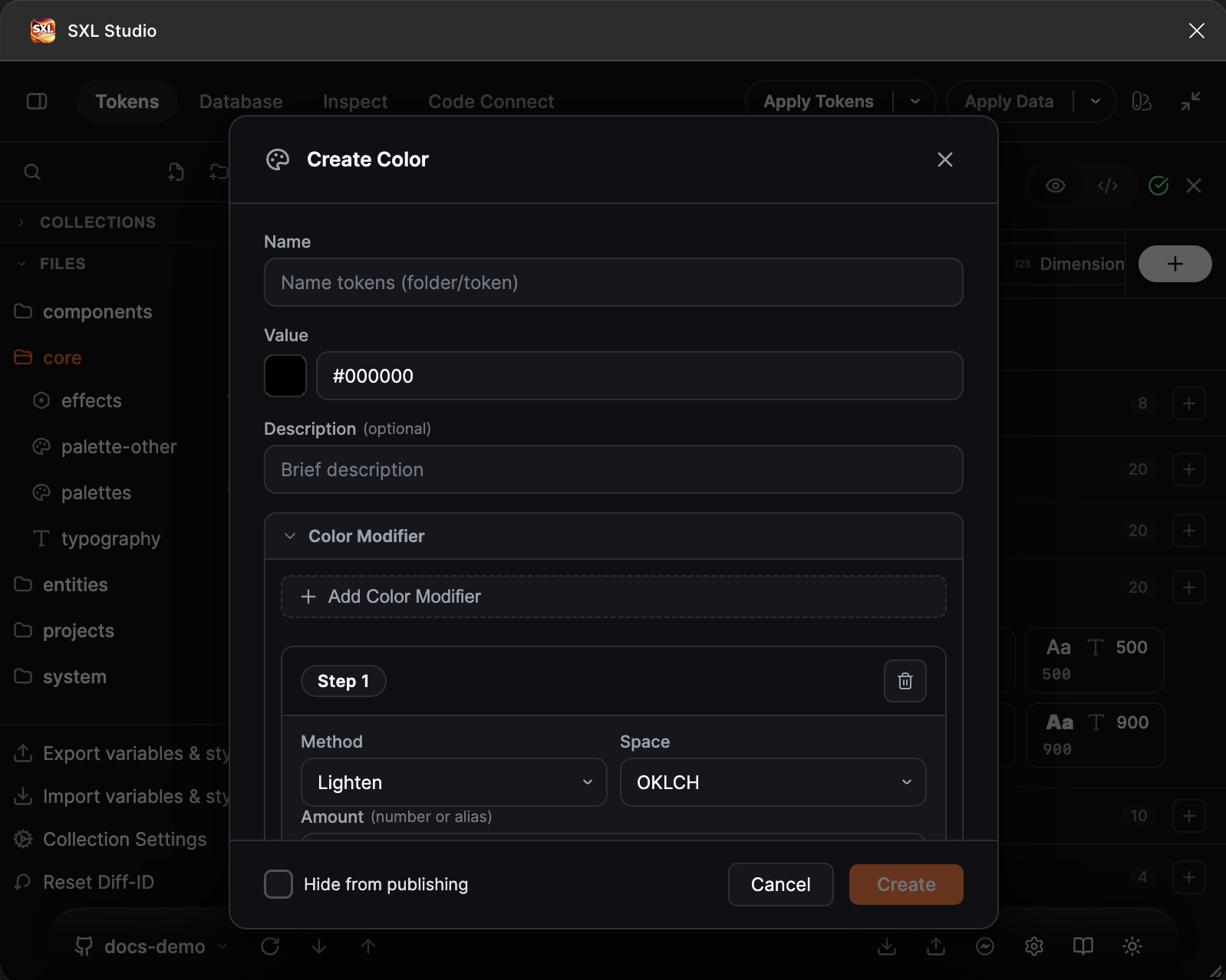
A modifier step: the Lighten method, the OKLCH space, the amount.
In JSON modifiers are written in $extensions.figma.modify:
| Field | Values |
|---|---|
type | lighten, darken, alpha, mix |
value | The amount: a number from 0 to 1, a number from 0 to 100, the string "56%" or a token reference |
space | srgb, hsl, lch, oklch. Defaults to oklch |
color | The second colour, required for mix |
{
  "$type": "color",
  "$value": "{color.brand.primary}",
  "$extensions": {
    "figma.modify": [
      { "type": "lighten", "value": 0.12, "space": "oklch" },
      { "type": "alpha", "value": 0.6 }
    ]
  }
}
The p3 space is not supported in modifiers, while a literal colour written as color(display-p3 …) is accepted.
A colour with an opacity variable
An opacity reference can be written directly in a colour token's $value; figma.modify is optional. Export tries to retain the source colour reference, when present, and the opacity reference in Figma's colour and opacity cells. The existing single alpha modifier uses the same export path. A colour reference with literal alpha retains the colour reference; a literal colour with literal alpha stays a regular RGBA value.
{ "$type": "color", "$value": "rgba({color.brand.primary}, {opacity.overlay})" }
Supported alpha positions include the existing colour shorthand (comma, space or /), rgb / rgba, hsl / hsla, lch, oklch, and color(srgb …) / color(display-p3 …):
{ "$type": "color", "$value": "rgb(0 0 0 / {opacity.overlay})" }
For example, rgba(0, 0, 0, {opacity.overlay}), hsl(210 50% 40% / {opacity.overlay}), oklch(0.7 0.1 30 / {opacity.overlay}) and color(display-p3 0.2 0.3 0.4 / {opacity.overlay}) accept an opacity reference without an extension. This does not add references in individual colour channels or CSS var() / calc() / color-mix().
A single additional alpha modifier replaces the inline alpha while retaining the source colour reference. Other modifiers and multi-step chains still apply in order and export their computed colour. Alpha replaces the source colour's alpha; it is not multiplied by it.
For a native colour reference with separate opacity, the base variable must be fully opaque. When the referenced colour already has transparency, the tested Figma runtime disables the opacity override and uses the base colour's alpha instead. Use a 100% opaque base colour and a separate opacity token for a live pair of references. Literal colour expressions can replace their own alpha without this restriction.
If the base is not opaque or its alpha cannot be verified, Export writes the computed colour and warns that the colour and opacity links are unavailable. An existing composed cell that cannot be proven to be an unchanged plugin write is preserved with a warning. If you later make a linked base translucent in Figma, Figma can ignore the separate opacity immediately; export again to check the cell against the token.
Native cells depend on the Figma Plugin API available in your session. If Figma rejects the write, for example with "Composed color variable values are not supported", the plugin exports a regular colour with the opacity already applied, as previous versions did, so the variable looks right but does not reference the source colour and the opacity variable. The export report gets one summary line: how many such variables, the reason and a list with a hint for each, for example testColor ("base" @ the variable "alpha"). To get the references, open the variable in the Variables panel and pick the colour and the opacity variable by hand. A cell set by hand is kept by later exports, also on a plain colour token without modifiers, and the plugin warns if the token drifts from it. As soon as Figma opens the write, the same JSON starts exporting with references, unchanged.
The opacity cell in Figma stores percents, so reference a token of the opacity type: it is exported as 65 for the value 0.65. If you reference a plain number between 0 and 1, Figma would read it as 0.65%. In that case the plugin keeps the colour reference, treats the opacity as a literal and reports a warning explaining how to make the variable bindable.
For a variable to be offered in the opacity cell of a colour it needs the Color Opacity scope. A new variable gets every scope; if you narrow them with figma.scopes, add the value COLOR_OPACITY (the Color Opacity item in the token form).
{
  "$type": "color",
  "$value": "{color.brand.primary}",
  "$extensions": { "figma.modify": [{ "type": "alpha", "value": "{opacity.overlay}" }] }
}
Gradient
A paint style with a gradient. Write a CSS gradient, a reference or an object.
| Accepted | Example |
|---|---|
| A CSS gradient string | "linear-gradient(135deg, #635BFF 0%, #A78BFA 100%)" |
| A direction in words | "linear-gradient(to right, #635BFF, #A78BFA)" |
| A reference | "{gradient.brand}" |
| A gradient object | see the keys below |
Supported: linear-gradient with an angle (135deg, 0.25turn) or a direction (to right), radial-gradient with a shape, size and position (circle 60% at 25% 75%), conic-gradient with a start and a centre (from 90deg at 50% 50%), and angular-gradient and diamond-gradient in Figma terms. Repeating repeating-* gradients are expanded into stops across the whole box: a percent cycle (#000 0%, #fff 25%) repeats exactly, a cycle that does not divide the box evenly is cut at the edge with a warning. Stop positions may be percentages, fractions 0..1 or pixels (pixels are scaled by the longest length); a double position #000 0% 50% makes a hard edge. Stop colours may be references to colour tokens: the Figma style then binds them to variables. The angle and stop positions may be references too ("{gradient.angle}deg", "{stop.mid}%"), but Figma cannot bind those to variables, so the export writes the current value and adds a warning to the report.
| Object key | Values |
|---|---|
type | linear, radial, angular, diamond |
angle | A number in degrees for linear |
stops | An array of { "position": 0..1, "color": "#…" } |
{
  "$type": "gradient",
  "$value": {
    "type": "linear",
    "angle": 135,
    "stops": [
      { "position": 0, "color": "{color.brand.primary}" },
      { "position": 1, "color": "#A78BFA" }
    ]
  }
}
Image
A paint style with an image.
| Accepted | Example |
|---|---|
| An address string | "https://…/cover.png" or "url(https://…/cover.png)" |
| An embedded image | "data:image/png;base64,…" |
| An image object | { "url": "https://…", "scaleMode": "FILL", "opacity": 1 } |
| A reference | "{img.cover}" |
scaleMode: FILL, FIT, CROP, TILE. The image is downloaded from the address at export time, so the address must be reachable from your computer.
{ "$type": "img", "$value": { "url": "https://…/cover.png", "scaleMode": "FILL" } }
Fill
The most flexible fill type: one layer or a stack of layers. In the Figma style the first array layer ends up on top.
| Accepted | Example |
|---|---|
| A colour, gradient or address string | "#635BFF", "linear-gradient(…)" |
| A single layer object | { "type": "solid", "color": "#635BFF" } |
| An array of layers | see the example |
| A reference | "{fill.card}" |
| Layer key | Values |
|---|---|
type | solid, gradient, image, video, pattern, strictly lowercase |
color | The colour or a colour token reference for solid |
gradient | A gradient object or string for gradient |
url | The image source for image: https://…, data:image/… or a Database asset local-asset://<id> |
videoUrl | The video source for video: https://… (mp4, mov, webm up to 100 MB) or local-asset://<id>; Figma uploads the video on export, a paid plan is required |
scaleMode | FILL, FIT, CROP, TILE for image and video |
scalingFactor, rotation, filters | Tile scale, rotation in multiples of 90° and adjustment sliders (exposure, contrast, … from −1 to 1) for image and video |
sourceNodeId, sourceNodeName | The source layer of a pattern: by id, or by name on the current page. Current Figma builds do not accept a pattern paint through the Plugin API: such a style is skipped with the reason in the report |
tileType, spacing, horizontalAlignment | For pattern: rectangular, horizontal-hexagonal, vertical-hexagonal; { "x": 0, "y": 0 }; start, center, end |
opacity | From 0 to 1, "50%" or a reference to an opacity token: Figma does not bind a layer's opacity to a variable, so a reference is written as its current value with a warning |
blendMode | A Figma blend mode, for example NORMAL, MULTIPLY |
visible | true or false |
In the Create Fill form layers are added with Add layer, every layer has an opacity, a blend mode and a visibility switch; images and videos can pick a Database asset and a scale mode; the order is changed by dragging.
{
  "$type": "fill",
  "$value": [
    { "type": "image", "url": "https://…/photo.jpg", "scaleMode": "FILL", "opacity": 0.7 },
    { "type": "solid", "color": "#00000029" }
  ]
}
Opacity
A Figma Number variable with the Opacity scope.
| Accepted | Example |
|---|---|
| A number from 0 to 1 | 0.6 |
| A percentage string | "60%" |
| A reference or math | "{opacity.disabled}", "{opacity.base} * 0.5" |
0.6 and "60%" mean the same thing; pick the spelling that reads better. The plugin converts the value to the form Figma expects for the variable and for the layer. In the editor a comma in a number is replaced by a dot.
{ "$type": "opacity", "$value": 0.6 }