Utilities

Bridge

SXL Studio Bridge: подключение SXL Studio в Figma к AI-инструментам и автоматизациям через MCP и HTTP. Установка, сценарии и категории команд.

Overview

SXL Studio Bridge (@sxl-studio/bridge) — это Node.js-процесс, связывающий запущенный плагин SXL Studio в Figma с внешними инструментами (Cursor, AI-клиенты, скрипты, CI). Он поднимает три интерфейса на одном порту (BRIDGE_PORT, по умолчанию 37830):

ИнтерфейсEndpoint (по умолчанию)Для чего
WebSocketws://127.0.0.1:37830Iframe плагина Remote Connect
MCP (Streamable HTTP)http://127.0.0.1:37830/mcpCursor / Claude Desktop / любой MCP-клиент
HTTP RESThttp://127.0.0.1:37830/api/*Скрипты, CI, curl, идемпотентные retry

На практике Bridge даёт единый контролируемый канал для:

  • токен- и style-процессов SXL;
  • генерации реальных экранов и документации в Figma через SXL agent skills;
  • codegen-потока Dev Mode без расхождений;
  • git-процессов синхронизации файлов;
  • автоматизаций для команд и агентов.

Когда использовать Bridge

Используйте Bridge, когда нужно запускать функции SXL Studio удалённо (из AI или скриптов), а не только вручную в UI плагина.

Типовые сценарии:

  • экспорт/применение tokens и styles;
  • генерация/применение composition JSON в bulk;
  • сборка/обновление Figma-экранов из существующих компонентов дизайн-системы;
  • отрисовка документации, палитр, component docs и scenario flows в Figma;
  • получение codegen-выводов (designer-json, vue3, react, swiftui, uikit, kotlin, divkit);
  • автоматизация Git pull/push и обновления token-файлов;
  • usage, coverage, drift, component и prop analytics в масштабе.

Требования

Перед использованием Bridge:

  1. Установите и запустите @sxl-studio/bridge.
  2. Откройте Figma-файл и запустите SXL Studio.
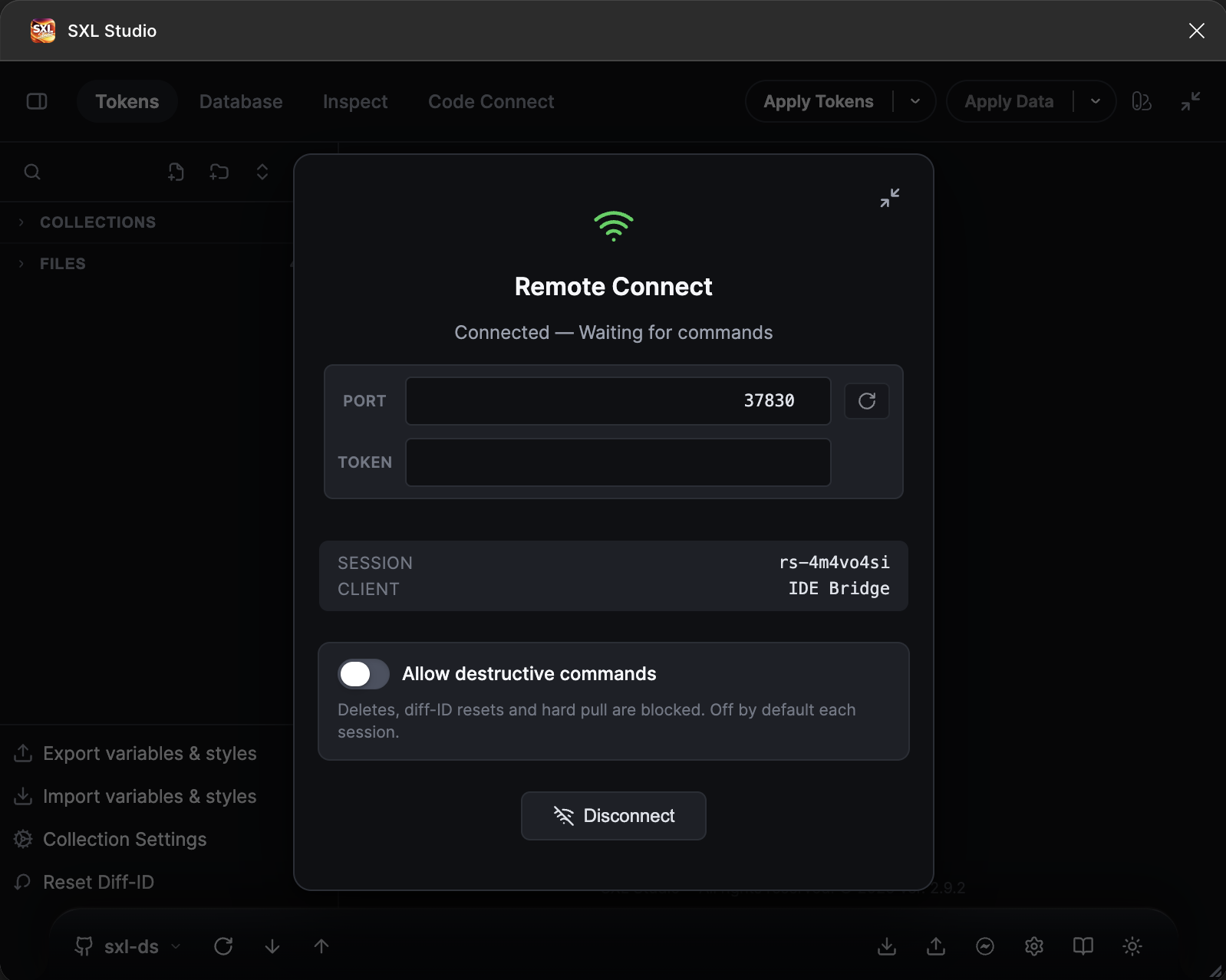
  3. Включите Remote Connect в плагине.
  4. Держите Bridge запущенным на время выполнения команд.

Git Sync Local Storage — исключение: он использует HTTP endpoints Bridge (/api/status, /api/workspace-blob) и не требует активной websocket-сессии Remote Connect.

Установка и запуск

npm (рекомендуется)

BASH
npm install -g @sxl-studio/bridge
sxl-bridge

Обновление до последней совместимой версии (1.8.9 для SXL Studio Plugin 2.8.1):

BASH
npm install -g @sxl-studio/bridge@latest

После обновления перезапустите Bridge: закройте старый процесс и снова выполните sxl-bridge — работающий процесс держит прежнюю версию в памяти. Проверка версии: при запуске Bridge печатает её в консоль, либо выполните curl http://127.0.0.1:37830/api/workspace-path — у 1.8.0+ вернётся JSON с полем root.

Из монорепозитория

BASH
cd Utils/bridge
npm install
npm run build
npm start

По умолчанию Bridge работает на порту 37830.

BASH
BRIDGE_PORT=38000 sxl-bridge

Если используете нестандартный порт, укажите это же значение в overlay Remote Connect плагина SXL Studio и в URL вашего MCP-клиента.

Безопасный доступ (рекомендуется)

Чтобы защитить MCP, HTTP и plugin Remote Connect WebSocket endpoints, задайте общий секрет.

BRIDGE_AUTH_TOKEN не выдаётся Figma, GitHub, GitLab или SXL Studio. Это локальный общий секрет: пользователь генерирует его сам и указывает одно и то же значение в Bridge-клиентах.

BASH
node -e "console.log(require('crypto').randomBytes(32).toString('hex'))"
# или
openssl rand -hex 32

Запустите Bridge с полученным значением:

BASH
BRIDGE_AUTH_TOKEN=<generated_secret> sxl-bridge

Тогда HTTP/MCP клиенты должны передавать:

  • Authorization: Bearer <generated_secret>

Для live Remote Connect укажите это же значение в token-поле overlay Remote Connect плагина. Если включён Git Sync Local Storage, также укажите его в форме Sync в поле Bridge Auth Token. Если Bridge запущен без BRIDGE_AUTH_TOKEN, оставьте эти поля пустыми.

Опциональный Figma REST companion

Для read-only hosted context без активной plugin session запустите Bridge с Figma REST token:

BASH
FIGMA_TOKEN=figd_xxx npm start
# или OAuth/plan token через bearer auth
FIGMA_ACCESS_TOKEN=xxx FIGMA_AUTH_MODE=bearer npm start

Сначала вызовите figma_rest_diagnose или GET /api/figma-rest-diagnostics?checks=whoami,fileMetadata&fileKey=..., чтобы проверить token/auth/scopes/permissions без вывода токена. Затем используйте figma_rest_whoami, figma_rest_get_file_metadata, figma_rest_get_file_nodes, figma_rest_get_images, figma_rest_get_file_components, figma_rest_get_file_component_sets, figma_rest_get_file_styles, figma_rest_get_team_components, figma_rest_get_team_component_sets, figma_rest_get_team_styles, figma_rest_get_variables_local, figma_rest_get_variables_published и figma_rest_search_design_system для известных file/team REST reads. Для Figma MCP-style library discovery предпочитайте Bridge get_libraries и search_design_system: они объединяют enabled libraries активного файла с known REST file/team sources, если они настроены. Bridge по-прежнему не создаёт новые файлы и не выполняет FigJam/Slides asset upload. Для Figma Design asset insertion используйте Bridge upload_assets с активной Remote Connect session.

Для библиотек, уже включённых в открытом Figma-файле, get_libraries и search_design_system являются основными agent-facing tools. Используйте search_enabled_library_assets для низкоуровневого enabled-library search, inspect_enabled_libraries для raw enabled descriptors, а list_enabled_library_variables — для переменных конкретной enabled collection. Figma Plugin API не умеет включать библиотеки из кода; Bridge сообщает это ограничение в ответах compatibility tools.

Для screenshots или rendered node images используйте get_screenshot. mode: "plugin-svg" возвращает inline SVG из active-file nodes или текущего selection через Remote Connect. mode: "rest-image" возвращает Figma-hosted PNG/JPG/SVG/PDF URLs для известных fileKey/url + nodeIds через REST Images endpoint.

Для metadata используйте get_metadata. mode: "plugin" возвращает active-file selection/page structure или node tree metadata через Remote Connect. mode: "rest" возвращает hosted file metadata или node metadata для известных fileKey/url и optional nodeIds.

Для active-file design context используйте get_design_context. Он собирает SXL codegen/composition JSON, sparse metadata, native variable/style definitions, optional SVG screenshot и optional local Code Connect suggestions для текущего selection или переданных node ids. Это соответствует intent official MCP get_design_context как structured starting point для агента; это не final production code.

Для Code Connect template/binding context используйте get_context_for_code_connect. Он собирает SXL registry/settings, selection status, existing bindings, SXL codegen/composition context, component discovery с props и local source-file suggestions. Он закрывает active-file/local-codebase часть official MCP workflow get_context_for_code_connect; hosted remote-only context остаётся companion scope official Figma MCP.

Для генерации .figma.ts Code Connect template используйте generate_code_connect_template. Он принимает полный SXL CodeConnectBinding или local targets/component names, по умолчанию возвращает dry-run content/path и пишет файл только при явном writeFile: true. Держите includePropertyAttrs выключенным, пока не проверили, что имена Figma properties совпадают с props code component.

Для variable/style definitions используйте get_variable_defs. mode: "selection" — official-MCP-style route для variables/styles, используемых в текущем Figma Design selection; он читает native boundVariables, text segment bindings, style ids и resolved variable/style definitions через Remote Connect, затем добавляет SXL applied-token metadata как compatibility context. mode: "local" читает active-file local variables/styles; mode: "enabled-libraries" читает variables из libraries, уже enabled в открытом файле; mode: "rest" читает known-file REST variable endpoints.

Font preflight для migration workflow

Перед migration, rebind, detach или repair-сценариями, которые могут менять текстовые слои, используйте migration_font_preflight.

Figma Plugin API требует загрузить точный шрифт текстового слоя до любого изменения этого слоя. При этом шрифт может быть виден в интерфейсе Figma, но быть недоступным для figma.loadFontAsync() в текущем plugin runtime. Поэтому Bridge даёт read-only preflight: он сканирует текстовые слои, группирует точные пары { family, style }, пробует загрузить их и возвращает отчёт, какие текстовые слои будут заблокированы.

Пример payload:

JSON
{
  "scope": "selection",
  "sampleLimit": 20
}

Доступные scope: selection, currentPage, allPages и node (для node обязателен nodeId).

Ответ содержит:

  • availableFontsCount
  • requiredFonts
  • missingFamilies
  • loadFailures
  • textNodesBlocked
  • sampleNodeIds
  • affectedPages
  • requiredAction

Если точный шрифт не загружается, SXL Studio не подставляет похожую семью автоматически. Например, SF Pro Display Regular не заменяется на SF Pro Regular, пока будущий workflow явно не получит пользовательский mapping. Безопасное действие: включить или загрузить точный shared font для файла/пользователя, перезагрузить Figma-файл, перезапустить SXL Studio и повторить preflight.

После успешного font preflight агенты могут использовать migration-команды через runtime SXL Studio plugin:

  • migration_text_variable_bindings — typography variables на text ranges (fontFamily, fontSize, fontWeight, lineHeight, letterSpacing, paragraph fields).
  • migration_text_fill_bindings — text fill color variables на text ranges.

Сначала запускайте dryRun: true, проверяйте affectedTextNodes, affectedRanges или affectedSegments, rebindCount, detachCount, skippedCount, leftoverCount, errors, leftovers и samples, и только потом повторяйте с dryRun: false для подтверждённых mappings. Результат применения дополнительно проверяется: команда не считается успешной, пока старые alias остаются на диапазонах. Typography migration также возвращает rangeResults со снимками bindings до/после. Text fill migration возвращает partial, changed, failed и skipped, чтобы агент видел прерванные проходы по instance sublayers/table cells и мог безопасно продолжить. Для больших файлов используйте maxTextNodes или maxNodesPerChunk и продолжайте, пока в ответе есть continueCursor.

Пример dry-run:

JSON
{
  "scope": "page",
  "dryRun": true,
  "mappings": [
    {
      "kind": "variable",
      "fromId": "VariableID:old",
      "fromName": "Projects/ff/label",
      "toId": "VariableID:new",
      "toName": "Projects/ff/label"
    }
  ],
  "sampleLimit": 20
}

Команда меняет только variable bindings. Она не меняет текст, font names, raw typography values и не создаёт отсутствующие переменные. Чтобы осознанно отвязать legacy binding и оставить raw formatting, используйте toId: "__SXL_GHOST_DETACH_RAW__" только после dry-run.

Для файлов, мигрированных между variable collections, используйте migration_explicit_modes_audit, чтобы найти page-level explicit mode references на отсутствующие collections и увидеть оставшиеся live collection refs. Если нужна очистка, сначала запустите migration_clear_orphan_explicit_modes с dryRun: true. Cleanup использует live collection objects там, где Figma их отдаёт. Если Figma отвергает очистку missing collection id, Bridge возвращает unsupportedByFigmaApi, manualFallbackRequired, manualSteps и unsupportedMissingCollectionRefs, а не ложный success. После ручной очистки повторите audit и продолжайте только когда missingCollectionRefs равен 0.

Подключение AI-клиента (MCP)

Любой AI-клиент с поддержкой MCP, установленный на том же компьютере, что и Bridge, может вызывать инструменты Bridge и читать/управлять открытым Figma-файлом — пока Bridge запущен, а в плагине включён Remote Connect. Каждому клиенту нужен только endpoint Bridge MCP: http://127.0.0.1:37830/mcp.

Cursor.cursor/mcp.json:

JSON
{ "mcpServers": { "sxl-studio": { "url": "http://127.0.0.1:37830/mcp" } } }

Claude Desktopclaude_desktop_config.json (проксируем HTTP-endpoint через mcp-remote):

JSON
{ "mcpServers": { "sxl-studio": { "command": "npx", "args": ["-y", "mcp-remote", "http://127.0.0.1:37830/mcp"] } } }

Codex CLI~/.codex/config.toml:

TOML
[mcp_servers.sxl-studio]
command = "npx"
args = ["-y", "mcp-remote", "http://127.0.0.1:37830/mcp"]

Если задан BRIDGE_AUTH_TOKEN, добавьте заголовок Authorization: Bearer <token> (для URL-клиентов) или передайте --header в mcp-remote, и укажите тот же токен в overlay Remote Connect плагина.

После сохранения конфига: перезапустите MCP-сессию клиента, убедитесь, что Bridge запущен, и что в плагине включён Remote Connect.

Проверка подключения

Быстрая проверка статуса:

BASH
curl http://127.0.0.1:37830/api/status

Ответ включает поля подключения/сессии, runtime.health (ready, busy, degraded или disconnected), actionable runtime.issues, sanitized snapshot очереди и telemetry счетчики/метаданные последней ошибки без значений payload.

Проверка каталога команд:

BASH
curl http://127.0.0.1:37830/api/tools

Для MCP-клиентов используйте list_tools, чтобы получить актуальный список команд.

Операционный контракт для AI-агента

Если вы даёте эту страницу AI-агенту, агент должен воспринимать Bridge как контролируемый слой управления SXL Studio, а не как универсальный раннер произвольных скриптов. Безопасный порядок работы:

  1. Проверить live-состояние через get_bridge_runtime_summary или GET /api/runtime-summary.
  2. Если задача требует открытый Figma-файл, а summary показывает, что Remote Connect не подключён, остановиться и попросить оператора открыть SXL Studio в Figma и включить Remote Connect. Не имитировать live-результат.
  3. Для natural-language запросов вызвать route_intent, затем plan_workflow, затем preview_workflow до write-команд.
  4. Для создания дизайна сначала изучить дизайн-систему через inspect_design_system; затем выполнить validate_screen_spec; затем запустить build_screen или update_screen с dryRun: true; только после этого применять изменения.
  5. Для token export сначала выполнить preview_export_variables, затем export_variables. Разрушающие export-опции требуют явный confirmDestructive: true; delete/reset-класс Remote Connect команд может дополнительно требовать, чтобы пользователь включил Allow destructive commands в overlay плагина для текущей сессии.
  6. Для документации в Figma использовать apply_doc_spec, build_component_doc, build_doc_flow, bind_variable_palette или build_scenario_from_md. Не писать composition JSON вручную и не строить ad hoc canvas scripts, если есть thick command Bridge.
  7. Для больших сканов сначала запрашивать summaries и переходить к paginated detail tools только по нужной части данных.
  8. После write-команд повторно запускать соответствующий read/audit и сообщать, что изменилось, что было пропущено и нужна ли визуальная проверка.

Критичные границы для агента:

  • Bridge ориентирован на Figma Design + active-file workflows SXL Studio.
  • Official Figma MCP остаётся companion для создания новых файлов, FigJam/Slides-специфичного редактирования, сгенерированных диаграмм и hosted-only Code Connect context.
  • Bridge умеет читать известные hosted Figma files через REST при настроенных FIGMA_TOKEN / FIGMA_ACCESS_TOKEN, но REST reads не заменяют Remote Connect для active canvas writes.
  • Git Sync Local Storage и /api/workspace-blob входят в публичный контракт Bridge. Они должны работать без активной Remote Connect websocket-сессии; если включён BRIDGE_AUTH_TOKEN, им нужен тот же bearer token, что и остальным /api/*.

Полезный официальный контекст: Figma описывает MCP server как agent interface для design context и write-to-canvas workflows, а также перечисляет несколько remote-only tools, включая create_new_file, generate_diagram, use_figma, get_libraries, search_design_system и upload_assets. Figma также публикует skills figma-use, figma-code-connect, figma-generate-library и figma-generate-design. Bridge честно закрывает только те части, которые доступны через локальный plugin и SXL workflows, а остальное явно помечает как companion scope.

Официальные ссылки:

Быстрая карта intent routing

Намерение пользователяАгент начинает сЗатем использует
"Нарисуй/собери экран в Figma"route_intent, inspect_design_systemvalidate_screen_spec, build_screen dry-run, build_screen apply
"Обнови существующий экран"get_metadata или get_design_contextupdate_screen dry-run, затем apply
"Создай документацию в Figma"route_intent, sxl://agent/recipes/sxl-doc-builderapply_doc_spec, build_component_doc, build_doc_flow, build_scenario_from_md
"Экспортируй variables/styles"preview_export_variablesexport_variables с явными опциями
"Найди raw values без переменных"audit_variable_coverage / audit_style_coveragefind_*_coverage_misses, затем dry-run apply suggestions
"Проанализируй usage компонентов или props"analyze_component_usage / analyze_component_prop_usagefind_component_usages / find_component_prop_usages
"Сгенерируй/примени compositions"compose_from_url или list_composition_filesbulk_generate_compositions, audit_composition_drift
"Свяжи Figma-компоненты с кодом"get_context_for_code_connectget_code_connect_suggestions, generate_code_connect_template, codeconnect_save_binding
"Работай с datasets/assets/mappings"list_datasets, list_assets, list_mappingssave/delete с dryRun, import/export payloads, mapping dry-runs
"Используй локальное хранилище репозитория"Git Sync settings + Local Storage/api/workspace-blob, git_pull, git_push

Паттерн raw HTTP command

MCP-клиентам лучше использовать MCP tools. HTTP-клиенты могут обращаться к /api/command напрямую:

BASH
curl -s -X POST http://127.0.0.1:37830/api/command \
  -H 'Content-Type: application/json' \
  -H 'Idempotency-Key: export-preview-001' \
  -d '{
    "commandType": "preview_export_variables",
    "payload": {
      "settings": {
        "dryRun": true
      }
    }
  }'

Если включён BRIDGE_AUTH_TOKEN, добавьте Authorization: Bearer <token>. Write-команды возвращают normalized envelope с command id, status, result и typed errors, где это возможно. Для повторов из скриптов и агентов используйте Idempotency-Key.

Для короткого start-here гайда вызывайте get_operator_runbook, подключайте sxl://agent/operator-runbook или используйте prompt sxl-operator. HTTP-клиенты могут использовать GET /api/operator-runbook. Он маппит типовые RU/EN запросы на нужный SXL workflow, ресурсы, preferred tools, dry-run gates, done criteria и handoff в official Figma MCP companion scope.

Для широких natural-language запросов сначала вызывайте route_intent. Он возвращает ranked SXL recipes, preferred tools, dryRunFirst и schema resources, например sxl://agent/schemas/design-dsl-v1, sxl://agent/schemas/doc-spec-v2, sxl://agent/schemas/code-connect-context-v1 или sxl://agent/schemas/code-connect-template-v1.

Для многошаговых задач вызывайте plan_workflow, затем проверяйте предложенную последовательность tools через preview_workflow до write-команд. Preview покажет unknown tools, пропущенные или misordered status checks, discovery дизайн-системы, dry-run gates, preflight tools из preferredAfter, и guard-шаги, которые стоят после write-команды вместо того, чтобы защищать ее.

Для token export сначала запускайте preview_export_variables, затем export_variables. Для Figma Design library discovery/search используйте Bridge get_libraries / search_design_system. Для official Figma MCP companion scope вроде создания нового файла, FigJam/Slides, диаграмм или hosted Code Connect repository context планировщик добавляет явный handoff step; не используйте Bridge write tools, если пользователь не сузил задачу обратно до SXL/active-file Figma Design.

Для больших workflow сначала вызывайте get_capability_matrix. HTTP-клиенты могут использовать эквивалентный endpoint:

BASH
curl http://127.0.0.1:37830/api/capabilities

Он возвращает тот же каталог с execution metadata (plugin, bridge-orchestration, bridge-local), точными pluginCommandTypes, aliases, natural-language intents, dryRunSupported, returnsLargeData, подсказками порядка вызова и Bridge timeouts.

Чтобы сравнить Bridge с official Figma MCP tools, используйте:

BASH
curl http://127.0.0.1:37830/api/figma-mcp-parity

MCP-клиенты могут вызвать get_figma_mcp_parity или подключить sxl://agent/figma-mcp-parity. Matrix помечает каждый official Figma MCP tool как covered by Bridge/SXL, companion-required, future scope или unsupported by plugin API. Bridge plugin tools закрывают enabled-library search и active-file metadata в открытом файле. Bridge REST tools закрывают authenticated whoami и known file/team library reads, если настроен Figma REST token. get_libraries / search_design_system дают Figma MCP-compatible Figma Design library discovery/search по active-file и known REST sources. get_design_context закрывает active-file SXL-native design context. get_metadata закрывает hosted file/node metadata. get_variable_defs закрывает selection/local/enabled-library/known-file variable definitions. get_screenshot закрывает active-file SVG и known-node REST image rendering. Bridge upload_assets закрывает Figma Design image insertion из URL/base64 с dry-run и лимитом 10MB на asset. get_context_for_code_connect закрывает active-file Code Connect context, generate_code_connect_template генерирует dry-run-first local .figma.ts templates, а get_code_connect_suggestions закрывает локальный поиск кандидатов перед codeconnect_save_binding. Remote-only hosted capabilities вроде создания нового файла, hosted Code Connect repository context и FigJam/Slides asset upload всё ещё требуют official Figma MCP как companion.

Для skill-level routing используйте:

BASH
curl http://127.0.0.1:37830/api/figma-mcp-skills-parity

MCP-клиенты могут вызвать get_figma_mcp_skills_parity или подключить sxl://agent/figma-mcp-skills-parity. Matrix маппит текущие official Figma MCP skills figma-use, figma-use-figjam, figma-use-slides, figma-swiftui, figma-code-connect, figma-create-new-file, figma-generate-diagram, figma-generate-library и figma-generate-design на SXL recipes/resources/tools, companion scope или agent-side работу с кодовой базой.

route_intent и plan_workflow понимают текущие official skills и legacy/client aliases. FigJam, Slides, new-file и diagram skills маршрутизируются в official Figma MCP companion. figma-swiftui использует Bridge для active-file design context и Code Connect hints, затем агент правит Swift-код. Старые aliases остаются поддержаны: figma-implement-design маршрутизируется в sxl-implement-design, figma-create-design-system-rules — в sxl-generate-library, а figma-code-connect-components — в sxl-code-connect.

Для чувствительных к производительности workflow используйте performance profile Bridge:

BASH
curl http://127.0.0.1:37830/api/performance-profile

MCP-клиенты могут вызвать get_performance_profile или подключить sxl://agent/performance-profile. Он помечает local, summary, paginated-detail, write-preview и long-running команды, отдаёт целевые бюджеты и подсвечивает large-data, dry-run-first и destructive-write риски. Используйте его перед широкими сканами, генерацией экранов, bulk export/apply или отладкой медленных workflow.

Для operational preflight вызывайте get_operator_runbook как start-here workflow chooser, затем get_bridge_runtime_summary перед live-работой. HTTP-клиенты могут использовать:

BASH
curl http://127.0.0.1:37830/api/operator-runbook
curl http://127.0.0.1:37830/api/runtime-summary

Runbook выбирает workflow, tools, dry-run gates и companion handoff. Runtime summary показывает plugin connection, current/queued commands, recent event/audit failures, auth state, MCP URL и рекомендации, чтобы агент понял: продолжать, ждать, смотреть логи или попросить оператора открыть Remote Connect.

Для release/readiness оценки вызывайте get_ultimate_readiness или:

BASH
curl http://127.0.0.1:37830/api/ultimate-readiness

Локальный оператор может запустить тот же аудит без запущенного Bridge server:

BASH
cd Utils/bridge
npm run readiness
sxl-bridge-readiness --json

Он раскладывает Ultimate Bridge plan на requirement rows: contract surface, SXL skills, Design DSL, analytics, database, variables/styles, compositions, docs, Code Connect, production safety, official Figma MCP tool parity и official Figma MCP skill parity. Contract row включает Remote Connect whitelist и handler-path evidence при доступном исходнике плагина. Companion/future scope для Figma MCP остаётся явным. Добавьте --runtime, чтобы рядом с local readiness получить доказательство running Bridge HTTP/MCP surface; добавьте --require-live, когда release sign-off должен падать без активной Remote Connect сессии плагина и успешной live validation.

Tools с returnsLargeData поддерживают bridgeResponseMode. Используйте summary, чтобы сначала получить counts, preview и pagination hints; auto оставляет budget-aware поведение по умолчанию; full используйте только когда нужен точный полный payload. Bridge удаляет эти control fields перед отправкой команды в плагин, а raw HTTP /api/command остаётся fallback для exact result.

В Bridge также есть destructive confirmation gate. Команды delete_*, remove_*, reset_*, git_hard_pull, detach_instance, flatten_nodes, boolean_operation и export_variables с deleteOrphans или allowDestructiveReorder требуют top-level confirmDestructive: true. Если доступен dry-run/preview, сначала запускайте его; перед token export используйте preview_export_variables, чтобы без изменений в Figma увидеть exact settings payload, effective plugin defaults, risk flags и required confirmation. Bridge удаляет confirmDestructive и destructiveReason перед отправкой payload в плагин.

Plugin 2.6+ добавляет второй, пользовательский gate для delete/reset-класса Remote Connect команд. Команды delete_*, batch_delete_variables, remove_variable_mode, reset_diff* и git_hard_pull остаются заблокированными, пока пользователь не включит Allow destructive commands в overlay Remote Connect плагина. confirmDestructive не обходит этот plugin-gate. Если команда падает с blocked by session policy, включите toggle в overlay и повторите команду.

Bridge сохраняет sanitized command audit log на диск. Используйте get_bridge_audit_log или:

BASH
curl http://127.0.0.1:37830/api/log?source=disk

Корень по умолчанию — OS cache directory из env-paths внутри sxl-studio-bridge/audit; его можно переопределить через SXL_BRIDGE_AUDIT_ROOT. Audit entries содержат ids, command type, status, timings, имена payload keys и idempotency keys, но никогда не сохраняют значения payload.

Для release-проверок или подключения нового агента/клиента запускайте contract audit Bridge:

BASH
curl http://127.0.0.1:37830/api/contract-audit

MCP-клиенты могут вызвать get_contract_audit. Он проверяет обязательные meta tools, ссылки recipes, schema entrypoints, workflow gates, объявления plugin commands, покрытие Remote Connect whitelist и handler-path coverage при доступном исходнике плагина, а также timeouts. status: "fail" считается блокирующим.

Для CLI-проверок используйте health gate Bridge:

BASH
# локальный contract gate; запущенный сервер не нужен
npm run bridge:check

# локальная проверка agent routing/planning/preview; Figma-сессия не нужна
cd Utils/bridge
npm run workflow:agent

# локальный Ultimate Bridge requirement audit; запущенный сервер не нужен
npm run readiness

# local readiness + running Bridge HTTP/MCP proof
npm run bridge:readiness:runtime
sxl-bridge-readiness --runtime

# строгий Figma E2E proof; требует активный Remote Connect
npm run bridge:readiness:live
sxl-bridge-readiness --runtime --require-live --suite all

# runtime HTTP + MCP smoke против запущенного Bridge
npm run health:runtime

# требовать живую Remote Connect сессию плагина
node dist/bridge-health-cli.js --runtime --require-plugin

# live workflow smoke через Remote Connect: status -> get_plugin_status -> find_components -> build_mockup dryRun
npm run workflow:smoke

# расширенная non-destructive live validation: baseline reads + Design DSL dryRun
npm run workflow:validate

# явная write-path проверка: создать tiny frame, проверить rootNodeId, удалить его
sxl-bridge-live --suite all --write-canary --cleanup

workflow:agent локально валидирует representative RU/EN requests через route_intent, plan_workflow и preview_workflow. Он ловит stale routing, missing preflight dependencies, unsafe generated plans и read-only intents, которые случайно планируют write tools. readiness печатает тот же Ultimate Bridge requirement audit локально без запущенного сервера. health:local включает тот же agent workflow gate плюс Ultimate Bridge readiness audit. Здоровая сборка возвращает PASS; WARN нужно разбирать перед релизом, а explicit companion/future scope выводится отдельно в readiness.

health:runtime проверяет /mcp initialize/session/tools-list/tools-call (get_libraries + search_design_system zero-config envelopes, get_operator_runbook, list_tools, validate_screen_spec, preview_export_variables, get_figma_mcp_skills_parity и plan_workflow для Figma Design library discovery routing), resources-list/resources-read для runtime-summary + operator-runbook + figma-mcp-skills-parity, prompts-list/prompts-get для sxl-operator + sxl-generate-design и REST runtime endpoints, включая /api/operator-runbook. Для readiness/performance endpoints проверяется не только shape, но и status: runtime fail блокирует gate, runtime warn выводится как предупреждение. Активная сессия плагина не нужна, пока не передан --require-plugin.

workflow:smoke требует запущенный Bridge и активную Remote Connect сессию плагина SXL Studio. По умолчанию он не меняет canvas; sxl-bridge-smoke --apply создаёт небольшой smoke-frame только при явном opt-in и если Figma возвращает writesAllowed=true. sxl-bridge-smoke --apply --cleanup удаляет rootNodeId, который вернул этот же apply step, поэтому canary доказывает create/delete доступ и не оставляет frame в файле.

workflow:validate также требует активную Remote Connect сессию. Baseline suite проверяет Bridge status, /mcp initialize/session/tools-list/tools-call (get_libraries + search_design_system zero-config envelopes, get_operator_runbook, list_tools, validate_screen_spec, preview_export_variables, get_figma_mcp_skills_parity и plan_workflow для Figma Design library discovery routing), resources-list/resources-read для runtime-summary + operator-runbook + figma-mcp-skills-parity, prompts-list/prompts-get для sxl-operator + sxl-generate-design, ultimate readiness, performance profile, operator runbook, tool catalogue, чтение tokens/config, чтение variables/styles, discovery компонентов и Design DSL dry-run. Readiness/performance status enforced: fail валит suite, warn выводится как предупреждение. sxl-bridge validate --suite all дополнительно проверяет Code Connect registry/settings/selection status, selection variable definitions, dry-run генерацию .figma.ts template, database list commands, database payload export плюс import dry-run, variable/style spec dry-runs, dedupe dry-runs, variable/style coverage summary и paginated detail, variable/style coverage dry-run apply previews, unused variable/style scans, composition list плюс bulk dry-run и drift audit, component usage summary/detail pagination, component prop usage summary/detail pagination и Doc Builder build_doc_flow dry-run. Добавляйте --write-canary --cleanup только с явным operator approval; этот режим создаёт tiny validation frame, проверяет returned rootNodeId, затем удаляет этот же node.

Live diagnostics очереди:

BASH
curl http://127.0.0.1:37830/api/queue

Endpoint возвращает current, queued и immediate команды с ids, status, timings и payloadKeys. Значения payload не раскрываются.

Timeline событий команд:

BASH
curl http://127.0.0.1:37830/api/events?limit=100
curl http://127.0.0.1:37830/api/events?commandId=<command-id>

Endpoint возвращает sanitized lifecycle/progress events (queued, started, completed/failed, timeout/cancel и plugin progress events). Значения не раскрываются; доступны только ids, status, timings, payloadKeys и detailKeys.

Persisted audit после рестарта:

BASH
curl http://127.0.0.1:37830/api/log?source=disk&limit=50

Основные рабочие сценарии

1) Tokens и styles

Через Bridge можно:

  • экспортировать variables/styles;
  • повторно применять token bindings;
  • управлять token-файлами и config в workspace;
  • запускать cross-file sync действия.

preview_export_variables — read-only preflight для export modes. Он возвращает exact export_variables payload, effective plugin defaults, risk flags и признак required destructive confirmation. export_variables использует безопасные defaults плагина: не применяет code syntax/scopes, не делает force-update всего, не удаляет orphans и не запускает destructive reorder, если эти опции не переданы явно.

Результат export — это реальный результат Plugin: Bridge не заменяет counts, warnings, errors и отчёт по partial modes общим сообщением об успехе. Отсутствующие mode-ячейки обрабатываются в том же недеструктивном запуске: существующие значения Figma не меняются, новые назначения сохраняют созданные Figma значения, а orphan cleanup/destructive reorder отключаются. get_export_report возвращает последний ручной, автоматический или Remote Connect результат; до первого export ответ содержит available: false.

Стартовые команды:

  • list_token_files
  • get_token_file_content
  • save_token_file
  • save_tokens_config
  • preview_export_variables
  • export_variables
  • get_export_report

2) Composition-сценарии

Через Bridge можно:

  • экспортировать composition JSON из выделения;
  • генерировать/применять/превьюить композиции;
  • проверять composition drift;
  • запускать bulk-операции по композициям.

Стартовые команды:

  • export_composition_json
  • generate_composition
  • apply_composition
  • bulk_generate_compositions
  • audit_composition_drift

Bridge использует тот же оптимизированный pipeline Generate / Apply для Composition, что и UI плагина. Для больших библиотек передавайте явный список файлов в bulk_generate_compositions, держите Remote Connect открытым до завершения операции и проверяйте результат через audit_composition_drift.

Для тяжелых Figma-файлов или запусков с десятками композиций используйте chunked bulk generation:

JSON
{
  "operation": "generate",
  "fileIds": ["button-primary-sm", "button-primary-md"],
  "chunkSize": 12,
  "pauseBetweenChunksMs": 300
}

chunkSize позволяет Bridge выполнять тот же bulk-запрос небольшими возобновляемыми партиями, а не отправлять весь canvas-run одной длинной командой в плагин. Для больших component libraries хороший стартовый размер — 10-15. Bridge возвращает progress по чанкам, следующий cursor и target hash, поэтому агент может безопасно продолжить работу, если оператору нужно переоткрыть Figma или Remote Connect.

3) Codegen-сценарии (паритет с Dev Mode)

get_codegen даёт тот же класс output, что и SXL Studio в Dev Mode:

  • designer-json
  • vue3
  • swiftui
  • kotlin
  • divkit (generic DivKit JSON card)

4) Design и документация

Bridge отдаёт SXL agent skill resources:

  • sxl://agent/operator-runbook
  • sxl://agent/recipes/sxl-use
  • sxl://agent/recipes/sxl-implement-design
  • sxl://agent/recipes/sxl-generate-design
  • sxl://agent/recipes/sxl-generate-library
  • sxl://agent/recipes/sxl-code-connect
  • sxl://agent/recipes/sxl-audit
  • sxl://agent/recipes/sxl-doc-builder
  • sxl://agent/recipes/sxl-data-apply-mapping
  • sxl://agent/recipes/sxl-data-apply-all
  • sxl://agent/recipes/sxl-data-generate-instances
  • sxl://agent/recipes/sxl-database-transfer
  • sxl://agent/recipes/figma-mcp-companion
  • sxl://agent/schemas/code-connect-context-v1
  • sxl://agent/schemas/code-connect-template-v1
  • sxl://agent/figma-mcp-parity
  • sxl://agent/figma-mcp-skills-parity
  • sxl://agent/performance-profile
  • sxl://agent/runtime-summary
  • sxl://agent/ultimate-readiness

MCP-клиенты с поддержкой prompts также могут использовать prompts/list / prompts/get для sxl-operator, sxl-router, sxl-use, sxl-implement-design, sxl-generate-design, sxl-generate-library, sxl-code-connect, sxl-audit, sxl-doc-builder и figma-mcp-companion. Prompts возвращают тот же SXL skill intent как actionable instructions: preferred tools, resources, dry-run gates и done criteria. Используйте figma-mcp-companion, когда route_intent определяет remote-only scope official Figma MCP: создание нового файла, FigJam/Slides или диаграммы; для Figma Design library discovery используйте Bridge get_libraries / search_design_system.

Для сборки или обновления editable Figma-экранов из существующих компонентов используйте inspect_design_system, validate_screen_spec, build_screen и update_screen. Для документации в Figma используйте apply_doc_spec, build_component_doc, build_doc_flow, bind_variable_palette и build_scenario_from_md. build_doc_flow принимает страницы с nodeId или compositionFileId; composition-страницы проходят через существующий composition pipeline и рендерятся во flow как instance или clone.

5) CRUD Variables и локальных styles

Bridge поддерживает полный цикл для:

  • variable collections, modes, values, scopes, code syntax;
  • локальных paint/text/effect styles;
  • назначения styles и import-by-key;
  • bulk import/dedupe/rebind/audit-потоков.

6) Audit, analytics и coverage

Bridge поддерживает read-first аудит:

  • usage и coverage для variables;
  • style coverage и drift;
  • поиск неиспользуемых variables/styles;
  • component usage и component prop usage analytics;
  • сценарии применения рекомендаций (сначала dry-run).

Coverage audit recipes работают read-only. Если пользователь просит исправить findings, переключайтесь на apply_coverage_suggestions / apply_style_coverage_suggestions и сначала запускайте preview mode.

7) Code Connect и database

Bridge отдаёт Code Connect settings, registry, node UI status, active-file Code Connect context (get_context_for_code_connect), dry-run-first генерацию .figma.ts templates (generate_code_connect_template), локальные suggestions по source files, а также чтение/сохранение полных binding payloads: docs URL, files, Storybook metadata и status component API.

Database tools умеют list/get/save/delete для datasets, assets и mappings. Save/delete команды поддерживают dryRun preview до изменения состояния плагина. export_database_payload собирает переносимый backup/transfer payload через существующие CRUD reads; asset content не включается, пока явно не передан includeAssetContent=true. import_database_payload по умолчанию работает как dryRun, показывает конфликты существующих IDs и требует confirmDestructive=true плюс причину перед перезаписью datasets, assets или mappings. Mapping write tools (apply_mapping, apply_all_mappings, generate_instances) тоже поддерживают dryRun previews, чтобы агент мог проверить mappings, target counts и row estimates перед записью. Apply/count/generate workflows принимают явные targetNodeIds как deterministic selection roots; без них Bridge использует текущую selection или scope.

8) Git Sync

Через Bridge можно вызывать git-действия, используемые в SXL Studio:

  • git_pull
  • git_hard_pull
  • git_push

Local Storage для крупных Git Sync проектов

Для средних и крупных наборов данных включайте Local Storage в настройке Git Sync.

Так большие синхронизируемые данные сохраняются на диск через Bridge и стабильность выше для больших workspace. Перед Pull плагин проверяет GET /api/status, а затем читает/пишет payload конкретного workspace через /api/workspace-blob.

Если задан BRIDGE_AUTH_TOKEN, заполните Bridge Auth Token в этом же Sync-подключении. Используйте тот же сгенерированный секрет, с которым запущен Bridge, а не Git provider token и не Figma REST token. Для Local Storage не нужна отдельная websocket-сессия Remote Connect, но Bridge должен быть доступен на localhost.

Используйте SXL_BRIDGE_WORKSPACE_BLOB_ROOT, если нужно перенести директорию blob-хранилища. Если Pull остановился с предупреждением Local Storage, проверьте, что Bridge запущен на той же машине, что и Figma, порт совпадает, а auth token указан одинаково.

Пользовательский обзор: Git — интеграция

Поведение в Dev Mode

В Figma Dev Mode:

  • read и file-сценарии доступны;
  • прямые canvas-write операции могут ограничиваться контекстом Figma;
  • token/config/git file workflows остаются доступны при валидном соединении.

Если write-действие заблокировано режимом, выполните его в Design Mode.

Категории команд (практическая карта)

Каталог команд Bridge большой и развивается. Используйте таблицу как карту, а точный актуальный список берите через list_tools.

КатегорияТиповые задачи
diagnosticsстатус, проверка режима, summary выделения, summary drift
tokensCRUD token-файлов, обновление config, экспорт variables/styles, reapply bindings
compositionexport/generate/apply/preview/link-check композиции
codegenoutputs designer-json/vue3/swiftui/kotlin/divkit
variablesCRUD коллекций/режимов/значений/scopes/codeSyntax + batch
stylesCRUD локальных styles, назначение, import, drift-проверки
auditvariable/style usage coverage, component usage, prop analytics, unused assets, suggestion-потоки
mockupinspect дизайн-системы, validate/build/update экранов, генерация по dataset
datadatasets, assets, mappings, variable/style definition orchestration, enabled-library search/read tools, Code Connect registry/bindings/suggestions
canvasnode reads/writes, design context, screenshot/SVG export, selection, page structure
gitpull/push через настроенный sync

Рекомендуемая модель работы

  1. Начинайте с read/audit вызовов.
  2. Где доступно, сначала запускайте dry-run.
  3. После проверки применяйте write-действия.
  4. Храните token и composition JSON в git.
  5. После изменений повторно запускайте audit.

Устранение проблем

Bridge запущен, но команды не выполняются

  • Проверьте, что в плагине включён Remote Connect.
  • Проверьте URL/порт в .cursor/mcp.json.
  • Если включён BRIDGE_AUTH_TOKEN, проверьте Authorization header для MCP/HTTP, token в overlay Remote Connect и поле Bridge Auth Token в Sync-подключении для Local Storage.

Unauthorized / forbidden

  • Несовпадает токен в Authorization header, overlay Remote Connect или поле Bridge Auth Token в Sync-подключении.
  • После изменения env-переменных перезапустите Bridge.

Команды видны, но canvas-write не проходит

  • Текущий контекст Figma может ограничивать запись в Dev Mode.
  • Повторите операцию в Design Mode.

Ошибки Git-операций

  • Проверьте валидность Sync-подключения в плагине.
  • Проверьте scopes токена провайдера и настройки пути репозитория.

Совместимость версий (короткое правило)

Сверяйте версии Bridge и плагина по release notes. Для релиза, описанного на этой странице, используйте точную пару:

SXL Studio PluginBridgeКонтракт
2.8.11.8.9Достоверный результат export_variables и get_export_report; без continuation и вводящей в заблуждение команды composition reapply.

Старый Bridge может не показывать новые инструменты, а старый Plugin — отклонять команду нового Bridge. reapply_compositions не публикуется в этой паре, потому что раньше эта команда фактически не выполняла Apply. Для одной композиции используйте apply_composition, для явного проверенного набора — bulk_generate_compositions с operation apply.

Практическое правило:

  • обновляйте Bridge и SXL Studio plugin в одном окне обслуживания;
  • после обновления запускайте list_tools, get_performance_profile, workflow:smoke и workflow:validate против живой Remote Connect сессии.

Промты для пользователя

Вы не вызываете инструменты вручную — вы описываете задачу на естественном языке, а AI-клиент сам выбирает нужные инструменты Bridge. В Bridge есть natural-language роутер (route_intent), который сопоставляет запросы на RU/EN с нужным рецептом и инструментами. Готовые промты:

ЦельПример промта
Экспорт токеновЭкспортируй мои токены в переменные и стили Figma — сначала preview, потом apply.
Сборка по URLСгенерируй composition из этого Figma URL <url> и примени его.
Аудит сырых значенийПроверь файл на сырые цвета, которые должны быть переменными, и покажи топ нарушителей.
ОчисткаНайди неиспользуемые переменные и стили в этом файле.
Сборка экранаСобери экран логина из компонентов моей дизайн-системы.
ДокументированиеЗадокументируй выбранный компонент: заголовок, матрицу вариантов и таблицу props.
Использование переменнойКакие ноды используют переменную color.brand.primary? Покажи использования.
Git round-tripСделай Pull токенов из Git, запусти export, затем Push моих изменений.

Рекомендация Для многошаговых или деструктивных задач просите агента сначала сделать preview / dry-run. У Bridge есть read-only превью (preview_export_variables, preview_composition, audit_*) и dryRun у write-инструментов — так вы проверяете результат до изменений в Figma.


Справочник команд (MCP-инструменты)

Bridge предоставляет 250+ MCP-инструментов по категориям. Каждый вызывается любым подключённым AI-клиентом (большинство мапится на одну команду плагина через Remote Connect). Read-only и dryRun-first инструменты безопасны для исследования; write-инструменты меняют Figma-файл.

Примечание Имена команд и краткие описания приведены на английском — это литеральные идентификаторы MCP-инструментов и их технические описания из кода (именно в таком виде их вызывает AI). Diagnostics (5)

CommandWhat it does
get_plugin_statusPlugin runtime status (editor, mode, selection, session).
is_dev_modeShortcut flag: true when figma.editorType === 'dev'.
get_selection_summarySummary of current Figma selection.
get_drift_statusDrift status across exported collections.
get_export_reportMost recent export report.

Tokens (19)

CommandWhat it does
list_token_filesIndex of token files (id, name, folder, gitPath).
get_token_file_contentRaw JSON body of a token file.
save_token_fileUpsert JSON content of a token file.
create_token_fileCreate a new token file.
delete_token_fileDelete a token file (queues gitPath removal if tracked).
move_token_fileRename/move a token file.
rename_token_fileRename a token file (alias of move_token_file).
get_tokens_configRead the plugin config.json content.
save_tokens_configOverwrite config.json.
get_applied_tokensApplied tokens + composition binding on a node.
apply_token_doc_specDoc Spec v1: bind token paths to TEXT layers by name (same as build_token_documentation).
preview_export_variablesREAD-ONLY preflight for export_variables: normalize exact settings payload, effective plugin-safe defaults, risks, and destructive confirmation requirement.
export_variablesRun variables/styles export with plugin-safe defaults unless flags are explicitly provided.
reset_diffReset all Diff-IDs.
reset_diff_collectionReset Diff-IDs for a collection.
reset_diff_fileReset Diff-IDs for a file.
reapply_token_bindingsRe-apply token bindings (scope: selection|page|document).
cross_file_sync_fetchFetch remote variables for cross-file sync.
cross_file_sync_applyApply cross-file sync entries.

Variables (25)

CommandWhat it does
get_variablesList local variable collections and variables.
get_variable_defsBridge orchestration for official-MCP-style variable/style definitions: selection-compatible applied token context plus local, enabled-library, or REST variable definition modes.
create_variable_collectionCreate a new variable collection.
create_variableCreate a new variable inside a collection.
bind_variableBind a variable to a node property.
rename_variableRename a variable.
delete_variableDelete a variable.
rename_variable_collectionRename a variable collection.
delete_variable_collectionDelete a variable collection.
add_variable_modeAdd a mode to a collection.
remove_variable_modeRemove a mode from a collection.
rename_variable_modeRename a mode.
set_variable_mode_valueSet variable value for a mode.
set_variable_scopesSet variable scopes.
set_variable_code_syntaxSet variable codeSyntax per platform.
batch_create_variablesCreate many variables in one collection with per-item errors.
batch_set_variable_valuesSet many variable mode values in one round-trip.
batch_delete_variablesDelete many variables with per-item errors.
batch_bind_variablesBind many nodes/properties to variables in one round-trip.
get_mode_contextRead SXL token mode preview context and mode inventory.
set_mode_preview_contextSet file-level SXL mode preview context.
apply_modes_to_selectionApply current SXL/native mode context to selected nodes.
apply_modes_to_parent_frameApply current SXL/native mode context to the nearest parent frame.
apply_modes_to_pageApply current SXL/native mode context to the current page.
clear_modes_from_selectionClear explicit modes from selected nodes.

Variables — bulk / orchestration (5)

CommandWhat it does
import_variable_specIdempotent bulk-create / update of Variables from a declarative spec (collections + modes + variables + aliases).
analyze_variable_orderREAD-ONLY: recommend a new order for variables in a collection (alphabetical / byPath / explicit).
dedupe_variablesFind / merge duplicate Variables (byName | byDefaultModeValue). Dry-run by default; canvas write only when apply: true.
rebind_variable_aliasesBulk rewrite alias targets across modes ({ fromVariableId, toVariableId }[]).
apply_coverage_suggestionsApply audit_variable_coverage suggestions as setBoundVariableFor* writes. Dry-run by default.

Styles (9)

CommandWhat it does
get_local_stylesList local paint/text/effect styles.
create_paint_styleCreate a local PaintStyle.
create_text_styleCreate a local TextStyle.
create_effect_styleCreate a local EffectStyle.
set_text_styleAssign a TextStyle to a node.
set_effect_styleAssign an EffectStyle to a node.
set_stroke_styleAssign a PaintStyle to a node stroke.
set_fill_styleAssign a PaintStyle to a node fill.
import_style_by_keyImport a published style by key.

Styles — bulk / orchestration (5)

CommandWhat it does
import_style_specIdempotent bulk-create / update of local Paint / Text / Effect styles from a declarative spec. Dry-run preview supported.
dedupe_stylesFind / merge duplicate styles (byName | bySignature). Dry-run by default; canvas write only when apply: true.
rebind_style_consumersBulk rewrite styleId on every consumer node ({ fromStyleId, toStyleId }[]). Dry-run aware.
audit_style_driftREAD-ONLY: detect drift between local Paint styles and same-named Variables / explicit expectations.
apply_style_coverage_suggestionsApply audit_style_coverage suggestions as setStyleId writes. Dry-run by default.

Compositions (12)

CommandWhat it does
export_composition_jsonSingle source of truth: composition JSON for a node.
get_codegenMirror Dev Mode Inspect→Code for any node.
get_codegen_settingsRead Dev Mode Codegen project settings from the current Figma file.
preview_codegen_settingsValidate Codegen settings without writing them.
save_codegen_settingsSave Dev Mode Codegen project settings after validation.
list_compositionsEnumerate composition files in workspace.
generate_compositionGenerate Figma component/set from composition JSON.
apply_compositionApply composition to an existing anchor.
preview_compositionPreview composition structure.
check_composition_linkedCheck if a composition is linked.
remap_composition_idRemap a composition id to a new anchor.
inspect_selectionInspect current selection.

Compositions — bulk (2)

CommandWhat it does
bulk_generate_compositionsBulk generate / apply many composition files. Filters by fileIds | names | prefix; per-item error isolation; dry-run preview supported. Use chunkSize for heavy Figma files so Bridge runs resumable short plugin commands.
audit_composition_driftREAD-ONLY drift detector between composition files and the Figma components they tracked (linked | unlinked | drift | missing).

Canvas & nodes (68)

CommandWhat it does
get_selectionCurrent selection with node ids.
set_selectionSelect nodes.
select_nodesSelect nodes (alias).
get_pagesList document pages.
set_current_pageChange current page.
get_node_infoBasic info about one node.
get_node_treeFull scene subtree.
get_node_reactionsRead normalized prototyping reactions from a node.
set_node_reactionsSet prototyping reactions on a node with diff preview.
clear_node_reactionsClear prototyping reactions from a node with diff preview.
audit_node_reactionsCompare expected reactions with live node reactions.
get_component_property_definitionsRead component property definitions for a component/set/instance.
set_instance_component_propertiesSet validated component property values on an instance/component.
audit_component_property_usageAudit instance component property values against definitions.
repair_component_property_valuesValidate and repair component property values with dry-run default.
get_page_structureSummary of current page structure.
get_design_contextBridge design-context orchestration: active-file SXL codegen/composition context, metadata, native variable/style definitions, optional screenshot, and optional Code Connect suggestions.
get_metadataBridge metadata orchestration: active-file selection/page/node tree metadata through plugin or file/node metadata through Figma REST.
read_node_propertiesRead canonical node properties.
find_nodesFind nodes by predicate.
list_componentsList local components.
list_available_fontsAvailable fonts (+ project text styles hint).
migration_font_preflightRead-only exact-font preflight before text migration/rebind workflows.
migration_text_variable_bindingsDry-run/apply TEXT range variable rebind/detach by explicit variable mappings.
migration_text_fill_bindingsDry-run/apply TEXT fill color variable rebind/detach by explicit variable mappings.
migration_explicit_modes_auditRead-only audit for page-level explicit variable modes that point to missing collections.
migration_clear_orphan_explicit_modesDry-run/apply best-effort clear for orphan page explicit variable modes; reports Figma API limits.
migration_replace_ghost_explicit_mode_pagesDry-run/apply clean PageNode replacement for missing explicit variable mode refs while preserving page children.
probe_motion_exportRead-only probe for Figma Motion runtime export support and Motion node metadata.
export_as_svgExport node(s) as SVG.
get_screenshotBridge screenshot/render orchestration: plugin inline SVG for active-file nodes or Figma REST image URLs for fileKey/nodeIds.
notifyFigma toast notification.
create_frameCreate a frame.
create_rectangleCreate a rectangle.
create_textCreate a text node.
create_ellipseCreate an ellipse.
create_lineCreate a line.
create_svg_nodeCreate a node from SVG string.
create_vectorCreate a vector node.
set_auto_layoutConfigure auto layout.
modify_nodeModify generic node properties.
set_node_textSet text on a text node.
set_node_propertySet arbitrary node property.
rename_nodeRename a node.
set_node_visibilityShow/hide node.
set_node_sizeResize a node.
set_node_fillSet solid fill.
set_node_fill_variableBind a variable as fill.
set_strokeSet stroke.
set_effectsSet effects array.
set_fillSet fills array.
set_image_fillSet image fill from bytes.
set_constraintsSet layout constraints.
style_text_rangeStyle a text range.
insert_dataInsert raw payload onto the page.
delete_nodeDelete one node.
delete_nodesDelete many nodes.
clone_nodeClone a node.
duplicate_subtreeDuplicate a subtree.
move_to_parentReparent a node.
create_componentCreate a component.
create_component_setCreate a component set.
create_component_instanceCreate an instance of a component.
detach_instanceDetach an instance.
import_component_by_keyImport a published component by key.
boolean_operationBoolean op on nodes.
flatten_nodesFlatten nodes.
apply_documentation_payloadApply SXL documentation payload.

Datasets, assets, mappings & Code Connect (36)

CommandWhat it does
list_datasetsList SXL datasets.
get_datasetGet one SXL dataset.
save_datasetCreate/update one SXL dataset.
delete_datasetDelete one SXL dataset.
list_assetsList SXL local assets.
get_assetGet one SXL asset; optional content.
save_assetCreate/update one SXL asset.
delete_assetDelete one SXL asset.
list_mappingsList SXL mappings.
get_mappingGet one SXL mapping.
save_mappingCreate/update one SXL mapping.
delete_mappingDelete one SXL mapping.
export_database_payloadBridge orchestration: export portable SXL datasets/assets/mappings payload via existing CRUD commands.
import_database_payloadBridge orchestration: dry-run-first import/upsert of portable SXL database payloads.
apply_mappingApply a mapping to explicit targetNodeIds or the current Figma selection. Dry-run preview supported.
apply_all_mappingsApply all mappings within a scope or explicit targetNodeIds. Dry-run preview supported.
count_apply_targetsCount mapping targets.
generate_instancesGenerate instances from mapping into explicit targetNodeIds or the current selection. Dry-run preview supported.
apply_imageApply an image asset.
upload_assetsBridge asset uploader: validate/fetch PNG, JPG/JPEG, GIF, or WebP assets up to 10MB and apply them as image fills via set_image_fill. Dry-run preview supported.
rebind_instanceRebind an instance to a new main.
codeconnect_get_bindingGet Code Connect binding for node.
codeconnect_save_bindingSave Code Connect binding.
codeconnect_get_selection_statusCode Connect status for selection.
codeconnect_get_registryCode Connect registry snapshot.
codeconnect_get_global_settingsGlobal Code Connect settings.
codeconnect_save_global_settingsSave global Code Connect settings.
codeconnect_get_node_ui_statusCode Connect node UI status.
get_context_for_code_connectBridge Code Connect context orchestration: selection status, existing SXL bindings, registry/settings, codegen/composition context, component discovery, and local source suggestions for template/binding generation.
get_code_connect_suggestionsBridge-local Code Connect suggestion engine: scan local code and rank full CodeConnectBinding candidates for selected Figma nodes before saving.
generate_code_connect_templateBridge-local .figma.ts Code Connect template generator from a full SXL CodeConnectBinding or local suggestions. Dry-run preview by default; writes only with writeFile=true.
inspect_enabled_librariesREAD-ONLY: inspect team libraries already enabled for the current Figma file (variable collections and runtime-optional component/style descriptors).
list_enabled_library_variablesREAD-ONLY: list variables from enabled team-library variable collections; requires an explicit collection/library filter or includeAllCollections=true.
search_enabled_library_assetsBridge orchestration: search components, styles, variable collections, and variables in libraries already enabled for the current Figma file.
get_librariesFigma MCP-compatible library discovery: active-file enabled libraries through Remote Connect plus known file/team libraries through Figma REST.
search_design_systemFigma MCP-compatible design-system search across active-file components, enabled libraries, and known file/team REST libraries.

Audit & analytics (13)

CommandWhat it does
analyze_variable_usageSummarise where a variable is used (counts, byProperty, aliasChain). Read-only.
find_variable_usagesPaginated detail list of nodes using a variable.
render_variable_usage_pageClone every usage of a variable into a fresh page.
audit_variable_coverageFind raw values that should be variables (summary + topOffenders).
find_variable_coverage_missesPaginated detail for audit_variable_coverage.
audit_style_coverageFind raw values that should be styles (summary).
find_style_coverage_missesPaginated detail for audit_style_coverage.
find_unused_variablesList local variables that nothing references.
find_unused_stylesList local Paint / Text / Effect styles that nothing references.
analyze_component_usageSummarise local/remote component instance usage by component selector.
find_component_usagesPaginated list of component instances matching a component selector.
analyze_component_prop_usageSummarise instance component property usage by property/value filters.
find_component_prop_usagesPaginated component property usage records.

Mockups & Design DSL (7)

CommandWhat it does
inspect_design_systemREAD-ONLY: aggregate components, variables, styles, token config, and composition index for design agents.
validate_screen_specREAD-ONLY: validate Design DSL v1 screen spec before writing to Figma.
build_screenBuild a screen using Design DSL v1; Bridge wrapper over build_mockup with agent-friendly naming.
update_screenUpdate an existing screen/frame using Design DSL v1 without recreating the whole file.
find_componentsREAD-ONLY: paginated catalogue of local + (opt) library components used in this file (id, key, name, parent set, defaultVariantId, propertyDefinitions).
build_mockupAssemble an auto-layout mockup from a declarative item tree (instance + section + spacer + text). Supports property / text / fill-binding overrides. Dry-run preview supported.
apply_mockup_datasetClone a template scene node once per dataset row and apply row-specific overrides (properties, text, fill bindings). Dry-run preview supported.

Orchestration, docs & meta (24)

CommandWhat it does
index_icons_for_exportRead-only icon index: COMPONENT + COMPONENT_SET variants with page/section metadata for export pipelines.
generate_code_from_urlParse Figma URL → run get_codegen on target node.
compose_from_urlParse Figma URL → export_composition_json → save as composition file → optional generate.
document_componentGenerate SXL documentation payload for a component and apply it.
build_token_documentationDoc Spec v1: resolve token paths and fill doc template TEXT by layer name.
apply_doc_specDoc Spec v2 (canonical): apply a list of documentation sections to a Figma frame.
bind_variable_paletteDoc Builder: render Figma variable collection as cards by cloning a swatch template.
build_component_docDoc Builder: title + variants matrix + props table for a component / component set.
build_doc_flowDoc Builder: render multi-page flow / scenario in an auto-layout container.
build_scenario_from_mdParse markdown scenario into build_doc_flow pages. Dry-run preview supported.
get_capability_matrixMachine-readable Bridge capability matrix: catalogue metadata + command type + timeout.
get_contract_auditBridge-local release contract audit: catalogue mapping, meta tools, recipes, schema entrypoints, workflow gates, and findings.
get_bridge_plugin_parity_auditBridge-local Remote Connect parity audit: catalogue/MCP tools vs plugin whitelist, handlers, timeouts, destructive policy, and companion-only Figma MCP scope.
get_figma_mcp_parityBridge-local parity map: official Figma MCP tools → Bridge/SXL equivalents, companion requirements, future/unsupported scope.
get_figma_mcp_skills_parityBridge-local parity map: official Figma MCP skills → SXL Bridge recipes/resources, companion requirements, and agent-side implementation boundaries.
get_performance_profileBridge-local performance profile: command budgets, large-data/dry-run policies, destructive-write warnings, and recent audit timings.
get_bridge_audit_logBridge-local sanitized command audit log from memory or persisted disk JSONL.
get_bridge_runtime_summaryBridge-local runtime summary: plugin connection, queue pressure, recent events/audit failures, MCP URL, auth flag, and recommendations.
get_operator_runbookBridge-local start-here operator runbook: common workflows, safety rules, preferred tools, dry-run gates, and Figma MCP companion handoff.
get_ultimate_readinessBridge-local requirement-by-requirement readiness audit for the Ultimate Bridge Toolkit plan.
list_toolsList all Bridge MCP tools with metadata.
route_intentBridge-local natural-language router: user request → ranked SXL recipes, preferred tools, schema resources, and dry-run policy.
plan_workflowBridge-local workflow planner: request/recipe → resources, expected tools, dry-run gates, approval gates, done criteria.
preview_workflowBridge-local workflow validator: proposed tool sequence → findings for missing status/discovery/dry-run gates.

Figma REST companion (16)

CommandWhat it does
figma_rest_diagnoseFigma REST companion preflight: token, auth mode, endpoint, scope, plan, and permission diagnostics without exposing secrets.
figma_rest_whoamiFigma REST companion: authenticated user for configured token.
figma_rest_get_file_metadataFigma REST companion: file metadata from /v1/files/:key/meta.
figma_rest_get_fileFigma REST companion: file JSON from /v1/files/:key; prefer depth/ids.
figma_rest_get_file_nodesFigma REST companion: specific nodes from /v1/files/:key/nodes.
figma_rest_get_imagesFigma REST companion: render node image URLs from /v1/images/:key.
figma_rest_get_image_fillsFigma REST companion: image fill download URLs from /v1/files/:key/images.
figma_rest_get_file_componentsFigma REST companion: published components in a file library.
figma_rest_get_file_component_setsFigma REST companion: published component sets in a file library.
figma_rest_get_file_stylesFigma REST companion: published styles in a file library.
figma_rest_get_team_componentsFigma REST companion: published components in a team library.
figma_rest_get_team_component_setsFigma REST companion: published component sets in a team library.
figma_rest_get_team_stylesFigma REST companion: published styles in a team library.
figma_rest_get_variables_localFigma REST companion: local and remote variables used in a file.
figma_rest_get_variables_publishedFigma REST companion: variables published from a file.
figma_rest_search_design_systemFigma REST companion: search known file/team library components, styles, and variables.

Git Sync (3)

CommandWhat it does
git_pullPull from active Git connection.
git_hard_pullHard pull (overwrite local).
git_pushPush to active Git connection.

Связанные разделы